
At Autodesk University 2026 in Las Vegas on 15 September, Autodesk announced that Autodesk Inventor will become the first "Fusion Connected Client" and that a next-generation Autodesk Assistant will work through Inventor's APIs and iLogic, while Vault gets natural-language search. None of this is generally available yet: Autodesk says rollout timing and subscription terms will be announced in 2027.
For Inventor engineers, this touches two things that have been stable for years: where your master design files live, and who, or what, may change them. An AI assistant that can modify parameters and components is useful. It is also a new actor in your design history, with new questions about data, ownership and proof.
The story moved again in October. From 6 October 2026, Autodesk began metering Autodesk Assistant actions in Fusion with a monthly allowance of Flex tokens, in beta. Nothing like that has been announced for Inventor. Below we separate what was announced from what you can install today, explain what it means for your data and IP, and give a short checklist for CAD managers.
TL;DR: Autodesk Inventor AI after AU 2026
Autodesk announced that Inventor will become the first Fusion Connected Client, linking desktop Inventor to cloud data and processes in Fusion, and that a next-generation Autodesk Assistant will analyse models, change parameters and components, create model states and automate tasks through Inventor's APIs and iLogic. Vault will get natural-language search. These features are not generally available. What ships today is the Autodesk Assistant technical preview in Inventor 2027, which includes an MCP server. On AI training with customer data, Autodesk's answer is that it depends on the feature. Use the time before rollout to set a policy for the preview, map where your master files live, and keep independent, timestamped proof of each design version.
What did Autodesk announce for Inventor at AU 2026?
Autodesk University 2026 ran from 15 to 17 September. On the first day, Autodesk published its design and manufacturing AI news and a press release on agentic AI across its industry clouds. The Inventor and Vault parts are short but significant. You can read the full list in Autodesk's AU 2026 design and manufacturing announcement.
- Fusion Connected Client. Autodesk says Inventor will become the first Fusion Connected Client. The aim is to connect desktop Inventor workflows with cloud data and processes in Fusion, including product lifecycle management.
- Autodesk Assistant inside Inventor. The next-generation Assistant is meant to work through Inventor's APIs and its iLogic foundation. Autodesk and press coverage list four jobs: analyse models, modify parameters and components, create model states, and automate repetitive tasks.
- Autodesk Assistant inside Vault. Vault will use the Assistant to search existing data in natural language and suggest relevant parts, so teams can reuse earlier work instead of modelling it again.
- Related Fusion features. AutoTimeline (beta), AutoAssemble, System Modeler and agentic PLM in Fusion Manage. They matter to Inventor shops on the Product Design & Manufacturing Collection, which includes Fusion.
If you already automate Inventor with rules and add-ins, the direction is familiar, except that instructions will come from plain-language requests to an AI agent rather than code you reviewed. See our overview of Autodesk Inventor plugins for workflow automation and our guide to advanced iLogic programming show what that automation layer can already do.
Is any of it available today?
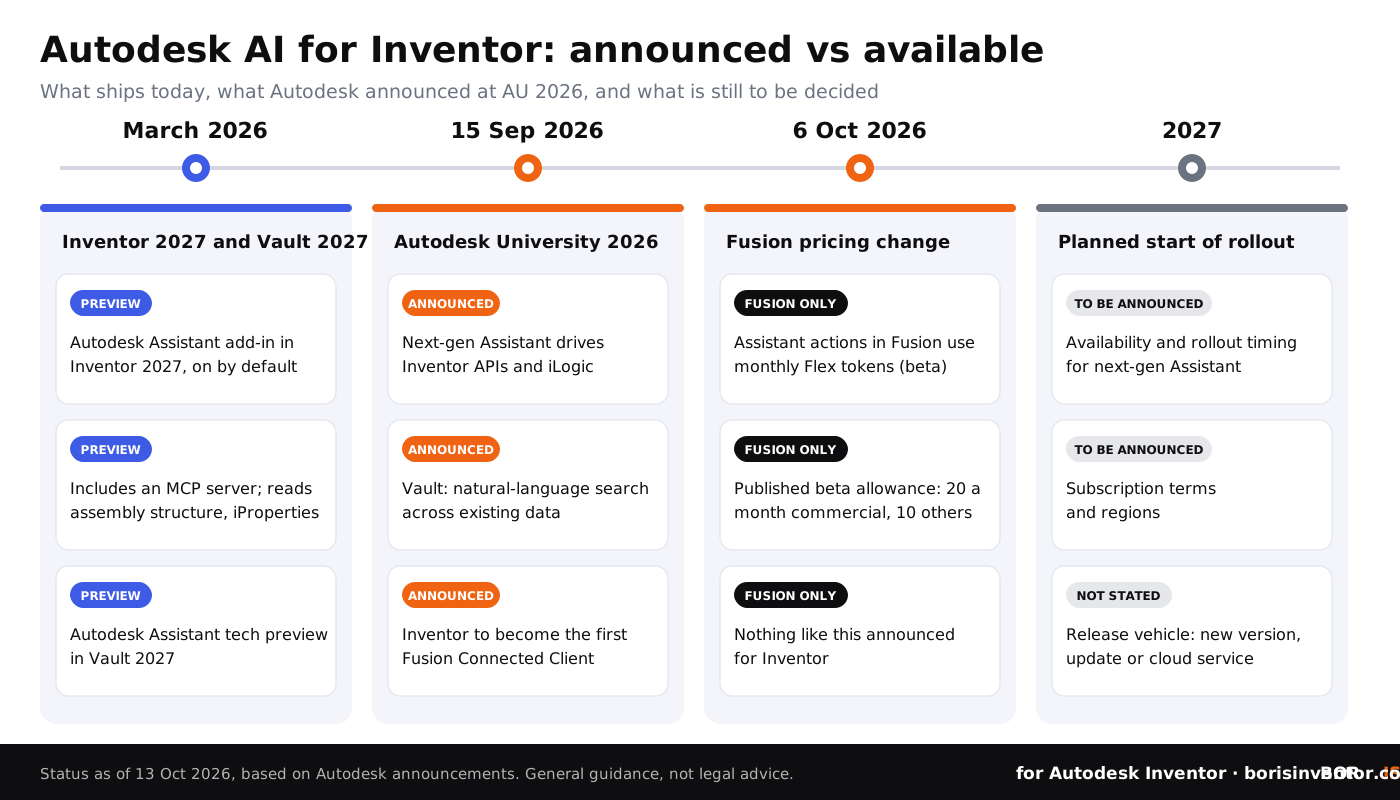
Only part of it. Autodesk describes the next-generation Assistant as not yet generally available. Its press release says availability, rollout timing, subscription terms and regions will be announced in 2027, and the capabilities are planned to begin rolling out that year. Autodesk has not said whether they will arrive in a new Inventor release, an update or a cloud service.
The Fusion Connected Client is in the same position. Cadalyst's 25 September analysis notes that several of the larger automation and connected-client capabilities are still announced or in development. One report described Inventor and Vault as already connected clients, but that conflicts with Autodesk's own future tense. Treat it as not yet available.
What does ship today is smaller. Since Inventor 2027 was released in March 2026, Autodesk Assistant has been included as a technical preview add-in, enabled by default. According to Autodesk's developer blog, the add-in includes an MCP server, the protocol that lets AI agents connect to tools and data. It reads the open assembly structure, component iProperties and component relationships. It is strongest at retrieval and analysis, and for some edit requests it gives step-by-step guidance instead of making the change. Vault 2027 also has an Assistant tech preview.
What changed on 6 October, and does it affect Inventor?
The freshest development is in Fusion, not Inventor. From 6 October 2026, eligible Fusion plans include a monthly allowance of Flex tokens, in beta, that is used up when Autodesk Assistant works with your design or performs tasks for you. Asking the Assistant for help or support does not use tokens.
Autodesk's published beta allowance is 20 tokens a month on commercial plans and 10 a month on Personal, Education and Trial plans. The allowance refreshes each month, unused tokens do not carry over, and the tokens cannot be used for other Flex products. Autodesk adds that the quantities may change as the offering evolves.
For Inventor, nothing like this has been announced. The only official word is that subscription terms for the next-generation Assistant will be announced in 2027. It would be speculation to say Inventor AI will be metered the same way. The Fusion change does show that Autodesk now treats AI actions on a design as something it can count and price. If you run Fusion alongside Inventor, watch usage in your Autodesk Account.
Where will your master Inventor files live?
Today most Inventor teams know the answer: a workstation, a file server or Vault, under their own control. A Fusion Connected Client links that desktop world to cloud data in Fusion. The details are not published, so nobody outside Autodesk can yet say which data will sync or which copy will count as the master.
Cadalyst's advice to CAD teams is to settle three questions before a connected workflow arrives: where the authoritative data lives, what happens when cloud services are unavailable, and how permissions are inherited. Those are easier to answer now, while nothing has changed, than in the middle of a rollout. Our guides to Inventor Vault setup and management and to securing sensitive CAD data in cloud storage cover the basics.
Revision histories in a PDM or PLM system are useful evidence, but they live inside a vendor's system and can be lost in a migration. If part of your design history moves to the cloud, keep a record of each version that does not depend on that service. See what CAD file versions mean in Autodesk Inventor for how versions work today.
Keep proof of every Inventor design version that no cloud service controls.
BORIS for Autodesk Inventor registers your CAD files with a blockchain timestamp, directly inside Inventor, so you have an independent certificate of ownership for each version.
👉 Get BORIS for Autodesk Inventor
Will Autodesk train AI on your Inventor designs?
Autodesk's answer to whether it trains AI on customer data is short: "It depends on the feature." For certain features, Autodesk says training data includes customer content that has been aggregated and de-identified, and limited to common elements, industry standards or other non-sensitive information. Autodesk also says it does not share customer data with third parties for their own model training.
To make this easier to check, Autodesk expanded its AI Transparency Cards on 15 September with sections on data handling, customer choice, safeguards and the model provider behind each feature. You can now ask Autodesk Assistant about them in plain language, and its answers cite the card. Two limits are worth knowing. AEC Magazine points out that the cards are written by the vendor, not independent audits. And we could not find a Transparency Card specific to Inventor, or any Autodesk statement on whether Inventor Assistant prompts or model data are processed in the cloud. We do not assume either way.
For IP owners, the practical rule is simple: read the card for each AI feature before you use it on sensitive models, and decide in advance which projects are off limits. Designs that rely on trade secret protection need the most care, because secrecy is part of the legal protection itself.
“And for Design and Make professionals, 'probably right' is wrong because their work has consequences in the real world.”
Andrew Anagnost, President and CEO, Autodesk
Who is responsible for a change an AI agent makes?
An assistant that can modify parameters and components is, in practice, a new author in your design history. If it proposes a substitute part, the engineering, cost and compliance consequences are still yours. Cadalyst frames the key question for teams as which decisions they are prepared to let AI make, prepare or recommend.
Write the answer down before the next-generation Assistant arrives, and record who approved each AI-assisted change. Our articles on how to track design changes in Autodesk Inventor and how to assign liability to CAD file modifications explain how to set that up.
The MCP server in the Inventor 2027 preview deserves the same attention. MCP lets outside AI agents connect to Inventor data, and Autodesk is also opening Fusion to third-party agents. Treat every agent connection like any other integration: check its permissions, security and administration, and give it a named owner. Our notes on plugin security architecture for Inventor apply here too.
What should Inventor teams do now?
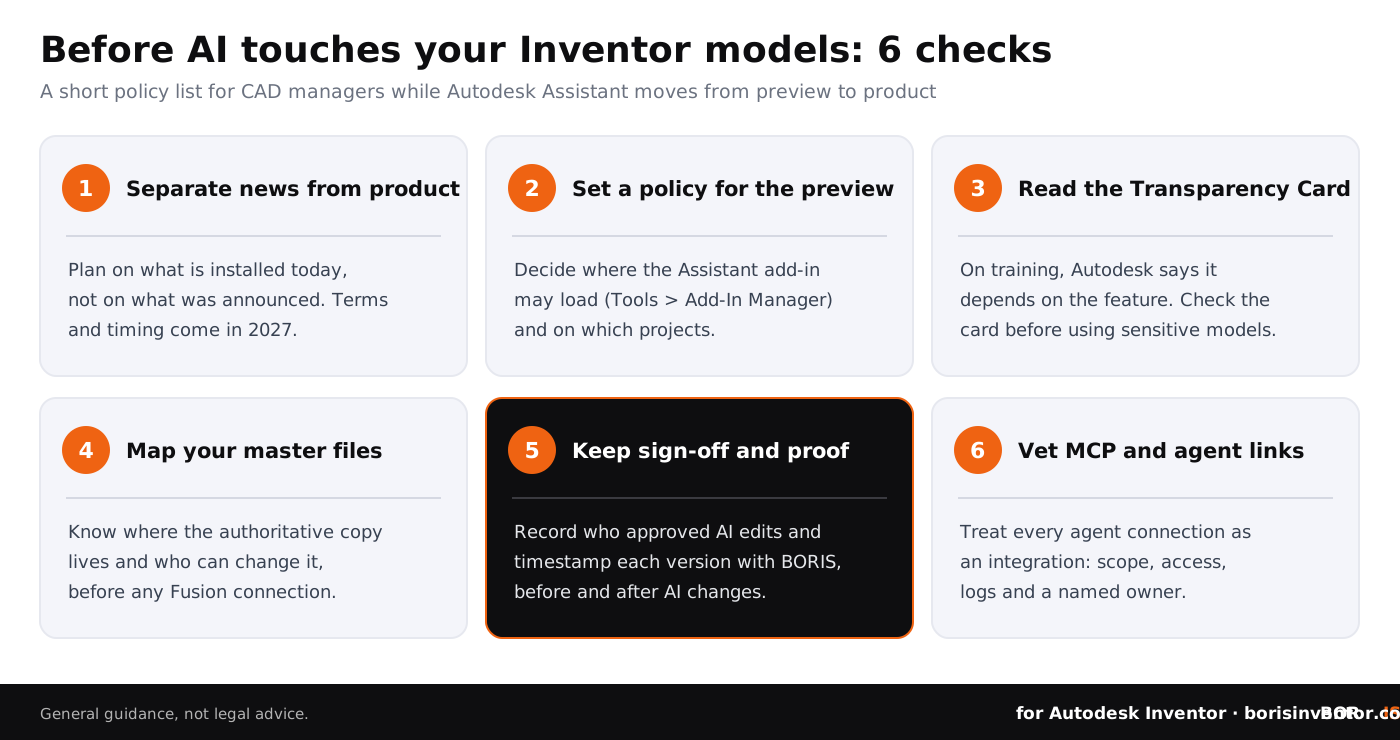
- Separate the announcement from availability. Plan on what is installed today. Don't change workflows or budgets until Autodesk publishes rollout timing and terms in 2027.
- Set a policy for the Assistant preview. The add-in is enabled by default in Inventor 2027 and can be managed in Tools > Add-In Manager. Decide where it may load and on which projects.
- Read the AI Transparency Card first. Check the data handling and customer choice sections in the Autodesk Trust Center, or ask the Assistant directly, before using AI on sensitive models.
- Map your master files. Write down where the authoritative copy of each project lives, who can change it, and what happens if a cloud service is unavailable, before any Fusion connection.
- Keep human sign-off and independent proof. Record who approved each AI-assisted edit. Register each important version with a blockchain timestamp so you can show the file state before and after AI or cloud tools touched it.
- Vet MCP and agent connections. Treat each one as an integration with defined scope, access, logs and an owner.
- Watch AI usage costs. If you also run Fusion, monitor the monthly Flex token allowance in your Autodesk Account. Nothing equivalent has been announced for Inventor yet.
- Keep patching. Advisory ADSK-SA-2026-0004 covers Inventor 2026 and Vault Client 2026: crafted CATPART and MODEL files can cause out-of-bounds writes. The fix is in Autodesk Shared Components 2026.6. Treat third-party CAD files from unknown senders as untrusted.
How does this fit the wider picture for CAD data?
Autodesk's plans are one of several moves this autumn that change who controls engineering data and how it can be used.
- Vendor ownership is changing. Schneider Electric agreed to buy PTC, the company behind Creo, Windchill and Onshape. Our sister site explains what the Schneider Electric PTC acquisition means for your CAD data.
- SOLIDWORKS users face similar questions. Dassault Systèmes keeps adding cloud and AI features to its desktop CAD. Read what is new in SOLIDWORKS 2027 for design data and IP.
- AI training on 3D models is now in court. In October 2026 a US judge found that a 3D artist had adequately alleged that a Sketchfab NoAI tag can count as copyright management information, although the case was dismissed for now. See the NoAI tag ruling explained for 3D artists.
The common thread: your designs are becoming more valuable to the platforms that host them. Our guide to Autodesk Inventor IP management and the CADChain overview of CAD data protection across tools are good starting points.
Conclusion
Autodesk's AU 2026 announcements point to an Inventor that is connected to the cloud and can be operated by an AI agent. Most of that is still on the roadmap: the next-generation Assistant and the Fusion Connected Client are announced, not shipping, and their terms will come in 2027. The useful work for Inventor teams starts now. Set a policy for the preview, read what Autodesk says about data use, decide where your master files live, and keep proof of each design version that does not depend on any vendor's system. If a dispute ever turns on proving design ownership, that independent record is what counts.
Protect your Autodesk Inventor designs before AI and cloud tools touch them.
BORIS for Autodesk Inventor gives every registered file a blockchain timestamp and a certificate of ownership, from inside Inventor.
👉 See how BORIS for Autodesk Inventor works
FAQ: Autodesk Inventor AI after AU 2026
What is a Fusion Connected Client?
It is Autodesk's name for a desktop product that connects its workflows to cloud data and processes in Fusion. Autodesk announced at AU 2026 that Inventor will be the first one. It is not yet available, and no date has been given.
Can Autodesk Assistant edit my Inventor models today?
Only in a limited way. The technical preview in Inventor 2027 reads assembly structure, iProperties and component relationships, and for some edit requests it gives step-by-step guidance instead of acting. The next-generation Assistant that drives Inventor's APIs and iLogic is planned to begin rolling out in 2027.
Does the Inventor 2027 Assistant use MCP?
Yes. According to Autodesk's developer blog, the Assistant add-in in Inventor 2027 includes an MCP server, which lets AI agents connect to Inventor data. Review it like any other integration.
Will AI in Inventor cost extra?
Autodesk has not said. Subscription terms for the next-generation Assistant will be announced in 2027. In Fusion, Assistant actions have used a monthly Flex token allowance (beta) since 6 October 2026, but nothing like that has been announced for Inventor.
Does Autodesk train AI on my Inventor files?
Autodesk says it depends on the feature. For some features it uses aggregated, de-identified customer content limited to non-sensitive information, and it says it does not share customer data with third parties for their model training. Check the AI Transparency Card for each feature.
What will Autodesk Assistant do in Vault?
Autodesk announced natural-language search across existing Vault data, with suggestions of relevant parts to reuse. Vault 2027 already includes an Assistant tech preview; the next-generation features are part of the 2027 rollout.
How can I prove which version of a design was mine before AI changed it?
Keep an independent, timestamped record of each important version. BORIS for Autodesk Inventor registers files with a blockchain timestamp from inside Inventor, giving you a certificate that does not depend on Vault, Fusion or any other vendor system.