
Every Autodesk Inventor design leaves the building sooner or later. A part goes to a machine shop for a quote, an assembly goes to a customer for approval, a drawing goes to a supplier, a whole project goes to a freelancer. CAD file protection is everything you do so that those files reach only the right people, reveal only what they need to, and can still be proven to be yours if something goes wrong. This guide compares the main CAD file protection methods side by side, explains what each one really stops, and shows the Inventor and Vault features that put them into practice.
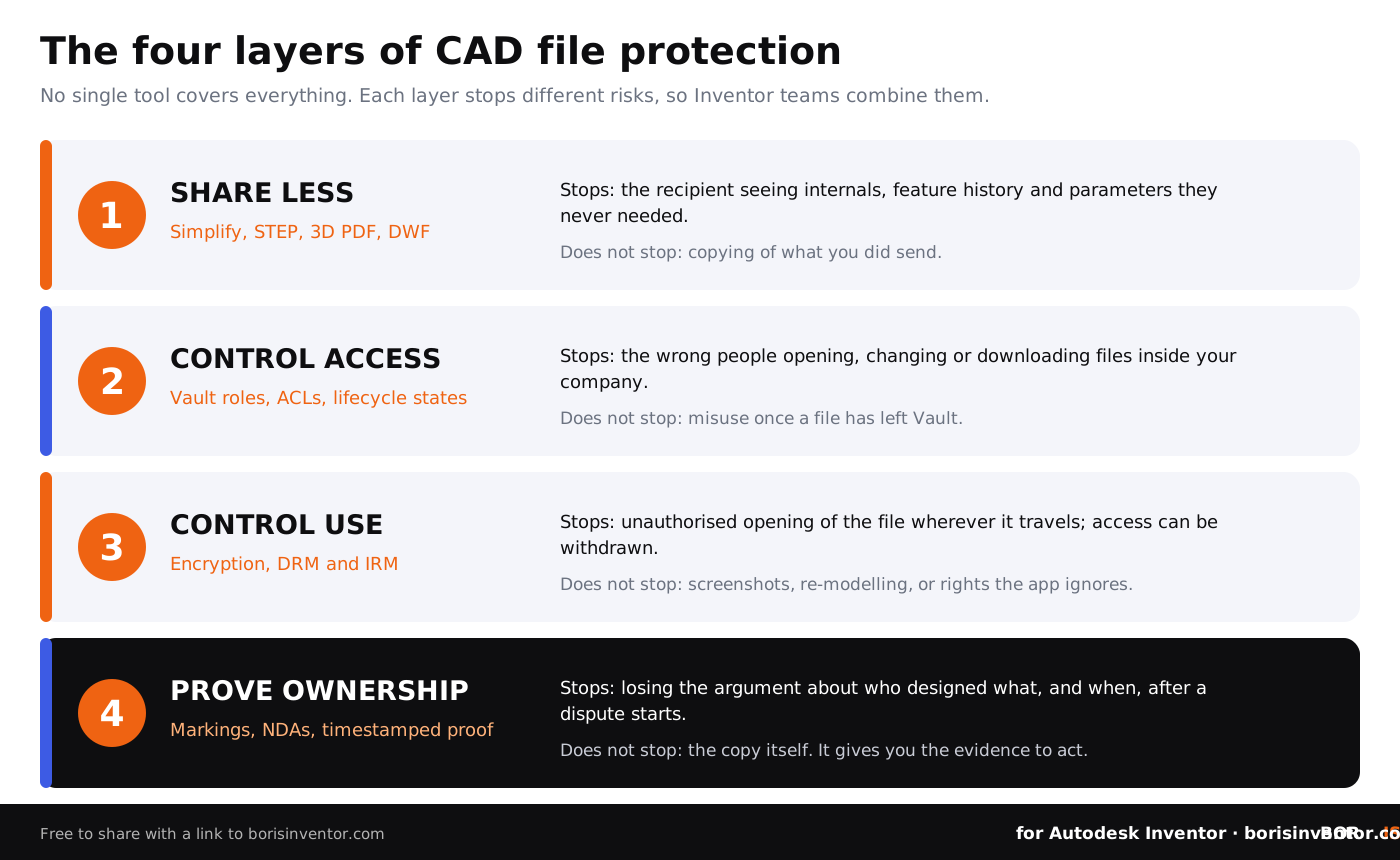
TL;DR: No single tool protects a CAD file on its own. Inventor teams get the best protection by combining four layers: share less (Simplify the model, send STEP, 3D PDF or PDF instead of native files), control access (Autodesk Vault roles, access control lists and lifecycle states), control use (encryption, DRM or IRM for files that must leave as native CAD) and prove ownership (confidential markings, NDAs and dated proof of each design version). Inventor has no built-in password for .ipt or .iam files, so never rely on a password alone.
What is CAD file protection?
CAD file protection is the set of technical and legal measures that keep computer-aided design files, such as Inventor parts (.ipt), assemblies (.iam), drawings (.idw or .dwg) and presentations (.ipn), away from people who should not have them, and that limit what authorised people can do with them. It covers four goals:
- Confidentiality: only the right people can open the file.
- Minimisation: the people who do open it see only the geometry they need, not your whole design history.
- Control: you decide whether a file can be edited, printed, copied or forwarded, and you can withdraw access later.
- Evidence: you can show who created which version of a design, and when.
The last goal is easy to forget. Trade secret law in the EU and the US protects confidential know-how only when its owner has taken reasonable steps to keep it secret, and IP disputes are often decided on who can document authorship first. Read more in how to protect trade secrets in manufacturing and how to prove authorship of CAD models.
What are you protecting Inventor files from?
Before choosing tools, name the risk. Most CAD file leaks are not dramatic hacks. They come from ordinary sharing:
- Over-sharing. A full native assembly goes out when the supplier only needed the outer shape and the mounting points. Native files carry feature history, parameters, iLogic rules and every internal part.
- Uncontrolled copies. Files sit in email threads, USB sticks, personal cloud folders and old supplier portals long after the project ended. See the risks of sending CAD files to factories.
- Insiders and leavers. An employee or contractor copies a project folder before moving to a competitor.
- Attacks on the supply chain. Stolen engineering drawings from PLM and file-transfer systems end up on leak sites, as in the Clop PLM data leak.
- Ownership disputes. A partner or former freelancer claims the design was theirs, and you cannot show which version existed first.
The consequences of CAD file leaks range from lost quotes and copied products to export-control breaches, so it pays to decide in advance which files need which level of protection.
CAD file protection methods compared
The table compares the CAD file protection methods Inventor teams use most, what each one stops, where it falls short and how to apply it with Inventor and Vault.
Does Autodesk Inventor have password protection?
No. Inventor has no built-in option to put a password on a part, assembly or drawing file. Workarounds in user forums use an iLogic rule that asks for a password when a file opens, but anyone who switches iLogic off or opens the file another way skips the prompt, so it is not real protection.
If you send drawings in AutoCAD DWG format, note that Autodesk removed drawing password protection from AutoCAD 2016-based products and recommends a current encryption product instead. Password-protected ZIP archives and PDFs are fine for a one-off transfer, but the protection ends as soon as the recipient extracts the file. For stronger options, see how to encrypt Autodesk Inventor files.
How to share less: Simplify, STEP and 3D PDF in Inventor
The cheapest CAD file protection is not sending what the other side does not need. A supplier quoting a housing rarely needs your internal mechanism; a customer checking fit rarely needs editable geometry. Inventor has built-in tools for this:
- Open the assembly and start Simplify from the Simplification panel on the Assemble tab. Autodesk describes it as a way to protect intellectual property by removing features and internal components (see the Simplify help page).
- Remove components by selecting them or by size (a bounding box measurement), remove features such as holes, fillets and pockets by type or size, and replace components with simple envelopes where only the space they take matters.
- Save the result as a new part file or as a Substitute part, and check it: open it as the recipient would and confirm nothing sensitive is left.
- Export the simplified part in the format the recipient needs: STEP for other CAD systems, 3D PDF for viewing (Export in the File menu, or the Export panel on the Annotate tab), or a PDF drawing for quoting.
- Send native .ipt or .iam files only when the recipient really has to edit your design, and then use the access, encryption and contract layers below.
Neutral formats such as STEP drop the feature history and parameters but keep the exact geometry, so they reduce exposure rather than remove it. Inventor file formats and their security implications covers what each format reveals.
How does Autodesk Vault protect Inventor files?
Autodesk Vault is the first line of CAD file protection inside a company. Instead of files spread across local drives, every part, assembly and drawing has one controlled home with version history. Vault security works on three levels:
- Roles decide what kind of work a user can do in Vault at all.
- Access control lists (ACLs) on folders, files and other objects set Read, Modify, Delete and Download permissions to Allow, Deny or None for each user or group.
- Lifecycle states add state-based security, for example locking released designs. Vault combines object-based and state-based security as a dual gate: a user needs permission from both, and None in either one means no access.
Use these to keep sensitive projects visible only to the people who work on them, and to stop downloads where nobody needs a local copy. Vault protects files while they are inside Vault. It cannot control a file after someone downloads it and sends it outside, which is why external collaboration needs the next layers too. For setup tips, see Inventor Vault setup and management tips. Also read about the limitations of digital vaults for CAD storage and how to track who accesses your CAD files.
Encryption, DRM and IRM for Inventor files
When a native Inventor file must leave your company, encryption and rights management are the only layers that travel with it.
- Encryption protects files at rest and in transit: encrypted laptops and servers, secure transfer services and encrypted archives. It stops a lost or intercepted file from being read, but once the recipient decrypts it, it is an ordinary file again. Read CAD file encryption methods and limitations.
- DRM and IRM keep the file encrypted and check permissions every time it opens, so you can set who may open, edit or print it, add an expiry date and withdraw access later. See what digital rights management systems for CAD are.
Many companies already pay for Microsoft Purview. Its information protection client (Windows only) can label and encrypt almost any file type, but most CAD formats, Inventor files included, get generic protection: the file is wrapped as a .pfile and the user must sign in before it opens, yet the usage rights are only displayed, not enforced, according to the Microsoft Purview Information Protection client documentation. Only a few formats, such as .jt, get native protection. To enforce rights inside CAD applications, companies add a Purview extension: HaloCAD from SECUDE, for example, lists IPT, IAM and IDW among its supported formats. Compare the approaches in CADChain's guides on how CAD encryption works at rest, in transit and in use and information rights management for engineering files.
Keep the weak spot in mind: no DRM stops someone from taking screenshots or re-modelling a part they can see. Combine rights management with sharing less and with evidence of ownership.
Watermarks, markings and contracts
Simple markings still matter. Put your company name and a confidentiality notice in the drawing title block, in the iProperties and in every PDF or 3D PDF you export. Markings do not stop copying, and CAD file watermarking has clear limitations, but they show that the recipient knew the file was confidential.
Contracts come next. Sign an NDA and agree who owns the IP before the first file goes out, especially with freelancers and contract manufacturers. NDAs give you a legal claim, not a technical barrier, as explained in NDA limitations for protecting CAD files. For day-to-day rules, see how to share CAD files securely with contractors. Then read how to manage contractor access to CAD files and how to protect CAD files when working with freelancers.
Proving the design is yours: timestamped proof of ownership
Every other layer can fail: a supplier keeps a copy, a former contractor reuses a design, a partner claims they drew it first. At that point the question is no longer access but evidence. Can you show that your version of the design existed, in your hands, on a given date?
Dated, tamper-evident records answer that question. Blockchain timestamps for proving design authorship record a fingerprint of a file at a moment in time, so anyone can later check that a file is unchanged and when it was registered, without publishing the design itself.
Protect your Inventor designs with proof of ownership.
BORIS for Autodesk Inventor registers the existence of your design on the blockchain from inside Inventor and gives each 3D model a verifiable blockchain certificate, with a public version and a private owner version you can share as a link or PDF.
👉 Try BORIS for Autodesk Inventor
Which CAD file protection fits which situation?
- Request for quote to a new machine shop: simplified model as STEP or a PDF drawing, confidential title block, NDA, register the version you sent.
- Long-term supplier who edits your models: NDA and IP clauses, native files only through a controlled channel, DRM or IRM with expiry dates, Vault access for the supplier's project only. See CAD file protection in outsourced manufacturing.
- Freelancer or contractor: clear IP ownership in the contract, access limited to one Vault folder, no local copies where possible, dated records of every delivered version.
- Employee leaving the company: remove Vault access on the last day, check recent downloads and keep dated proof of the designs they worked on.
- Design before a patent filing: keep it inside Vault, share nothing native, and record dated versions. See the complete guide to CAD data protection.
- Export-controlled or defence data: follow your export-control rules first; read export control considerations for CAD files.
An 8-step CAD file protection plan for Inventor teams
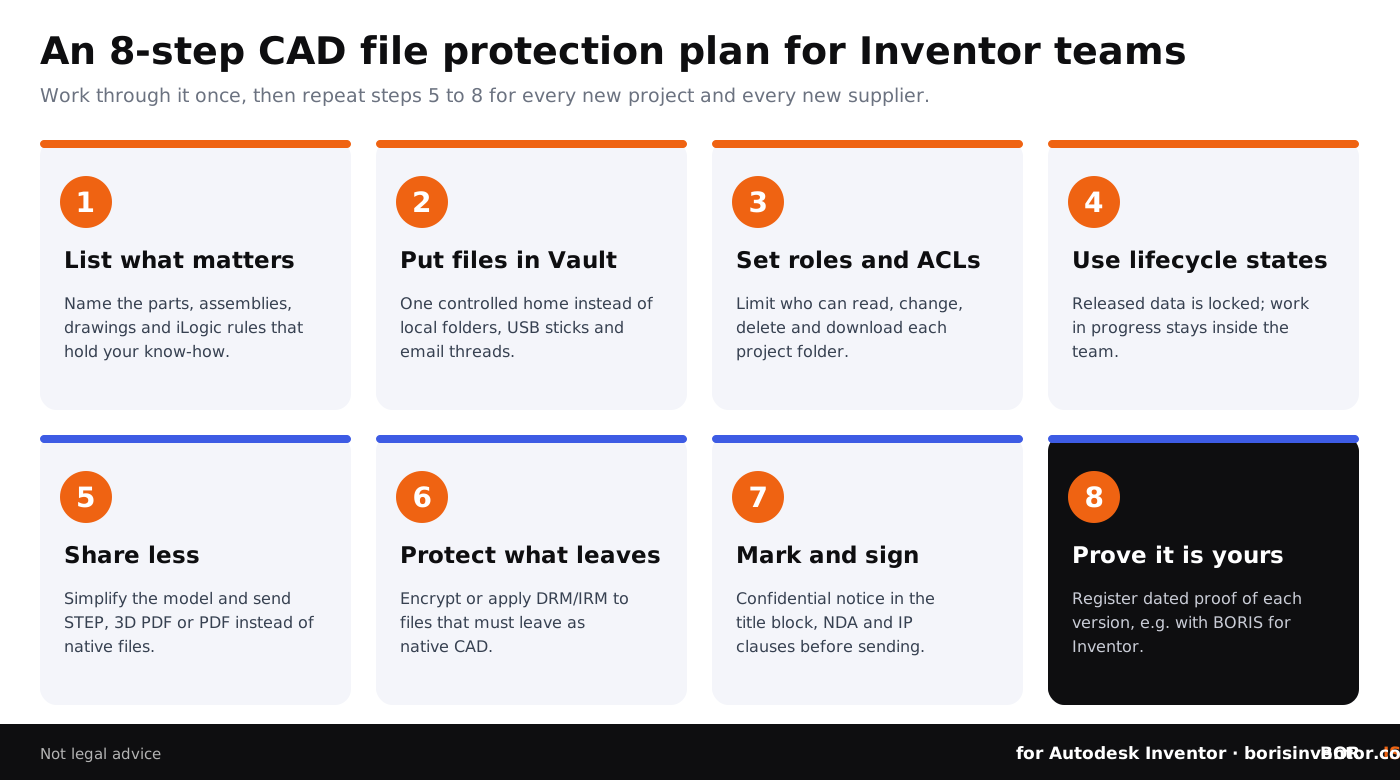
- List what matters. Name the parts, assemblies, drawings and iLogic rules that hold your know-how.
- Put files in Vault. One controlled home with version history instead of local folders and email threads.
- Set roles and ACLs. Limit who can read, change, delete and download each project folder.
- Use lifecycle states. Lock released designs and keep work in progress inside the team.
- Share less. Simplify models and send STEP, 3D PDF or PDF instead of native files wherever you can.
- Protect what leaves. Encrypt, or apply DRM or IRM to, native files that must leave the company.
- Mark and sign. Confidential notice in the title block and exports; NDA and IP clauses before sending.
- Prove it is yours. Register dated proof of each important version, for example with BORIS for Autodesk Inventor.
Common CAD file protection mistakes
- Relying on an iLogic password prompt or a ZIP password as the only protection.
- Sending the full native assembly when a simplified STEP file would do.
- Leaving every Vault folder open to every user because no ACLs were ever set.
- Encrypting files in transit and assuming they stay protected after the recipient opens them.
- Signing the NDA after the files were already sent.
- Having no dated record of which version you shared, with whom, and when.
More examples in the common mistakes engineers make with CAD security.
More CAD file protection guides
Conclusion
CAD file protection is not one product but a habit built from four layers. Share less with Simplify and neutral formats. Control access with Vault roles, ACLs and lifecycle states. Control use with encryption, DRM or IRM when native files must leave. And keep dated proof of ownership, because when every other layer fails, evidence is what decides who owns the design. Start with the files that matter most, follow the eight steps, and repeat the sharing steps for every new project and supplier.
FAQ: CAD file protection
What is the best way to protect CAD files?
Combine layers: send as little as possible (simplified models, STEP or PDF), keep originals in a controlled vault with access rules, use encryption or DRM for native files that must leave, sign NDAs, and keep dated proof of ownership. No single method covers every risk.
Can I password protect an Inventor file?
Not with a built-in setting. Inventor has no file password option for .ipt, .iam or .idw files. iLogic password rules are easy to bypass. Use encryption, a DRM or IRM product, or a password-protected archive for one-off transfers instead.
How does Autodesk Vault protect intellectual property when collaborating externally?
Vault controls who can read, change, delete and download files while they are in Vault, using roles, access control lists and lifecycle states. It cannot control a file once it has been downloaded and sent outside, so for external partners combine Vault with simplified exports, NDAs, DRM or IRM and proof of ownership.
How do I share an Inventor model without giving away my design?
Use the Simplify command to remove internal components and features, save the result as a new part, and export it as STEP or 3D PDF. The recipient gets the outer geometry they need without your feature history, parameters or internal parts.
Does Microsoft Purview protect Inventor files?
Purview can encrypt Inventor files with generic protection (.pfile): users must sign in to open them, but usage rights such as no-print are only displayed, not enforced. To enforce rights inside CAD applications you need a Purview extension or a CAD DRM product.
Is STEP export enough to protect my CAD design?
It helps, because STEP drops the feature history and parameters, but it keeps the exact geometry. Simplify the model first, export only what the recipient needs, and add an NDA and a confidentiality marking.
Do watermarks protect CAD drawings?
Watermarks and title block notices show ownership and confidentiality, but they are easy to remove and do not stop copying. Use them as one layer alongside access control, encryption and proof of ownership.
How can I prove a CAD design is mine?
Keep dated, tamper-evident records of each important version: Vault history inside the company, and an independent timestamp such as a blockchain registration. BORIS for Autodesk Inventor registers designs from inside Inventor and issues a verifiable certificate.
Is CAD file protection the same as CAD data security?
They overlap. CAD data security covers the systems, networks and backups that hold design data; CAD file protection focuses on the files themselves: who can open them, what they reveal and how you prove they are yours.