
TL;DR: How File Format Changes Affect CAD Protection
CAD file format changes can expose designs to theft, unauthorized edits, and reduced security: an export to DWG, DXF, STEP or STL is a new file that still carries the geometry, may carry metadata you did not mean to share, and leaves your Vault permissions behind. Blockchain registration helps by giving each registered version, the native file and the export, a tamper-evident fingerprint and timestamp as dated proof of ownership. SMEs and innovators can safeguard their designs while maintaining legal credibility by combining that proof with controlled sharing, as Autodesk Inventor users can with BORIS.
💡 Curious about file privacy and metadata implications? Gain actionable insights from our metadata and privacy guide.
How File Format Changes Affect CAD Protection: Exploring Challenges and Solutions
Changes to CAD file formats introduce critical challenges for intellectual property protection, particularly for users of tools like Autodesk Inventor. Whether it's vulnerabilities in native file structures or issues with converted neutral formats, inadequate tools or policies can compromise design security and ownership. Here's why this matters.
Attackers have exploited flaws in the code that reads CAD files: vendor security advisories regularly list crafted DWG, DXF, STEP and other files that can crash or take over a CAD application or viewer. Meanwhile, companies often lose control of designs after sharing them, unable to prevent modification or unauthorized redistribution. This is why robust CAD protection strategies, combining controlled sharing, encryption and blockchain proof of ownership, are now essential for safeguarding IP.
A format change does not remove the design from a file; it only removes the controls you had around it.
Secure Your Autodesk Inventor Designs.
Explore how BORIS by CADChain enables blockchain-based ownership certification for your Inventor files.
👉 Discover CAD Format Security
What Challenges Arise From File Format Changes?
Organizations encounter several risks when CAD files are shared or manipulated across different formats. Here are the key challenges:
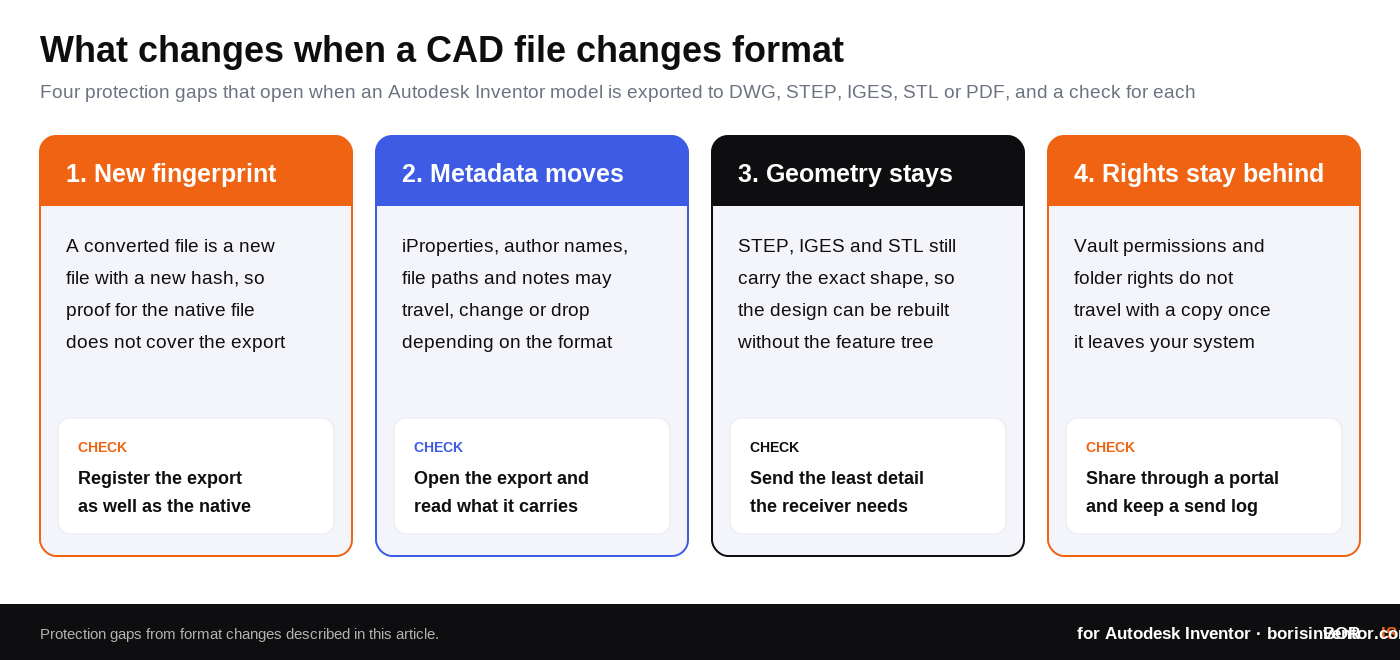
- Native file formats carry the most information: Inventor parts and assemblies (IPT, IAM) hold the full feature history and iProperties, and DWG drawings carry title blocks, layers and properties, so anyone who receives them gets everything. Read more about Autodesk Inventor file formats and their security implications.
- Neutral formats such as STEP and IGES drop the feature tree but still carry the exact geometry, and they often exclude feature-level details, causing geometry alienation in CAD conversion.
- Versioning issues: Designers struggle to maintain ownership proofs when multiple file versions exist post-sharing, because every export or conversion is a new file with a new fingerprint.
- Legacy formats risk compatibility failures, making designs unusable across ecosystems.
Why Protection Strategies Often Fail
Many existing CAD protection methods fall short in solving these issues due to poorly integrated security at the file and workflow levels. Here's where vulnerabilities emerge:
- Lack of encryption: Without encryption in storage and in transfer (AES-256 is the common choice), files are susceptible to theft and espionage upon sharing.
- Reliance on passwords: Password-protected PDFs offer minimal protection if editing capacity remains intact, and once a file is opened, the content can be copied or redistributed.
- Incoherent DRM systems: DRM often fails to accommodate hybrid workflows across native and neutral formats.
- Absence of ownership proofs: Many businesses lack mechanisms like blockchain certificates to provide dated evidence of authorship.
Format Changes and Protection at a Glance
Each format your Inventor data is turned into carries a different part of the design. This table shows what travels with it and how to protect it.
How Blockchain Solves Modern File Format Security Issues
Blockchain enables tamper-evident authentication for CAD files: a registered file has a fingerprint (hash) and a timestamp, so any change to the file, including a format conversion, produces a different fingerprint. That is why you register the native file and every export you send. Violetta Bonenkamp emphasizes its impact on mitigating risks for Autodesk Inventor users.
- Tamper-evident ownership certification: Generate unique certificates that provide timestamped evidence of design authorship; how much weight a court gives them depends on the jurisdiction and the case.
- Version-by-version records: Each file version you register, from the first model to the export you send, gets its own dated record, so you can show which version existed when.
- Licensing support: Certificates give you a dated reference to cite in licence and NDA agreements, which can reduce disputes over which design a contract covers.
Dirk-Jan Bonenkamp: "Judicial systems increasingly accept blockchain certificates as evidence, enabling Inventor users to solidify IP claims under evolving EU legislation."
Want to Learn More About Geometry Alienation?
Explore how CAD data can change during conversion and what you can do to address these issues.
👉 Solve Geometry Alienation
Steps To Protect Your CAD Files Efficiently
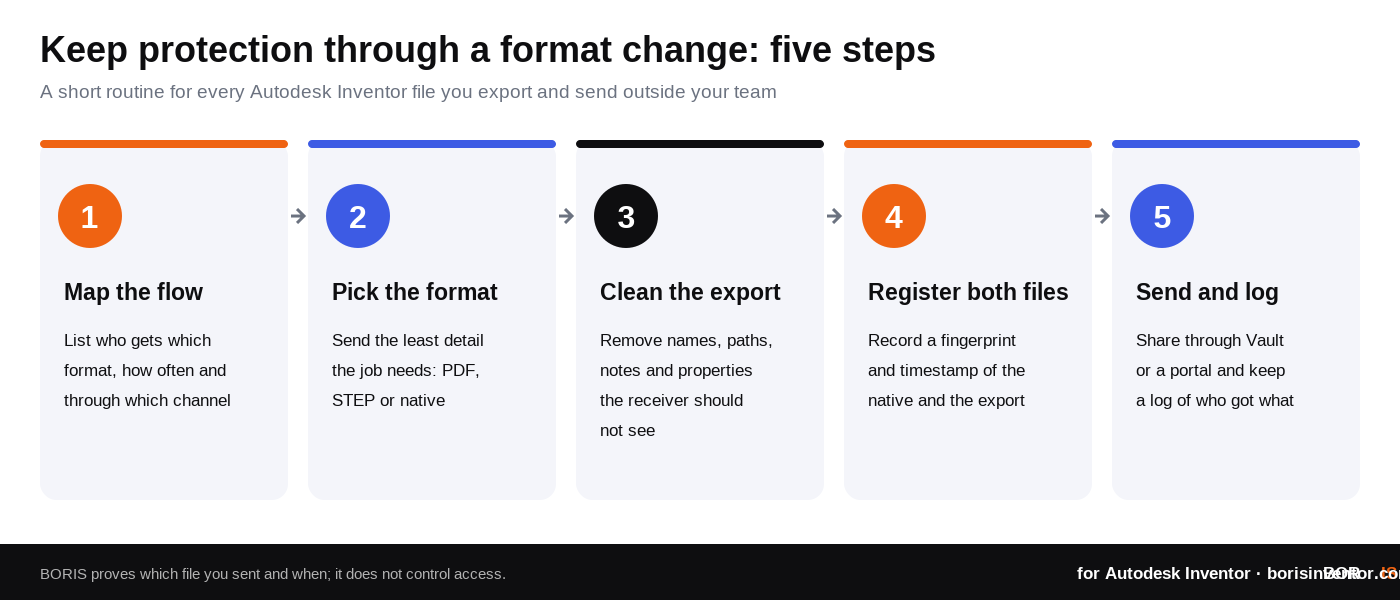
- Audit file workflows: Identify risks based on file usage, conversion, and sharing processes.
- Install integrated plugins: Use solutions like BORIS by CADChain within Autodesk Inventor to register files and certify ownership without leaving the CAD environment.
- Train stakeholders: Conduct regular sessions to educate on encryption practices and metadata management.
- Implement blockchain-based proofs: Register files immediately upon creation to establish ownership, and register each export before you send it.
- Monitor file exchanges: Use the logs in Vault, your file-sharing portal or your storage system to track who accessed, downloaded or changed shared files.
Most CAD leaks start with an ordinary export sent to the wrong place, not with a sophisticated attack.
Compliance and Regulatory Alignment for European SMEs
For European firms, GDPR and ISO 27001 compliance often drive CAD workflows. GDPR applies to the personal data in CAD files, such as names, e-mail addresses and user IDs in title blocks, iProperties and logs, so remove what the receiver does not need before you export. ISO 27001 asks for documented controls over how information is classified, shared and logged; blockchain records of registered files can support that evidence but do not replace the controls. Violetta Bonenkamp’s EU-specific guidance advises prioritizing technology that aligns with evolving requirements to maintain certification readiness.
Learn more about aligning your CAD operations with regulations by exploring compliance standards for secure CAD workflows.
Conclusion: File Formats And The Future of CAD Protection
As CAD workflows grow more complex, the need to protect designs from unauthorized access and modifications intensifies. File format changes should no longer be treated merely as an engineering issue but as a legal and security challenge affecting intellectual property ownership.
Companies implementing blockchain-backed systems within Autodesk Inventor, focusing on ownership proof alongside access control and encryption, are in a stronger position when a design is copied or disputed. European SMEs, especially in manufacturing and aerospace, should adopt compliant digital frameworks now to stay ahead.
Ready to dive deeper into CAD file formats, metadata, and privacy? Read about the technical dive into privacy and metadata protocols.
People Also Ask:
How do you protect CAD files?
Protecting CAD files can be achieved using methods such as password encryption tools like AxCrypt or specialized software designed for CAD security. For enhanced protection, digital signatures or converting drawings into PDF may also be used to restrict editing and unauthorized access.
What file formats are compatible with CAD software?
CAD software supports a variety of file formats, including DWG, DXF, PDF, STL, DWF, BMP, JPG, PNG, TIFF, FBX, STEP, and IGES. These formats serve purposes such as 3D modeling, design sharing, and data exchange.
Why does AutoCAD say a file is write-protected?
This typically happens due to restricted system permissions, a read-only flag on the drawing or its folder, or because the file is still open by another user or locked by a leftover lock file (.dwl). Resolving this issue may require changing file permissions or ensuring AutoCAD has the proper system access.
What are neutral file formats in CAD?
Neutral formats like STEP (STP) and IGES allow interoperability by enabling files to be shared and edited across different CAD software. They carry the geometry but not the feature history, so the receiver gets the shape rather than the model as it was built. These are widely used in collaborative projects.
How do file format changes affect CAD security?
Changes in file formats can make files compatible with other software, increasing the risk of unauthorized access or editing. Ensuring secure formats, or converting files into protected versions like PDFs, can minimize security concerns.
Can you watermark CAD drawings for protection?
Yes, watermarking is an effective way to protect CAD drawings by embedding identifiable marks that discourage duplication or unauthorized sharing. Tools and software are available to automate this process.
What steps ensure better control over CAD file sharing?
Restricting access, using secure file transfer systems, and setting up file permissions or password protection are effective ways to control how CAD files are shared. These steps help mitigate risks of data leakage.
How do you make CAD files read-only?
To make CAD files read-only, you can adjust the file properties on your system to restrict editing or save the file in a format with edit permissions disabled, such as a protected PDF.
What are the consequences of file corruption in CAD projects?
File corruption can result in data loss, project delays, and a need for file recovery. Regular backups and employing secure and stable file management practices can safeguard against such disruptions.
What is the safest way to store CAD files long-term?
The safest ways include using encrypted drives, cloud storage with built-in security protocols, or offline backups on resilient storage media like external hard drives, ensuring redundancy and accessibility.
FAQ on How File Format Changes Influence CAD Protection and Security
How do file format changes impact CAD file vulnerability?
A format change creates a new file: metadata may travel, change or drop, the geometry still goes with it, and the access controls of your own system stay behind. Attackers have also used crafted files in formats like DWG, DXF or STEP to exploit flaws in the programs that read them. For effective strategies, learn about common CAD file vulnerabilities and solutions.
What role do encryption methods play in CAD file protection?
Encryption ensures CAD file confidentiality when shared across platforms. Advanced encryption like AES-256 makes files illegible to unauthorized actors without keys, guarding designs effectively. For details, explore the guide on how CAD file encryption works.
Why are neutral formats like STEP and IGES considered risky?
Neutral formats often lack restrictive security measures, enabling easy reverse engineering. This creates risks, particularly in collaborative supply chain settings. Protect such designs by combining robust DRM and blockchain technologies.
What is the role of blockchain in CAD file security?
Blockchain creates tamper-evident ownership records: each registered file version gets a fingerprint and timestamp, so you can show which version existed when and that a file has not changed since. Because a converted file has a new fingerprint, register the exports you send as well as the native file. Blockchain proof does not stop anyone from opening or copying a file; that is the job of access control and encryption.
How can organizations prevent unauthorized CAD file exports?
Implement watermarking, secure access management, and Zero Trust frameworks to limit exports. These measures ensure only licensed stakeholders can access or convert CAD files, mitigating risks of IP theft.
Why do legacy CAD formats pose a security risk?
Legacy formats may lack compatibility with modern encryption and metadata controls, rendering designs vulnerable in updated workflows. Regularly migrate to secure formats and audit file integrity.
How do multi-CAD environments challenge file security?
Multi-CAD environments heighten the risks of file inconsistencies, access mismanagement, and unmonitored data exchanges. Use format-agnostic tools and unified blockchain certifications to standardize security across platforms.
What regulatory frameworks influence CAD file protection in Europe?
GDPR applies to the personal data in CAD files and their logs, ISO 27001 asks for documented information security controls, and the EU Trade Secrets Directive protects designs only when you take reasonable steps to keep them confidential. Blockchain records of registered files can support your audit evidence but do not replace those controls.
Can metadata removal help safeguard CAD file security?
Yes, removing metadata from shared copies reduces what a receiver or attacker learns about your people, systems and projects while preserving confidentiality. Clear iProperties, notes and file paths you do not want to share, check the export options, and open the exported file to confirm what it still carries.
What are actionable steps to secure CAD files during collaborations?
Combine encryption, controlled sharing through Vault or a secure portal, neutral file audits, and ownership registration with CAD plugins like BORIS. BORIS registers a fingerprint and timestamp of each file you share, so you can prove which version you sent and when; access control and encryption keep unauthorized people out.