
TL;DR: can blockchain be the version control for Autodesk Inventor files?
Not on its own. Keep versions, revisions and release states in Autodesk Vault or another PDM, and use a blockchain only to register each released file's fingerprint (hash) with a timestamp, which gives you dated, tamper-evident proof that a version existed. IPFS can move files between partners, but it is a public network, so encrypt files before adding them and pin what you must keep. Smart contracts can log milestones or release payments; they do not control who opens a file.
💡 New to the basics? Start with our guide to what CAD version control is and how it works.
Web3 design collaboration sounds like one product, but for an Autodesk Inventor team it is really four separate jobs: keeping versions in order, sharing files with people outside the company, proving who had which design first, and settling agreements between partners. Blockchain version control only helps with one of them. This guide shows which Web3 tools fit which job, the 7 tips that actually hold up in practice, and the mistakes that turn a pilot into a second, unreliable copy of your PDM.
What blockchain version control means for Inventor files
A version control system stores every version of a file, shows who changed what, and stops two people overwriting each other. For Inventor data that is the job of product data management (PDM): Autodesk describes Vault as PDM software that integrates with Autodesk tools and other CAD systems and supports data creation, revision, and review and release processes. Inventor files are large binary models with references between parts, assemblies and drawings, which is why they are managed in PDM rather than in a generic file store.
A blockchain does something different. NIST IR 8202, Blockchain Technology Overview describes blockchains as tamper evident and tamper resistant digital ledgers implemented in a distributed fashion, usually without a central authority. That makes a blockchain a good place to record a short fact, such as "this file fingerprint existed at this time", and a poor place to store or edit the CAD files themselves. In practice, "blockchain version control" for an engineering team means PDM for the versions plus a blockchain record of the hashes of the versions that matter. Our post on blockchain timestamps for proving design authorship goes deeper into that second part.
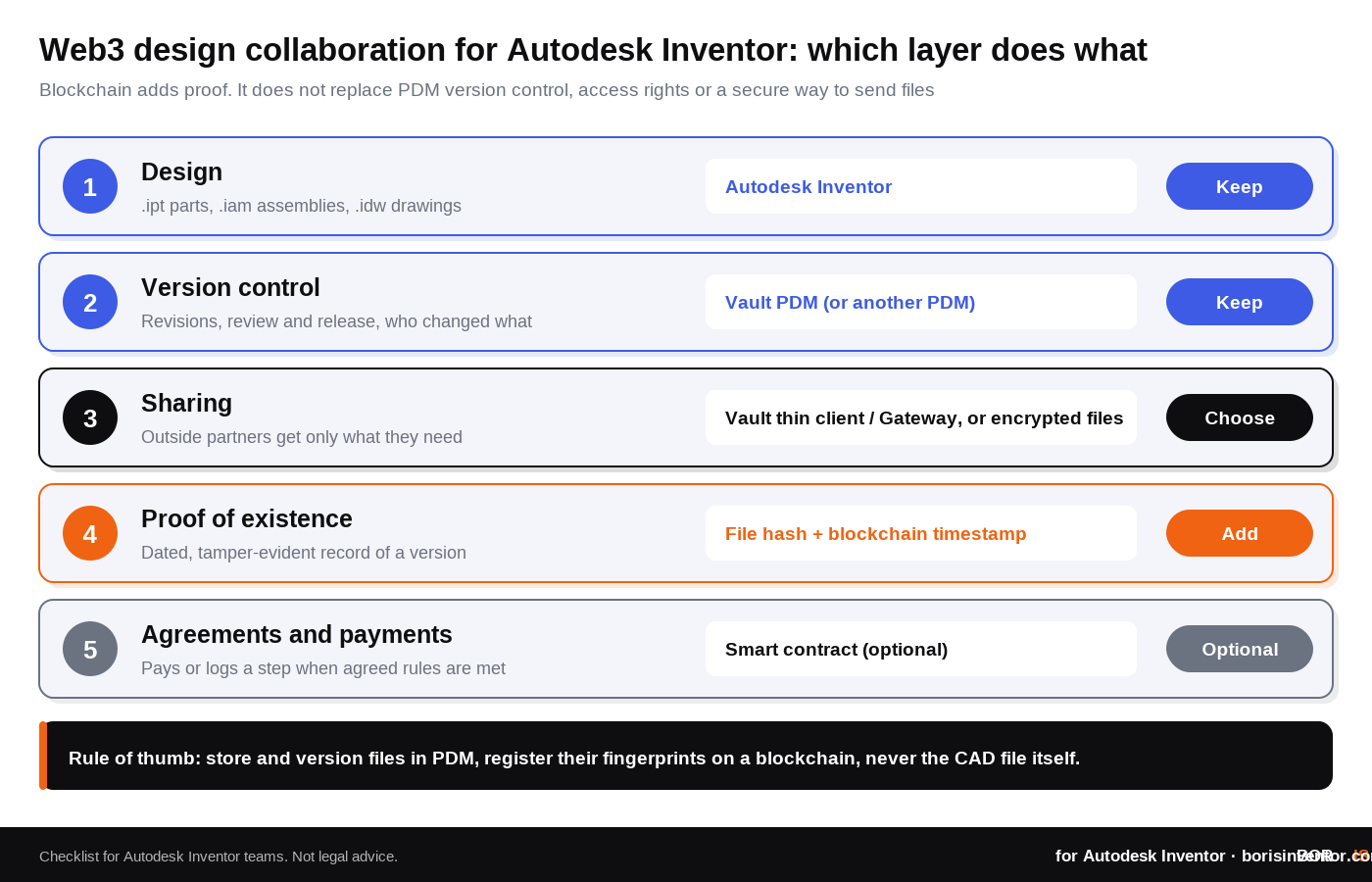
Vault, blockchain, IPFS and smart contracts compared for CAD collaboration
7 tips for Web3 design collaboration in Autodesk Inventor
1. Keep versions in Vault, not on a chain
Use Vault (or the PDM you already run) as the single place where Inventor parts, assemblies and drawings are versioned, reviewed and released. On its product page Autodesk lists remote access options for Vault, including a mobile app, a browser-based thin client and Vault Gateway, so distributed teams do not need a decentralized file system to work on the same data. See how CAD file versions work in Autodesk Inventor and how to prevent CAD file version conflicts before you add anything Web3 on top.
2. Register file fingerprints, not the files
When a version is released or sent to a partner, compute its hash and register that hash with a timestamp. Any change to the file gives a different hash, so the record shows exactly which version existed at that moment, while the design itself never leaves your PDM. Do not write CAD files or readable design data to a public blockchain: the ledger is replicated across many nodes and built to resist changes, so you could not take it back.
3. Treat IPFS as a public network and encrypt first
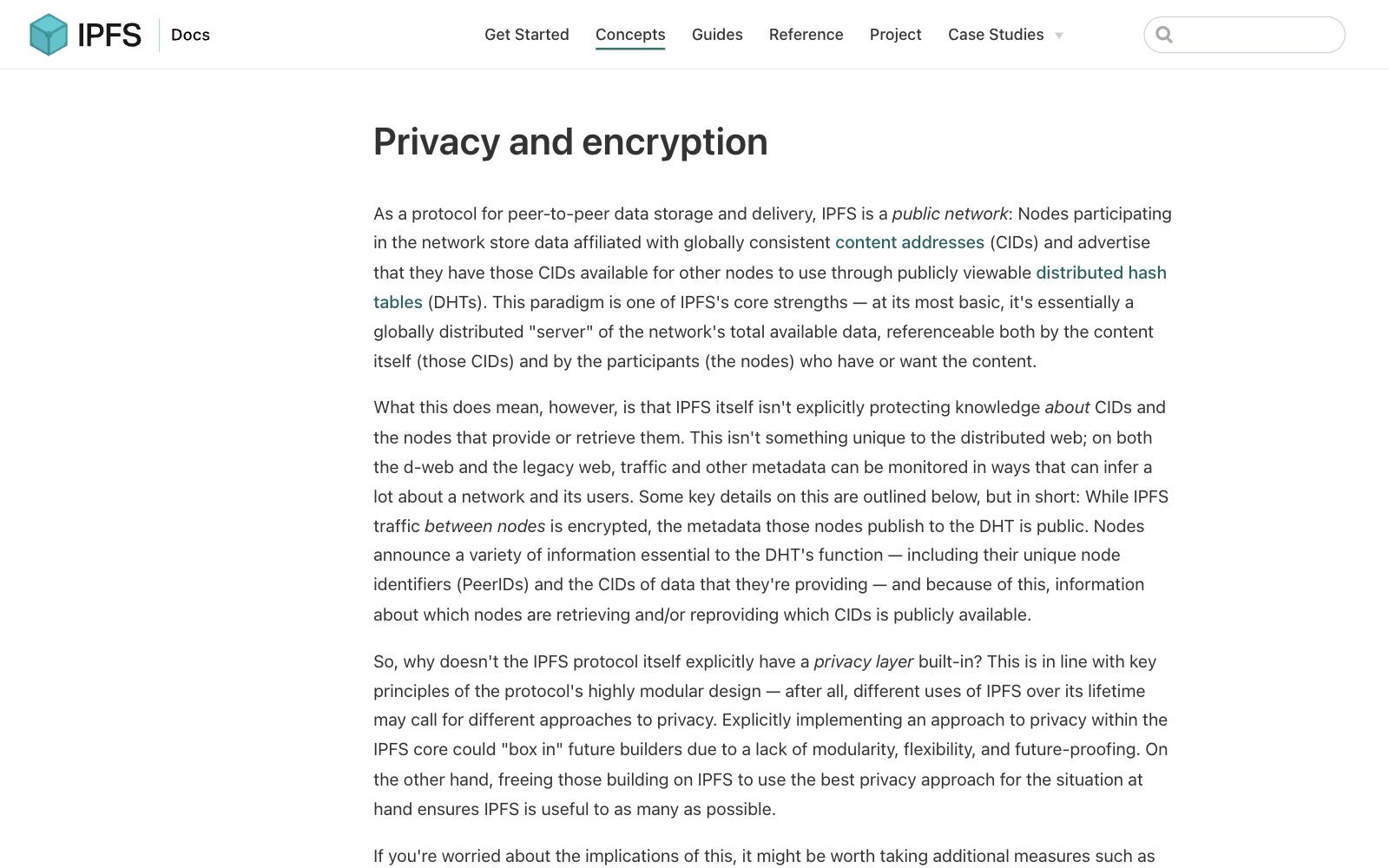
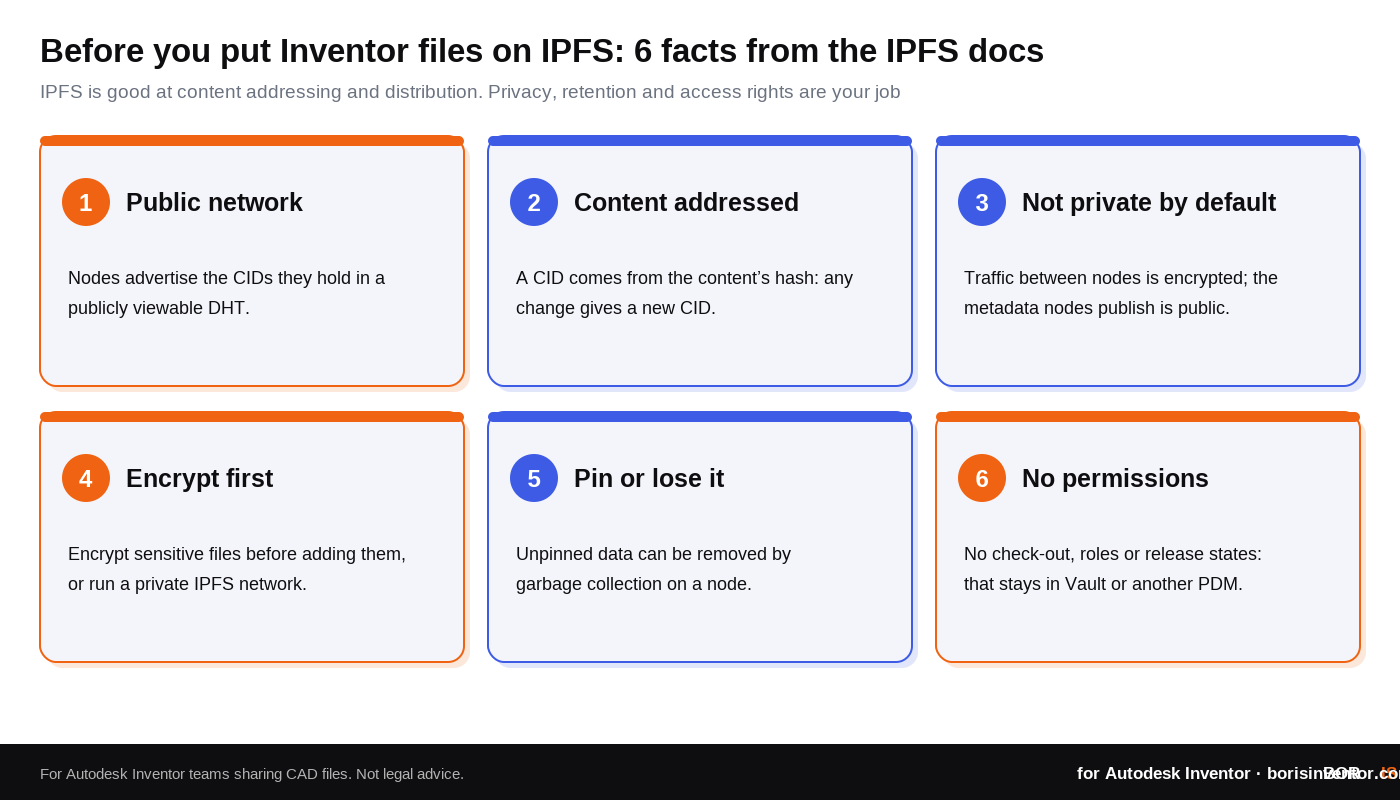
IPFS addresses files by their content: a content identifier (CID) is based on the content's cryptographic hash, so any change produces a different CID. The privacy and encryption page of the IPFS docs is clear that IPFS is a public network: nodes advertise the CIDs they hold through publicly viewable distributed hash tables, and while traffic between nodes is encrypted, that metadata is public. For Inventor files the docs' own advice applies: encrypt sensitive content before you add it, or run a private IPFS network.
4. Pin what you must keep
IPFS does not keep files forever by itself. The IPFS docs on persistence, permanence and pinning explain that nodes clear cached data through garbage collection, and that data has to be pinned on one or more nodes to persist. If a supplier needs a file next year, make sure it is pinned on a node you control, or keep the authoritative copy in Vault and use IPFS only for distribution.
5. Use smart contracts for agreed steps, not for access control
A smart contract can record that a milestone was accepted or release a payment when a clear rule is met. It does not stop anyone from opening, copying or forwarding an Inventor file once they have it; access is controlled by Vault permissions, encryption or DRM. Keep the licence terms in a normal written agreement and use the contract code only for what it can check. Read more on smart contracts for CAD licensing.
6. Share only what each partner needs
Most leaks in collaborative projects come from sending too much. Before any file leaves the company, decide whether the partner needs the native model, a simplified one or just a drawing. Inventor's Simplify tools help here; see how to share an Inventor model without giving away your design and our checklist for CAD file sharing with external collaborators. Encryption helps in transit but has gaps once a file is opened; see the limits of CAD file encryption.
7. Agree the rules, then train the team
Write down which system is the source of truth (Vault), which events get a blockchain record (release, hand-over to a supplier, end of a contract), who may share files over which channel, and how payments are triggered. Then train engineers on those few rules rather than on Web3 in general. Our guide to collaborative design workflows in Autodesk Inventor covers the day-to-day side of team collaboration.
Common Web3 workflow mistakes Inventor teams make
- Two sources of truth. Files versioned in Vault and again on a decentralized store drift apart. Pick one system for versions.
- Putting design data on a public chain. Register a hash; never the model, drawing or readable metadata.
- Assuming IPFS is private. It is a public network; unencrypted files can be fetched by anyone who has the CID.
- Forgetting to pin. Unpinned files can disappear from nodes during garbage collection.
- Calling a blockchain record proof of authorship. It proves that a file existed at a time. Who designed it still rests on your contracts, design history and witnesses.
- Expecting smart contracts to protect files. They automate agreed steps; they do not control access.
Step-by-step: rolling out blockchain records in an Inventor workflow
- Map the pain points. Version conflicts point to PDM settings; disputes about who had a design first point to dated proof; slow partner payments point to contracts.
- Fix version control first. Make Vault (or your PDM) the only place where versions and releases live.
- Choose the events to register. Typically each release, each hand-over to a supplier and each contract milestone.
- Pilot on one project. Register hashes for that project only and check that anyone can verify a file against its record.
- Review legal and security fit. Check the setup against your client contracts, NDAs and data protection duties before scaling.
- Roll out to partners. Give suppliers a short guide: how files reach them, which records exist, and how to verify a version.
Where BORIS fits in a Web3 design workflow
BORIS for Autodesk Inventor is the proof layer in the infographic above. It is an Inventor add-in that registers a file fingerprint (hash) and a timestamp, so you hold dated, tamper-evident proof that a specific version of your design existed at a specific time. It is not version control, DRM or encryption, and it does not decide who can open a file: Vault and your sharing setup still do that. For the technical side, read how to integrate blockchain solutions with Autodesk Inventor. SOLIDWORKS users can find the same topic on SolidBoris in Web3 design collaboration tips for SOLIDWORKS, and CADChain compares decentralized and centralized CAD file storage. See how BORIS registers Inventor files.
Want to Supercharge Your Web3 Content?
If you want to write content like this that connects Web3 ideas with tools like Autodesk Inventor, try the free F/MS AI Article Writer. It drafts SEO blog articles for engineers, startups and tech teams in minutes, formatting included.
Conclusion: Web3 adds proof to Inventor collaboration, not a new PDM
The Web3 tools that help Inventor teams are narrow and useful: a blockchain record of file hashes for dated proof, IPFS for distribution when files are encrypted and pinned, and smart contracts for clear, checkable steps. Versions, permissions and releases stay in Vault. Set it up in that order and Web3 design collaboration becomes one more reliable layer instead of a second filing system.
FAQ on Web3 design collaboration and blockchain version control
What is Web3 design collaboration?
Using decentralized tools, such as blockchain records, IPFS and smart contracts, alongside your CAD and PDM tools, mainly to share files with partners, record dated proof of versions and automate agreed steps between companies.
Can blockchain be used for version control of CAD files?
Only as a record. A blockchain can store a file's hash and a timestamp for each version, but the files, their history, permissions and releases belong in a PDM such as Autodesk Vault.
Where can I submit a guest post about my startup?
If your startups needs to drive targeted traffic and build authority with high-volume, niche-relevant content placements in articles that rank well not only in Google, but also in Perplexity and ChatGPT, then you might want to publish your guest post in one of the F/MS Startup Game's blogs. Get a quality backlink
Is IPFS secure for sharing Inventor files?
IPFS encrypts traffic between nodes, but it is a public network and the CIDs nodes provide are publicly visible. Encrypt sensitive files before adding them, or use a private IPFS network, and pin the files you need to keep.
How does Autodesk Inventor benefit from Web3 workflows?
Mostly through dated, tamper-evident records of file versions that help in disputes with partners, plus optional automation of milestones and payments. Day-to-day versioning and access stay in Vault.
Can I use AI to write SEO-optimized articles that help my brand grow?
Most business owners don't understand how SEO works, let alone how to use AI for writing blog articles. That's why for busy business owners there's a great free tool that doesn't require much knowledge. Write articles for free
Do smart contracts protect CAD files?
No. A smart contract can record an event or release a payment when a rule is met, but it cannot stop someone from copying a file they already have. Use Vault permissions, encryption or DRM for access.
What licensing strategies work for design IP in Web3?
Keep the licence terms in a written agreement, register the licensed file versions with hashes and timestamps, and use a smart contract only for checkable steps such as royalty payments or delivery confirmations.
About the Author
Violetta Bonenkamp, also known as MeanCEO, is an experienced startup founder with an impressive educational background including an MBA and four other higher education degrees. She has over 20 years of work experience across multiple countries, including 5 years as a solopreneur and serial entrepreneur. Throughout her startup experience she has applied for multiple startup grants at the EU level, in the Netherlands and Malta, and her startups received quite a few of those. She’s been living, studying and working in many countries around the globe and her extensive multicultural experience has influenced her immensely.