
TL;DR: How to Run Simulations and Drills for CAD Data Breach Response?
Protect your Autodesk Inventor and other CAD files by testing your team’s readiness with realistic breach scenarios. Simulations spotlight vulnerability gaps, improve response speed, and help you meet breach-notification rules such as the GDPR 72-hour deadline. Use the access logs in Vault or your file platform to trace files, and BORIS for Autodesk Inventor to register design fingerprints and timestamps as proof of what you owned and when.
💡 Want to ensure your team is secure and confident? Check out Training Tips for Secure CAD Use.
How to Run Simulations and Drills for CAD Data Breach Response?
In an era where intellectual property (IP) theft, cybersecurity threats, and data breaches are common challenges for designers, engineers, and manufacturing firms using Autodesk Inventor and other CAD tools, running simulated breach response drills has become essential. These simulations not only help identify gaps in existing data protection strategies but also ensure teams are prepared to act swiftly when a breach occurs.
The importance of running CAD data breach response drills lies in their ability to translate theoretical response plans into actionable, tested strategies. Creating realistic scenarios, testing technical controls, and evaluating team coordination are vital steps in building resilience against actual attacks.
Strengthen Your CAD Security Response
Discover how to boost your team’s readiness against CAD data breaches with tools that integrate seamlessly with Autodesk Inventor.
👉 Train Engineers on CAD Data Protection Best Practices
What Are CAD Data Breach Simulations?
CAD data breach simulations are carefully structured exercises designed to mimic real-world scenarios in a controlled environment. These simulations challenge your team’s ability to detect breaches, mitigate risks, and comply with legal and operational requirements. Unlike a real breach, simulations offer a safe space for testing without the risk of actual data loss or legal repercussions.
For example, consider an Autodesk Inventor user sharing a design file with a contractor who unintentionally forwards it to an unauthorized party. A simulation could test your team’s ability to trace the file transfer through Vault or file-sharing logs, revoke the contractor’s access, and use the BORIS for Autodesk Inventor registration record to show which version was yours and when. Our guide on how to manage contractor access to CAD files covers the controls worth testing.
Simulations come in several formats. Pick the one that matches what you want to test, and combine them over the year:
Why Simulations Are Critical for CAD Data Protection
- Early Detection: Simulations often reveal detection gaps, such as failure to notice data breaches involving backup files or unauthorized access to design blueprints.
- Improved Response Coordination: Drills help clarify roles and responsibilities, ensuring that incidents are handled swiftly and chaos is minimized.
- Compliance Assurance: Under GDPR, a breach involving personal data, such as names and emails in CAD file metadata or access logs, must be reported to the supervisory authority without undue delay and, where feasible, within 72 hours. Simulations check that the team can meet this deadline.
- Team Readiness: From engineers to project managers, simulations ensure every stakeholder knows the protocol for responding to a breach.
“Simulations help teams prepare for the inevitable. Breach readiness isn’t just a technical task, it’s a cultural and operational necessity.”
Violetta Bonenkamp, Co-founder, CADChain
Steps to Run Effective CAD Data Breach Simulations
Follow these steps to ensure your breach simulations yield actionable insights and improve overall readiness for your organization:
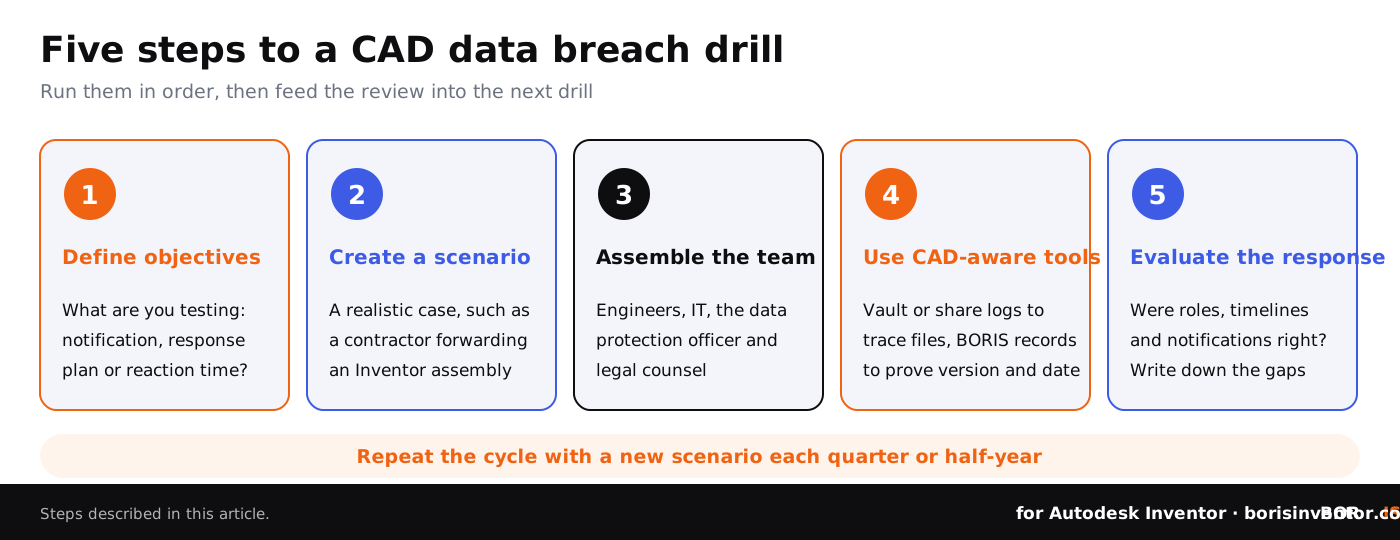
1. Define Objectives
Clarify what you want to achieve through the simulation. Are you testing your data breach notification processes, validating your response plan, or examining the reaction time of your engineering teams? Identifying key goals will shape the development of your scenarios.
2. Create Realistic Scenarios
Develop scenarios that reflect realistic risks. For example, simulate an insider threat where an employee downloads a sensitive CAD file without proper authorization. Use the access logs in Vault or your file-sharing platform to trace the file’s movements (see how to track who accesses your CAD files), and BORIS registration records to show which version was yours and when. Real incidents make good starting points: our case studies of CAD data breaches show the paths attackers and insiders actually use.
3. Assemble the Right Team
Include the relevant stakeholders: design engineers, IT staff, data protection officers, and legal counsel. Each team member should understand their role in identifying, containing, and mitigating the breach, ensuring the simulation covers legal, technical, and operational dimensions.
4. Use CAD-Specific Tools
Deploy CAD-oriented security solutions like CADChain’s BORIS plugin, which integrates seamlessly with Autodesk Inventor. BORIS registers a fingerprint and timestamp of each design version on the blockchain and issues ownership certificates, so during a drill the team can show which version was yours and when. Pair it with the access logs and permissions in Vault or your file-sharing platform for file tracking, and with encryption at the storage and transfer level.
Ready to Build a Security-First Culture?
Learn more about fostering proactive security practices among CAD teams with tailored solutions.
👉 Build a Security-First Culture Among CAD Teams
5. Evaluate Team Performance
After the simulation, conduct a thorough review of the team’s response. Were protocols followed? Were communication timelines adhered to? Were there unforeseen obstacles? This evaluation reveals gaps in your current breach response strategy.
Common Mistakes to Avoid When Running Simulations
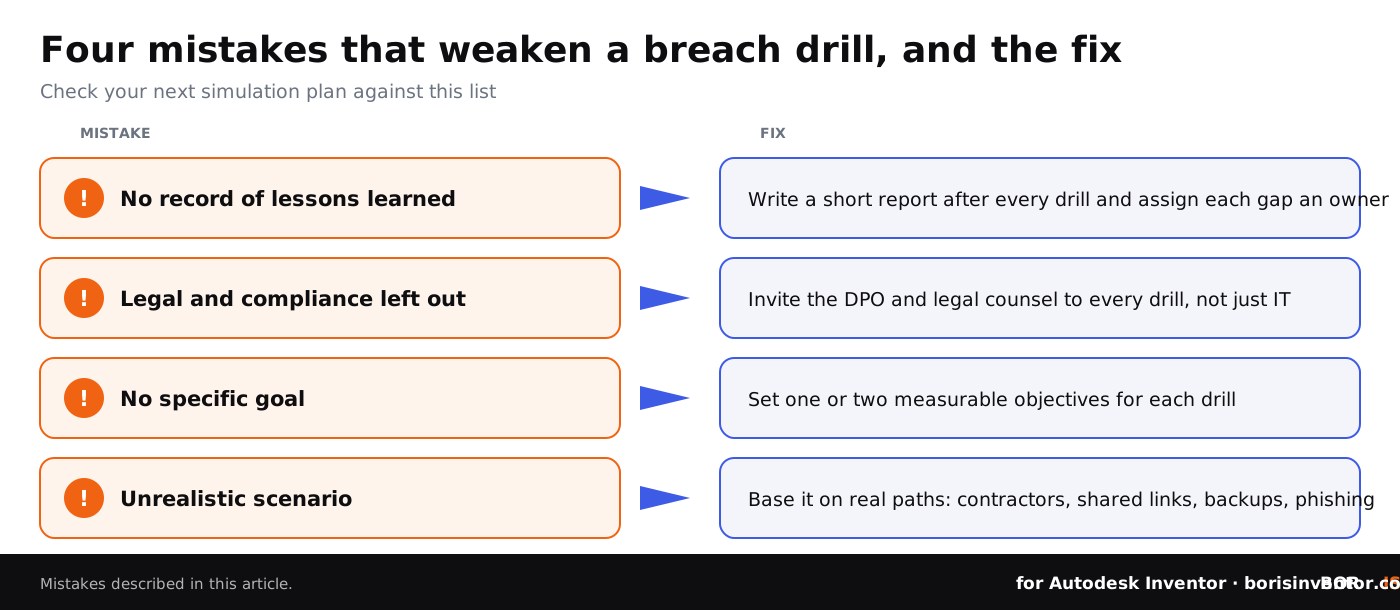
- Ineffective Documentation: Without a clear record of lessons learned, your team may repeat the same mistakes during actual breaches.
- Skipping Stakeholder Inclusion: It’s critical to involve all teams, especially legal and compliance experts, given their role in ensuring breach responses are legally sound.
- Lack of Specific Goals: Broad or undefined objectives can dilute the effectiveness of a simulation.
- Failure to Use Realistic Scenarios: Unrealistic exercises won’t replicate the pressures of a real-world breach.
Conclusion: Future-Proof Your CAD Security
Successful CAD data breach simulations enhance your resilience against IP theft and unauthorized file sharing. By aligning your security strategy with robust simulations, you not only safeguard engineering assets but also build a security-first culture that ensures sustained innovation.
Looking to dive deeper into securing your CAD workflows? Explore compliance and standards for secure CAD workflows to ensure that your safety measures align with industry regulations.
People Also Ask:
What is the best approach to simulate and drill for CAD data breaches?
The most effective method for CAD data breach simulations involves a mix of tabletop exercises, real-world scenario testing, and red team assessments. Tabletop sessions allow teams to discuss response protocols without active triggers, while live simulations mimic genuine breaches. This layered approach improves response readiness by exposing vulnerabilities, clarifying roles, and testing security controls.
What tools are available for breach and attack simulations in 2026?
In 2026, well-known breach and attack simulation tools include Cymulate for continuous exposure testing, AttackIQ for adversarial simulations, SafeBreach for playbook alignment, and Pentera for automated security validation. These platforms equip teams with insights into potential attack paths and provide actionable feedback on system defenses.
Why are incident response drills essential for CAD security?
Drills are critical because CAD systems often house sensitive design data vulnerable to insider threats and external attacks. Rehearsing response protocols ensures faster detection and containment when breaches happen, minimizing the compromise of intellectual property and lessening business disruption.
What are the key components of cyber drill exercises?
Cyber drill exercises typically start with predefined threat scenarios, such as ransomware or phishing, followed by role assignments, active simulations, and team evaluations. These drills emphasize detection efficiency, incident handling, and documentation of lessons learned to refine protocols.
How can data breach response workflows be tested in real-time?
Real-time testing is conducted with breach simulations that run real attack techniques in a controlled, authorized way, such as penetration tests or harmless simulated malware. Teams monitor system responses and recovery speeds, identifying areas for improvement in tools, communication strategies, and policy adherence.
What are the common challenges in running CAD data breach drills?
Challenges include ensuring scenario realism, training technical staff to interpret security data correctly, and maintaining production continuity during simulations. Effective planning and stakeholder cooperation mitigate these obstacles, making drills impactful.
What are the key metrics for evaluating the success of simulations?
Success metrics include detection time, response speed, containment efficiency, and post-incident analysis accuracy. These benchmarks ensure security teams can evaluate their readiness against evolving cyber threats.
What training resources are available for improving CAD security drills?
Resources in 2026 include immersive labs for virtual scenarios, breach and attack simulation platforms, and AI-driven training modules. Cybersecurity training providers and technical institutes also offer incident-response courses and certifications that you can adapt to CAD scenarios.
How does a breach attack simulation methodology work?
The methodology emulates real-world attack strategies to identify system vulnerabilities. Attack paths simulate techniques malicious actors may deploy, allowing security teams to preemptively strengthen defenses. Continuous simulations contribute to dynamic threat modeling.
Are simulations alone enough to secure CAD systems in 2026?
Simulations are essential but must be part of a broader strategy including up-to-date patch management, continuous monitoring, robust access controls, and employee education. Security must involve layered defenses combined with proactive testing methods.
FAQ on Running CAD Data Breach Simulations and Drills
How often should CAD breach simulations be conducted?
CAD breach simulations should ideally be conducted quarterly or biannually. This frequency keeps response plans refined, ensures teams remain familiar with protocols, and minimizes skill degradation. For industries with strict compliance mandates, align the simulation schedule with regulatory requirements for optimal preparedness.
What industries benefit most from CAD breach simulations?
Industries heavily reliant on intellectual property (IP), such as manufacturing, automotive, aerospace, and architectural design, benefit significantly from CAD breach simulations. These exercises are essential in protecting critical design data, ensuring compliance, and safeguarding competitive advantages in detail-sensitive sectors.
What tools are essential for optimizing CAD breach preparedness?
CAD-specific tools like BORIS for Autodesk Inventor, CADChain’s plugin, improve breach preparedness by registering a fingerprint and timestamp of each design version on the blockchain and issuing ownership certificates, while Vault or your PDM system supplies access logs and permissions. Together they allow teams to secure CAD workflows while identifying potential vulnerabilities and streamlining response actions during simulations.
How can simulations prepare teams for insider data threats?
Simulating insider threats, such as unauthorized file downloads or deliberate design leaks, builds team skills in identifying unusual behavior and deploying access controls. Realistic exercises improve detection rates and highlight gaps in policies, providing learning opportunities for preventing internal breaches.
What role does automation play in CAD security simulations?
Automation simplifies breach drills by providing real-time data analysis, file tracking, and detection of abnormal design file activities. Alerts from Vault, your file-sharing platform or a security monitoring (SIEM) tool can flag bulk downloads during a drill, while BORIS registers new design versions automatically, so the team can quickly show which version existed and when. Learn how to track CAD security metrics effectively.
How can breach simulation results be documented effectively?
Document simulations by capturing key performance metrics, challenges faced, resolution times, and lessons learned. Post-simulation reports strengthen compliance, reinforce team accountability, and ensure continuous improvement. Align documentation frameworks with industry standards like ISO 27001 to enhance organizational readiness.
Why is cross-functional collaboration critical during simulations?
Breach simulations require cross-functional teamwork to ensure seamless coordination among design engineers, IT staff, and legal/compliance teams. Such collaboration provides comprehensive testing of all contingencies, from technical vulnerabilities to regulatory adherence, creating a well-rounded response plan.
What lessons can other organizations learn from data breaches?
Organizations can learn from breaches like the Odido exposure by prioritizing phishing simulations and adopting robust verification protocols. Implement proactive systems that assume human error to reduce vulnerabilities. Read about Odido’s breach breakdown for insights.
What common mistakes undermine effective simulations?
Poor documentation, unrealistic scenarios, failure to include all stakeholders, and undefined objectives are common mistakes. Avoid these pitfalls by creating tailored simulations, ensuring alignment with actual risks, and reviewing feedback to refine protocols for future exercises.
How should companies respond to simulation findings?
Simulation insights should lead to actionable improvements like enhanced access control, revised response protocols, updated compliance measures, and additional security training. Regularly reevaluating findings ensures robust defenses against evolving threats and demonstrates a commitment to continuous security improvement.