
TL;DR: How to Sanitize CAD Files Before Sharing
Before sharing CAD files, secure your designs by removing sensitive metadata, encrypting the files, and converting them into neutral formats like STEP or IGES. These practices protect intellectual property and reduce security risks, ensuring safe file sharing during collaborations.
💡 Dive deeper into CAD privacy concerns, read about metadata risks and prevention strategies, and safeguard your designs effectively.
How to Sanitize CAD Files Before Sharing
Sharing Computer-Aided Design (CAD) files can be risky for engineers, startups, and enterprises if these files are not properly sanitized. CAD files contain proprietary designs, technical specifications, and metadata that could expose trade secrets and competitive insights. So, how can you sanitize these files effectively while preserving their usability?
This guide highlights proven strategies for sanitizing CAD files before sharing, incorporating recommended practices from experts like Violetta Bonenkamp, CEO of CADChain, and Dirk-Jan Bonenkamp, CADChain’s Chief Legal Officer. With techniques tailored to Autodesk Inventor users, we’ll explore how metadata removal, encryption, and file format optimization can protect intellectual property during collaboration and distribution.
“A single shared CAD file can compromise months or years of engineering work if improperly handled. Sanitization safeguards your digital designs and protects your competitive edge.”
Violetta Bonenkamp, CEO of CADChain
Protect Your CAD Files Before Sending Them
A native file can carry far more than the geometry your partner needs: names, project codes, internal parts and the way you built the design. Don’t let your designs leak through the details.
👉 Explore CAD metadata concerns
Why Do CAD Files Need Sanitization?
When sharing CAD files, metadata such as author information, design history, revision notes, and file paths often remain embedded, creating security vulnerabilities. Competitors or unauthorized collaborators can use these details to understand how a design was built, reverse-engineer it or learn who your suppliers and customers are.
- Metadata risks: Hidden data can reveal proprietary methods, internal systems, user names and folder paths.
- File access risks: Sharing raw files without protection enables unauthorized edits or duplication.
- Regulatory compliance: GDPR applies when files carry personal data such as names and e-mail addresses in iProperties or title blocks, and export-control rules can apply to some designs, so check what a file holds before it leaves your company.
Steps to Sanitize CAD Files for Secure Sharing
Sanitizing CAD files is a combination of technical preparation and secure practices. Each step addresses unique risks, ensuring files remain usable while removing unnecessary vulnerabilities. Let’s dive into the actionable process.
Step 1: Remove Sensitive Metadata
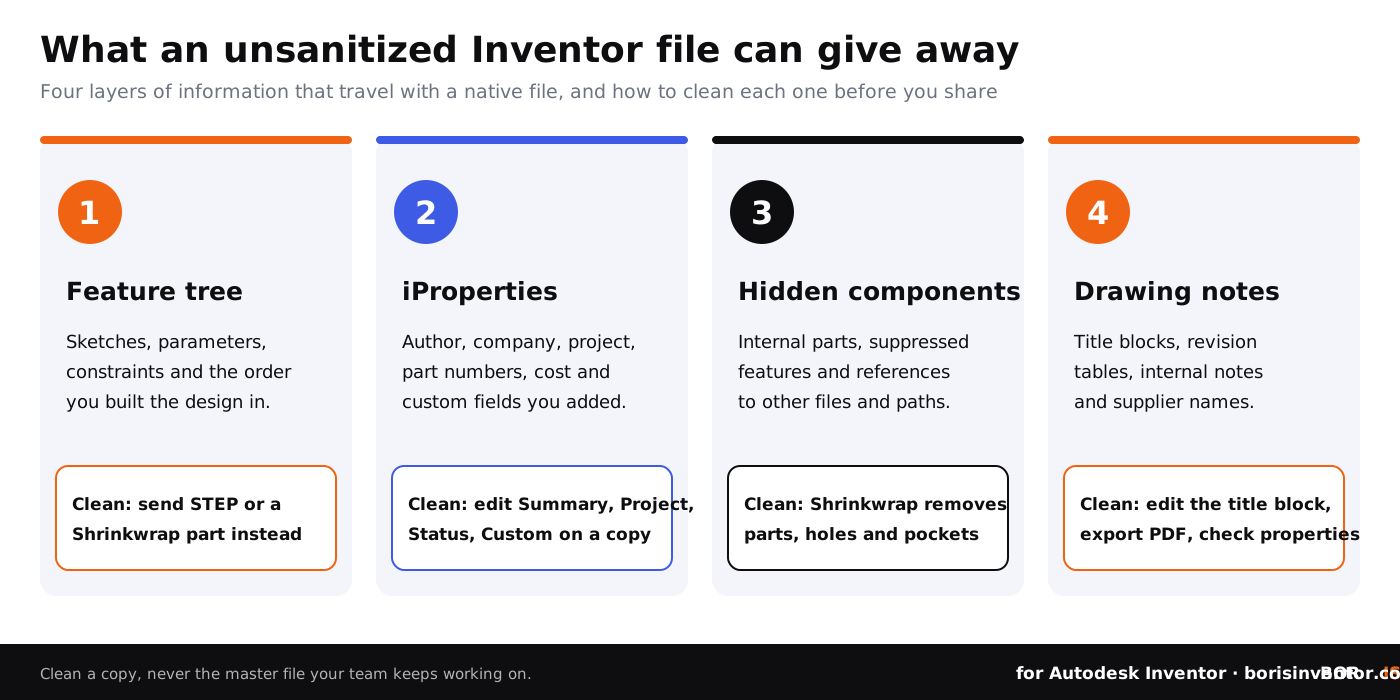
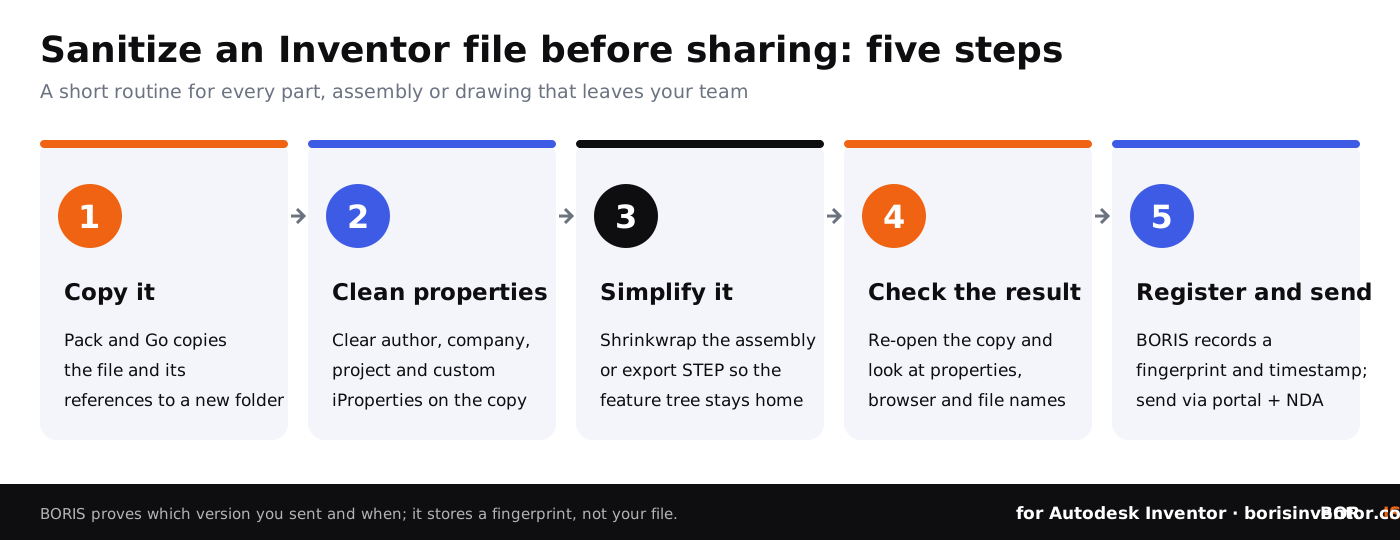
Metadata sanitization involves stripping or neutralizing details embedded in the CAD file that could pose risks. Always work on a copy: use Pack and Go to copy the part or assembly with its references to a new folder, then clear the Summary, Project, Status and Custom tabs of the iProperties on that copy. When you export to STEP or IGES, the feature tree stays behind, and the STEP export options let you set the header fields such as organization and description. This reduces exposure while preserving essential geometry for manufacturing.
For many files at once, Inventor’s Design Assistant can edit iProperties across a set of files, and an iLogic rule can clear chosen properties before export. Check the result by reopening the copy, so version notes and internal comments don’t accompany external file exports.
The table below shows where information hides in an Inventor file and how to clean it before sharing.
Step 2: Encrypt Files Before Sharing
Encryption ensures that only authorized recipients can access your CAD files. Industry-standard algorithms like AES-256 are a common choice for protecting sensitive designs. Inventor has no built-in file encryption, so encrypt the package you send, for example an encrypted archive or an encrypted transfer service, and share the password through a different channel.
Additionally, consider platforms that enforce collaborative permissions, limiting access to ‘view-only’ during file-sharing sessions. DRM and IRM tools such as SealPath can add access rules on top of encryption for some CAD formats; check which formats a tool supports before you rely on it for controlled access beyond internal teams.
Step 3: Export Files to Neutral Formats
Sharing editable CAD files (e.g., native DWG, IPT formats) increases the risk of unauthorized edits. Convert files into neutral formats such as STEP, IGES, or STL, which retain geometric data but leave the feature tree and parameters behind. STEP and IGES still carry exact geometry, so a recipient can measure and copy the shape; STL is a mesh. How native and neutral files differ is explained in our guide to native CAD file formats.
Autodesk Inventor’s Shrinkwrap feature turns an assembly into a single simplified part and can remove internal parts and features such as holes and pockets, so recipients see less of how the design works. This enhances workflow security without requiring significant manual intervention.
Step 4: Limit Share Permissions Strategically
Require collaborators to accept non-disclosure agreements (NDAs) before file sharing. Inside your company, Autodesk Vault controls who can see, check out and release files; for outside partners, use a secure portal or a cloud service such as Autodesk Docs with permissions per folder. This minimizes file exposure beyond intended recipients.
When sharing CAD files over shared links or cloud drives, enforce expiration dates and limit download count where the service supports it. For sensitive projects, portals and DRM tools can keep audit trails, revealing who accessed files and when.
Step 5: Verify Recipient Identity
Double-check the identity of collaborators before granting access. This protects designs from phishing attacks or impersonation tactics. Inventor’s Shared Views and Autodesk Docs give engineers a safer alternative to circulating files via email, a common vulnerability.
Common Mistakes to Avoid When Sharing CAD Files
- Skipping metadata review: Failing to eliminate sensitive metadata could expose internal details.
- Sharing raw formats: Native CAD files allow unauthorized recipients to extract proprietary data.
- Using unsecured platforms: Ordinary email is not end-to-end encrypted and has no access control, so a forwarded attachment is out of your hands.
“File exports should balance usability and security. Designers often skip steps like encryption or metadata cleanup, assuming NDAs are enough. They aren’t.”
Dirk-Jan Bonenkamp, CLO of CADChain
Secure Your Autodesk Inventor Files
Learn how neutral file formats can protect sensitive designs from unauthorized viewing and edits.
👉 Convert CAD files safely
Final Thoughts
Sanitizing CAD files before sharing simplifies collaboration while protecting your competitive edge. By removing metadata, encrypting files, and converting them into neutral formats, engineers enable safe partnerships without compromising on quality or security.
Looking ahead, designers should focus on embedding secure practices into workflows while exploring advanced solutions like BORIS for Autodesk Inventor, which registers a fingerprint and a timestamp of each version on a blockchain as dated proof of what you held and when. To learn more, explore the engineer’s handbook for CAD file security.
Certify Ownership and Protect Your CAD Data
Register your designs with BORIS for Inventor and get certificates that give dated, tamper-evident proof of which version you created and shared.
👉 Register your designs with BORIS
People Also Ask:
How to keep your CAD file confidential?
Once a plain file leaves your systems you cannot see what happens to it, so decide before you send. Share through a portal or secure link that logs downloads and lets you revoke access, use DRM or IRM tools when a partner must open the native file, and send only what the recipient needs to minimize the risk of intellectual property loss.
What is the best way to share CAD files?
Sharing CAD files securely can be achieved through view-only links, such as Inventor Shared Views. These links allow recipients to view the latest version of the design without receiving a file they can edit. This approach supports privacy and version control.
How to purge a CAD file?
In AutoCAD and other DWG tools: open the drawing, use the "AUDIT" command to check for errors, and fix any identified issues. Run the "PURGE" command to remove unused elements such as blocks and layers. For more advanced cleaning, use "-PURGE" with the Regapps option to remove registered application data. Save your file after completing these steps. In Inventor, work on a Pack and Go copy and clean the iProperties instead.
How to protect DWG files from modifying or copying?
Marking the DWG file as read-only (right-click the file, choose ‘Properties’, enable ‘Read-only’) prevents accidental edits, but any recipient can clear that flag. AutoCAD no longer offers password protection for drawings, so for more robust security share a PDF or DWF for viewing, encrypt the package you send, or use a DRM tool.
Why is it important to sanitize CAD files before sharing?
Sanitizing CAD files prevents the dissemination of sensitive or extraneous information, such as proprietary layers or internal notes. This ensures that only the necessary details are shared with external stakeholders while safeguarding intellectual property.
How can CAD files be watermarked to protect them?
Watermarking CAD files can be done by embedding visible marks, such as text or logos, into the drawing or the exported PDF. Some software tools also add watermarks tied to the recipient, which discourages unauthorized copying or redistribution.
What are effective ways to lock an AutoCAD drawing?
You can lock layers and viewports to prevent accidental changes, share a PDF or DWF instead of the DWG, or use an external DRM or encryption tool. Commands such as DWGPROPS only set drawing properties and do not restrict edits, and locked layers stop accidents, not a determined recipient.
How can metadata compromise confidentiality in CAD files?
Metadata in CAD files can contain confidential details, such as author names, timestamps, or software information, which could potentially lead to information leakage. Removing or anonymizing metadata before sharing is a fundamental step in protecting sensitive data.
What is the role of encryption in securing CAD files?
Encryption converts your CAD files into a coded format that requires a decryption key to access. This adds a layer of protection, ensuring only those with the key can open the files; once a recipient has opened them, encryption alone does not limit what they do next.
How can file transfer agreements help in sharing CAD files securely?
File transfer agreements legally bind both parties to terms regarding the use and sharing of CAD files. Including such agreements minimizes the risks of unauthorized copying, modification, or distribution.
What tools can automate CAD file sanitization?
In Inventor, Task Scheduler can batch-export files to STEP or PDF, Design Assistant can edit iProperties across many files, and iLogic rules can clear chosen properties before export. For DWG files, scripts that run PURGE and AUDIT can clean many drawings at once.
FAQ on How to Sanitize CAD Files Before Sharing
How can metadata in CAD files pose security risks?
Metadata in CAD files can reveal sensitive details like design history, author information, and file paths. Such data may expose proprietary methods, leaving your intellectual property vulnerable to exploitation. Learn more about potential security gaps in CAD sharing workflows by exploring understanding CAD file vulnerabilities.
Is converting CAD files to PDF a reliable method for sharing safely?
Converting CAD files into PDFs preserves accessibility and gives the recipient a file that is hard to edit as a model. However, PDFs may still carry hidden metadata unless sanitized. Use encryption and watermarking features to enhance security when sharing sensitive designs.
What are neutral CAD file formats, and why use them?
Neutral formats like STEP, IGES, and STL retain geometric data while removing proprietary dependencies and the feature tree. This hides your design intent and makes unauthorized edits harder, although STEP and IGES still carry exact geometry that a recipient can copy.
How does limiting share permissions protect CAD files?
Granting role-specific permissions, such as ‘view-only’ access, ensures files cannot be edited or duplicated by unauthorized users. Autodesk Vault controls who can see and change files inside your team, while portals and secure links add tracking and expiration dates for outside partners.
What role does encryption play in CAD file security?
Encryption ensures only authorized parties can access CAD files. AES-256 is a common choice for safeguarding sensitive designs during transit or storage. DRM and IRM tools such as SealPath add access rules on top of encryption.
How do automated tools help sanitize metadata?
Batch tools such as Inventor’s Design Assistant, Task Scheduler and iLogic rules can streamline metadata sanitization by clearing properties and exporting clean copies. They prevent accidental leakage of design intents, internal comments, and revision histories, vital for security.
Why should CAD file sharing workflows include audit trails?
Audit trails provide a log of access and modifications, helping identify unauthorized activities. Check out how to audit CAD file access for comprehensive strategies in maintaining secure workflows.
What mistakes should be avoided when sharing CAD files?
Avoid sending files via unsecured email, skipping metadata review, or using platforms without encryption. Ensure every shared file has proper formatting, minimal sensitive data, and access expiration controls.
How do watermarks enhance CAD file security?
Watermarks embed visible ownership and confidentiality disclaimers into CAD files. This discourages unauthorized duplication and helps trace misuse, ensuring accountability during collaborative workflows.
Why is Autodesk Shrinkwrap a good feature for CAD file security?
Autodesk Shrinkwrap reduces assemblies to a single simplified part and can remove internal components and features. Files shared externally then show the outer shape needed for layout and fit checks without the internal design details; it is not a manufacturing model of the internal parts.
How can non-disclosure agreements (NDAs) complement CAD file protection?
An NDA formalizes legal protections around intellectual property. Combine NDAs with secure platforms to provide layered defense, ensuring all collaborators are bound to confidentiality agreements.