
TL;DR: How to Send Partial CAD Files Safely
Securely sharing partial CAD files is essential to protect Intellectual Property (IP) and limit unauthorized edits or access. Send a reduced copy that holds only what the recipient needs, clean its metadata, use encryption or access control for the transfer, and register the copy on a blockchain so you can prove what you sent and when. In Autodesk Inventor, Simplify, Derive and STEP export create the reduced copy, and BORIS by CADChain registers a fingerprint and timestamp of each file as tamper-evident proof of ownership.
💡 Dive deeper into CAD file privacy and formats, read more in this article.
How to Send Partial CAD Files Safely: A Comprehensive Solution for Autodesk Inventor Users
Have you ever hesitated before sharing a sensitive CAD file via email or a cloud platform? If so, you’re not alone. Protecting Intellectual Property (IP) while fostering collaboration is a growing challenge in the CAD ecosystem. So, how can you send partial CAD files safely without compromising security or ownership? We're diving deep into the most practical and innovative solutions, focusing on Autodesk Inventor files.
Data breaches are no longer rare, and design files that leave the company through email, file-transfer links or supplier portals are one of the easiest ways for know-how to leak. Safeguarding designs, particularly partial files, is paramount, not just for large corporations but also for startups and SMEs seeking growth in competitive markets.
Unleash the Power of Secure Sharing!
Protect your CAD designs while collaborating with suppliers and partners. Learn which controls keep shared files safe and which proof you need if something goes wrong.
👉 Explore CAD Security Best Practices
What Are the Risks of Sharing Partial CAD Files?
When collaborating on projects that involve suppliers or external partners, there’s often a need to share only parts of a CAD assembly. But this comes with risks, including:
- IP theft: Even partial designs can expose key proprietary processes.
- Unauthorized alterations: Recipients might edit files without your consent.
- Loss of file control: Traditional sharing methods, such as email, provide no mechanisms to revoke access after sending.
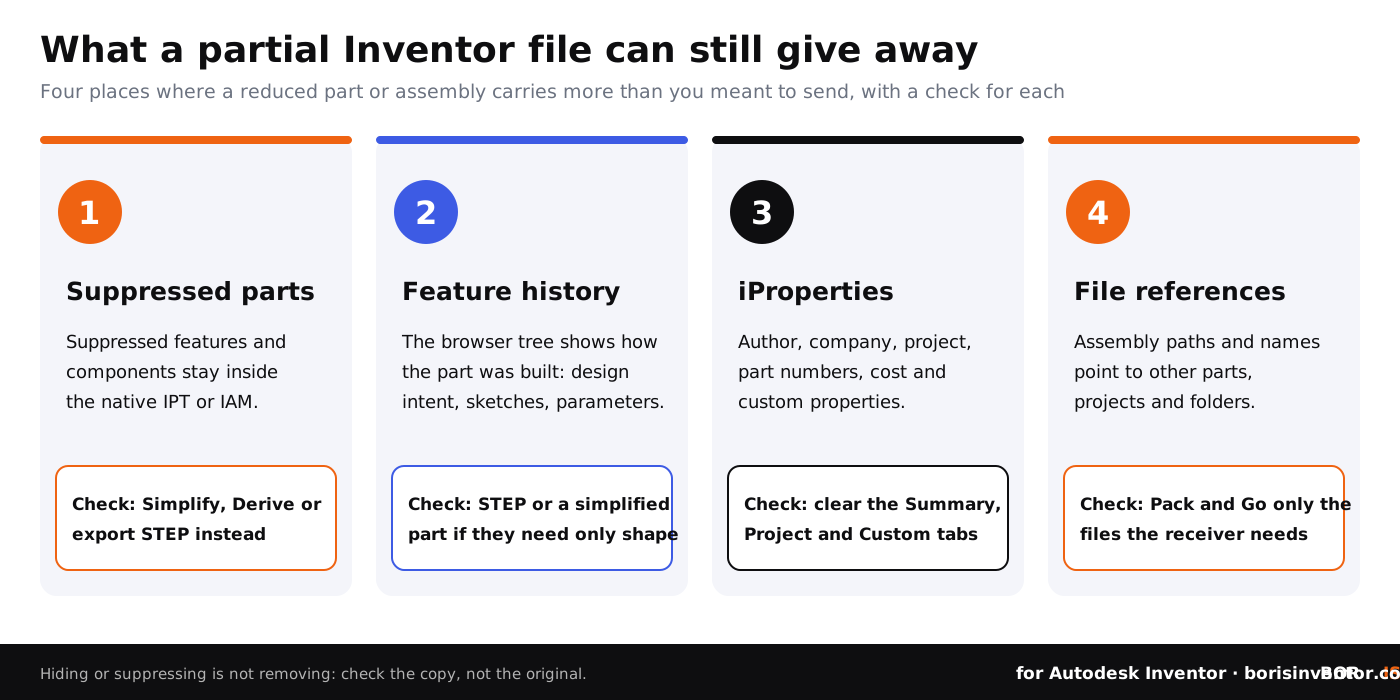
- Hidden content: A native Inventor file can carry more than you see on screen, such as suppressed features, hidden components and iProperties.
“Once a full or partial CAD file leaves your environment, you lose control over its lifecycle unless proactive security measures are in place.”
Dirk-Jan Bonenkamp, CLO at CADChain
Effective Strategies to Safeguard Partial CAD Files
Here’s how Autodesk Inventor users and others can send portions of CAD files securely while mitigating risks related to unauthorized use and unintended recipients.
1. Use Encryption and Restricted Access Formats
One of the most basic but powerful measures is employing robust encryption for file-sharing. Restrict access with formats and channels such as shared read-only links, viewer links or a supplier portal with permissions by user.
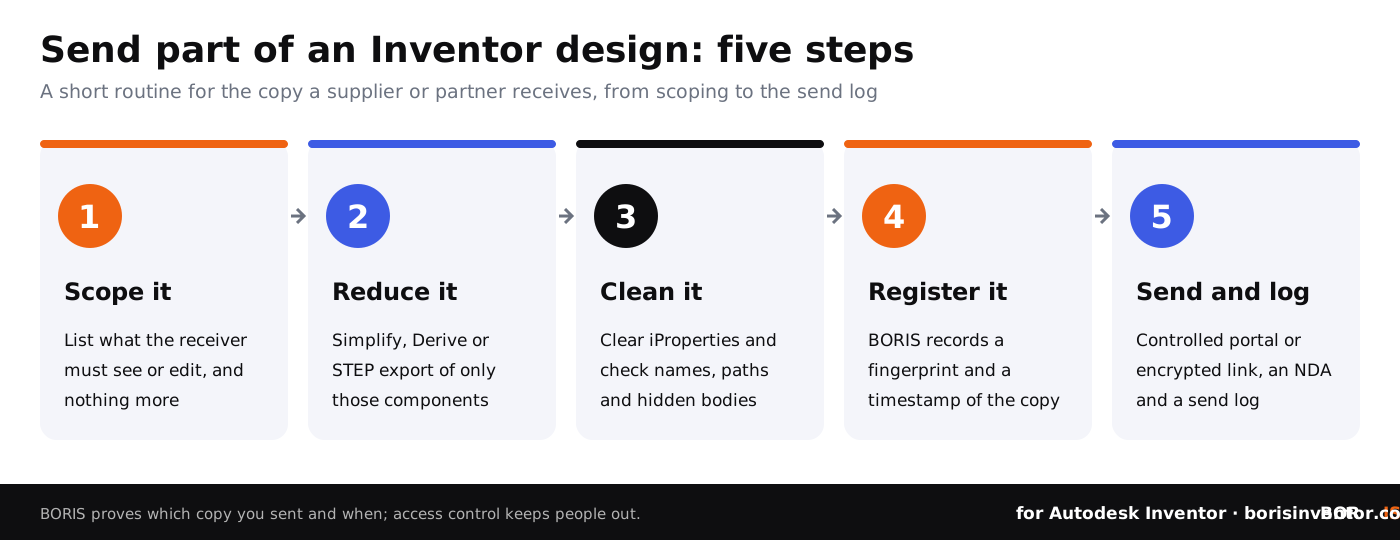
Encryption protects the file in transit and at rest, but it does not decide what is inside the file. Before you encrypt, make the copy smaller. Suppressing features or components in a native Inventor part or assembly hides them, yet they stay in the file and the recipient can unsuppress them. Use Simplify (Shrinkwrap in older releases) to turn an assembly into a single simplified part, Derive to create a part that contains only selected bodies or components, or a STEP export of only the components the partner needs. Our guide to CAD file formats, metadata and privacy explains what each format carries.
The table below compares the common ways to send part of an Inventor design.
2. Create a Simplified Copy and a Blockchain Anchor
Take a page out of CADChain’s playbook. Share a simplified or partial copy of your file for collaboration, and register both the original and the copy you send on a blockchain to maintain ownership records. BORIS for Autodesk Inventor records a fingerprint (hash) and a timestamp of each registered file, which gives you dated, tamper-evident proof that you had that exact file at that time.
For instance, if you modify a partial assembly and share it with limited partners, register the version you send before it leaves your team. If a dispute comes up later, you can show which file version existed when, and that it has not been altered since registration. BORIS does not track who opens the file; keep a send log or use a portal with access logs for that.
3. Use Information Rights Management (IRM) Policies
Microsoft-centric ecosystems have popularized IRM strategies, which equally apply to CAD workflows. With these policies implemented, recipients may view a file without being able to download, edit or print an editable copy. For native CAD files this takes a dedicated DRM or IRM tool such as Seclore, Fasoo or Secude HaloCAD, which encrypts the file and controls who can open it and what they can do with it. BORIS adds the proof side: a registered record of which file you shared and when.
4. Omit Metadata for Sensitive Secrets
It's a good practice to strip metadata from CAD files prior to transfer. In Inventor, the iProperties of a part or assembly (Summary, Project, Status and Custom tabs) can hold author and company names, project numbers, cost, vendor and internal notes, while file names and folder paths in assemblies reveal project structure. Clear or rewrite what the receiver should not see on the copy you send. Refer to CAD file formats, metadata and privacy for additional context.
5. Leverage Plugin-Based Security Tools
For Autodesk Inventor users, plugins bring security steps into the place where the files are made. BORIS by CADChain registers files from inside Inventor, so certifying a version takes a click rather than a separate process. Encryption and access control come from DRM tools or from your PDM, such as Vault permissions; the two work together, because one keeps people out and the other proves what was yours.
Maximize Your Impact with Blockchain Certification
Looking for dated proof of ownership for the files you share? BORIS registers a tamper-evident fingerprint and timestamp of each version, which you can use as evidence in a dispute; how much weight it carries depends on the jurisdiction.
👉 Register Your CAD IP
Common Pitfalls to Avoid When Sharing CAD Files
- Over-sharing: Sending more data than required for a task increases your exposure. Send specific components, not full assembly files whenever possible.
- Neglecting updates: When shared, outdated files generate confusion or even disputes.
- Skipping audits: Without a send log and registered versions, mistakes often go unnoticed until too late, and you cannot show which version went to whom.
- Trusting suppression: Suppressed or hidden features and components still travel inside a native file.
Closing Thoughts: What's Next?
Startups and manufacturers across Europe are driving forward using secure CAD workflows. With reduced copies, access control and BORIS registration, Autodesk Inventor users gain not just security but also the evidence they need in competitive environments. Explore more about the foundational principles behind safe file sharing by diving into compliance and standards for secure CAD workflows. The future of design protection awaits!
People Also Ask:
What is the best way to share CAD files?
The most efficient method involves using view-only links or secure cloud platforms that allow the recipient to access the latest version of the file. This approach provides up-to-date information without risking unintended edits or modifications.
Can you send CAD files via email?
Yes, CAD files can be emailed. In Inventor, Pack and Go collects a file and the files it references into one folder that you can zip; in AutoCAD, eTransmit does the same for drawings. Compress the package to minimize size and avoid transfer issues, and remember that ordinary email is not encrypted end to end, so use an encrypted link or portal for sensitive designs.
How to keep your CAD file confidential?
Securing CAD files can be achieved by encrypting the file or using password-protected zipping tools. Monitor download and sharing activities, and block unauthorized access by setting permissions on the folder, portal or link you share.
How do I send someone a CAD file?
You can share a CAD file by using trusted file transfer services such as WeTransfer, or by utilizing built-in features in design tools like AutoCAD's eTransmit or Inventor's Pack and Go, ensuring references and dependencies are included.
What are the common risks of sharing CAD files?
File sharing may expose sensitive designs to unauthorized alterations or intellectual property theft. Send only what the recipient needs, prefer view-only access where editing is not required, and use encryption for secure transfers.
What is eTransmit in AutoCAD?
The eTransmit tool packages an entire CAD drawing along with external references, fonts, and dependencies. This ensures that the recipient has all necessary resources intact for viewing without format loss.
Can CAD files be shared partially?
Yes. In Autodesk Inventor you can save a copy of one component, use Simplify or Derive to create a reduced part, or export only selected components to STEP. In AutoCAD, the WBLOCK command writes selected objects or layers to a new drawing file.
What is the safest website to transfer CAD files online?
Encrypted file-sharing services such as Virtru Secure Share, and viewers such as Autodesk Viewer that let people look at a model in the browser, are common choices. They allow for controlled sharing of design files; check the download and expiry settings before you send a link.
How do I extract only required data from a CAD file?
In Inventor, use Derive, Simplify or a STEP export of the components you need. In AutoCAD, use layer isolation to hide unwanted elements and the WBLOCK command to write just the required objects or layers to a new drawing.
What file formats are ideal for sharing CAD drawings?
Formats like DWG or DXF are commonly used for editable 2D designs, and STEP for 3D geometry between different CAD systems. For read-only purposes or presentations, convert files to PDF or image formats like PNG.
FAQ on Safely Sending Partial CAD Files
Can you share partial CAD files without compromising intellectual property?
Yes, combining a reduced copy, file sanitization, encryption and blockchain registration keeps the risk low. Tools like BORIS by CADChain register a fingerprint and timestamp of each version you share, so you can prove what was yours and when. Learn about these strategies in the BORIS Plugin guide.
What is the difference between metadata sanitization and encryption?
Metadata sanitization removes sensitive background information, such as revision logs, from CAD files, while encryption secures files against unauthorized access. Both are often used in combination for maximum data security. For detailed practices, read Industry 4.0 CAD security measures.
How can Autodesk Inventor users restrict access to partial CAD files?
Autodesk Inventor users can set permissions in Vault or another PDM for internal files, and use DRM or IRM tools for copies that leave the company, including view-only modes and expiration dates. Sending a simplified part or a STEP export of only the needed components ensures collaborators see only the necessary sections of CAD assemblies without full editing rights.
Is blockchain necessary for secure CAD file sharing?
Blockchain is not mandatory but adds tamper-evident records of which file existed when, which supports ownership verification. It is particularly valuable for maintaining audit trails or protecting high-stakes intellectual property during partial CAD file sharing.
What role does information rights management (IRM) play in CAD file security?
IRM policies prevent recipients from downloading or editing shared CAD files. They grant read-only access, ensuring shared files are used strictly as intended. IRM setups are effective for external collaboration.
How do you deal with outdated CAD file versions during collaboration?
Use Vault or a secure sharing platform to manage version control, ensuring collaborators always access the latest file variants. Registering each version you send with BORIS shows later which version each partner received, minimizing confusion and data integrity risks.
What precautions can prevent CAD file theft through email sharing?
Avoid email sharing for CAD files as it exposes them to unauthorized access. Use encrypted cloud platforms or secure link-sharing tools with multi-factor authentication for reliable protection.
What is the safest way to collaborate with external suppliers using CAD files?
Share sanitized files, remove exposed metadata, and use access control to restrict access. Consider implementing traceability measures like blockchain anchoring for external collaboration.
Are watermarks sufficient for securing CAD files during distribution?
Watermarks help identify your IP but can be removed by advanced users. Pair them with encryption and blockchain for comprehensive protection during file sharing.
What common mistakes should CAD users avoid during sensitive file sharing?
Avoid oversharing complete designs, neglecting access audits, and ignoring metadata vulnerabilities. Always verify recipient authentication and set file expiry dates to limit misuse.