
On 19 October 2026 Siemens confirmed that attackers are actively exploiting a flaw in Siemens Software Center, the tool customers use to download, install and update Siemens software. The criminals did not hack Siemens. They shipped a genuine, validly signed copy of the program together with their own malicious files, and used fake "fix it" instructions on web pages to get people to run it. On 20 October the US cybersecurity agency CISA added the flaw, CVE-2026-110936, to its list of known exploited vulnerabilities.
At first sight this is a Siemens story, not an Autodesk one. Look closer and it matters to every Inventor shop. The attack does not need Siemens software to be installed on the target PC at all: the attacker brings the signed Siemens program along and uses its good name to hide a remote access tool. Any engineering workstation where a user can be talked into pasting a command can be hit, whether it runs Inventor, Solid Edge, NX or all three.
This article explains what Siemens has confirmed, how the ClickFix trick works, why signed CAD vendor software is attractive to attackers, and what Inventor CAD managers should check on their workstations this week. It follows our recent report on Autodesk's ADP Desktop SDK advisory, which looked at a quieter weakness in software that runs in the background next to Inventor.
TL;DR: a signed CAD vendor tool used as a malware loader
Siemens Software Center versions before 4.0.9.8 load helper DLL files from their own folder without checking them (CVE-2026-110936, CVSS 4.0 score 8.4). Attackers behind a ClickFix campaign called Romulus bundle a genuine signed copy with malicious DLLs and trick users into running it. Siemens says its own systems and update channel were not breached. Fixed version 4.0.9.8 is out and existing installs update on next start. CISA added the flaw to its exploited list on 20 October. For Inventor teams: look for Siemens Software Center on PCs where nobody installed it, train users never to paste commands from web pages, install CAD software only from official vendor portals, and keep independent proof of your designs.
What did Siemens confirm?
Siemens ProductCERT published security advisory SSA-580366 on 15 October 2026 and updated it on 17 and 19 October. The advisory describes Siemens Software Center as the application customers use to download, install, activate and update the Siemens software they have bought, and to launch free trials. All versions before 4.0.9.8 load dynamic-link libraries (DLLs) from an uncontrolled search path. In plain words, the program trusts any helper file with the right name that sits next to it.
Siemens rates the flaw 6.7 under CVSS 3.1 and 8.4 under CVSS 4.0. On paper it needs local access with high privileges, which sounds hard to exploit. The real-world attack shows why that rating can mislead: the attacker does not need to break into an existing install, because the victim installs the attacker's package. The flaw was reported by a researcher at the security company Huntress.
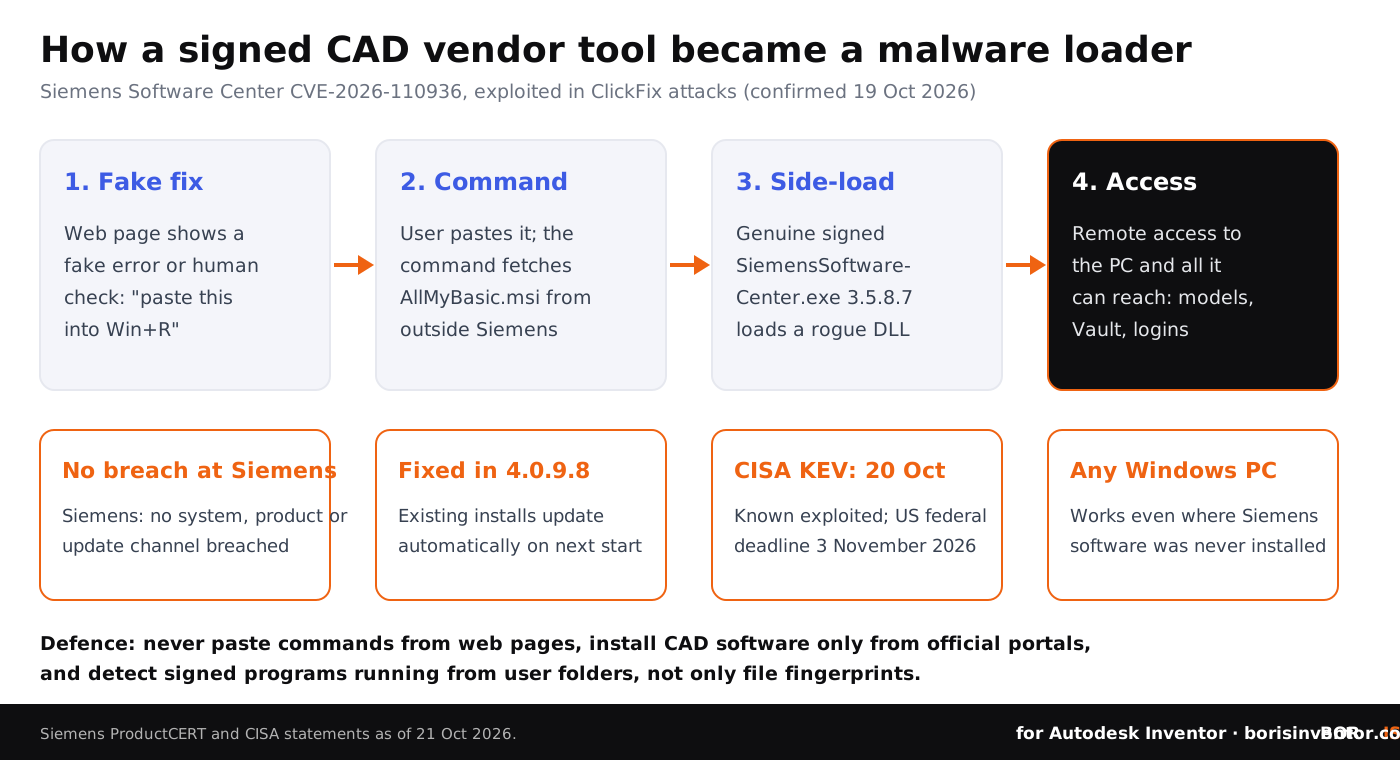
On 19 October Siemens followed up with a ProductCERT post on the active exploitation of CVE-2026-110936. It links the attacks to the Romulus multi-platform ClickFix campaign and states: "No Siemens system, product or update channel was breached to our knowledge." The attackers used version 3.5.8.7, which was the current release when the attacks happened, and left the Siemens program itself untouched. All the malicious code sits in the DLLs they added.
What is ClickFix, and why does it work on engineers?
ClickFix is a social engineering trick, not a software bug. A web page shows a fake error, a fake update prompt or a fake "verify you are human" box, and tells the visitor to fix it by copying a command, pressing Win+R and pasting it. The command quietly downloads and runs the attacker's installer. Because the user starts it, many security tools treat it as a normal action.
According to Infosecurity Magazine, the security firm Forescout identified the Romulus panel on 14 October 2026, describing it as a hosting panel that lets criminals run ClickFix lures at scale and deliver different kinds of malware. In the Siemens case the lure delivered a Windows installer called AllMyBasic.msi, distributed outside any official Siemens channel. It placed the signed Siemens program and the malicious DLLs in the user's own profile folder, so no administrator rights were needed.
Engineers are a good target for this. They install viewers, translators, converters, licence tools and add-ins more often than most office staff, they are used to troubleshooting installs themselves, and their PCs hold exactly the data attackers want: assemblies, drawings, supplier quotes and customer specifications. Our report on the Clop PLM data leak showed where stolen engineering drawings end up, and our guide to the consequences of CAD file leaks explains what that costs a manufacturer.
Why do attackers abuse signed CAD vendor software?
A digital signature proves who built a file. It does not prove that the files loaded next to it are safe. Many security rules still trust anything signed by a large software vendor, and a process named SiemensSoftwareCenter.exe looks normal on an engineering PC. That is why Siemens tells defenders to detect the attack by folder and behaviour, not by the file fingerprint of its program, which is genuine.
This technique, called DLL side-loading, is not new and it is not unique to Siemens. Any program that loads helper files from its own folder without checking them can be abused the same way. Nothing published so far says that Autodesk Access, the Autodesk installer or Inventor itself has this weakness, and we make no such claim. The lesson for Inventor teams is broader: the tools that install and update CAD software run with real power on your machines, so where they come from and where they run matters.
Autodesk makes a related point about unofficial copies of its own software. In a July 2026 interview on license compliance, Autodesk warned that cracked copies of its software often carry malware and viruses, and recommended buying from Autodesk or an authorised partner. The Siemens case shows the risk does not end with cracked software: even a genuine vendor program becomes dangerous when it arrives through the wrong channel.
Attackers want your design files. Make sure you can always prove they are yours.
BORIS for Autodesk Inventor registers your CAD files with a blockchain timestamp and a certificate of ownership, directly inside Inventor.
👉 Discover BORIS for Autodesk Inventor
What are the signs of compromise?
Siemens published indicators that IT teams can check on Windows workstations. The most useful one for an Inventor-only shop is simple: Siemens Software Center showing up in startup apps or the Task Scheduler on a PC where nobody ever installed Siemens software. This table sums up what Siemens and CISA have published by 21 October 2026.
Siemens also lists network indicators, an IP address and a domain still used for command and control, plus file hashes. Your IT provider or security tool vendor can add them to block lists. No victim count, target list or industry breakdown has been published, so it is not known how many engineering firms were hit.
What should Inventor CAD managers do now?
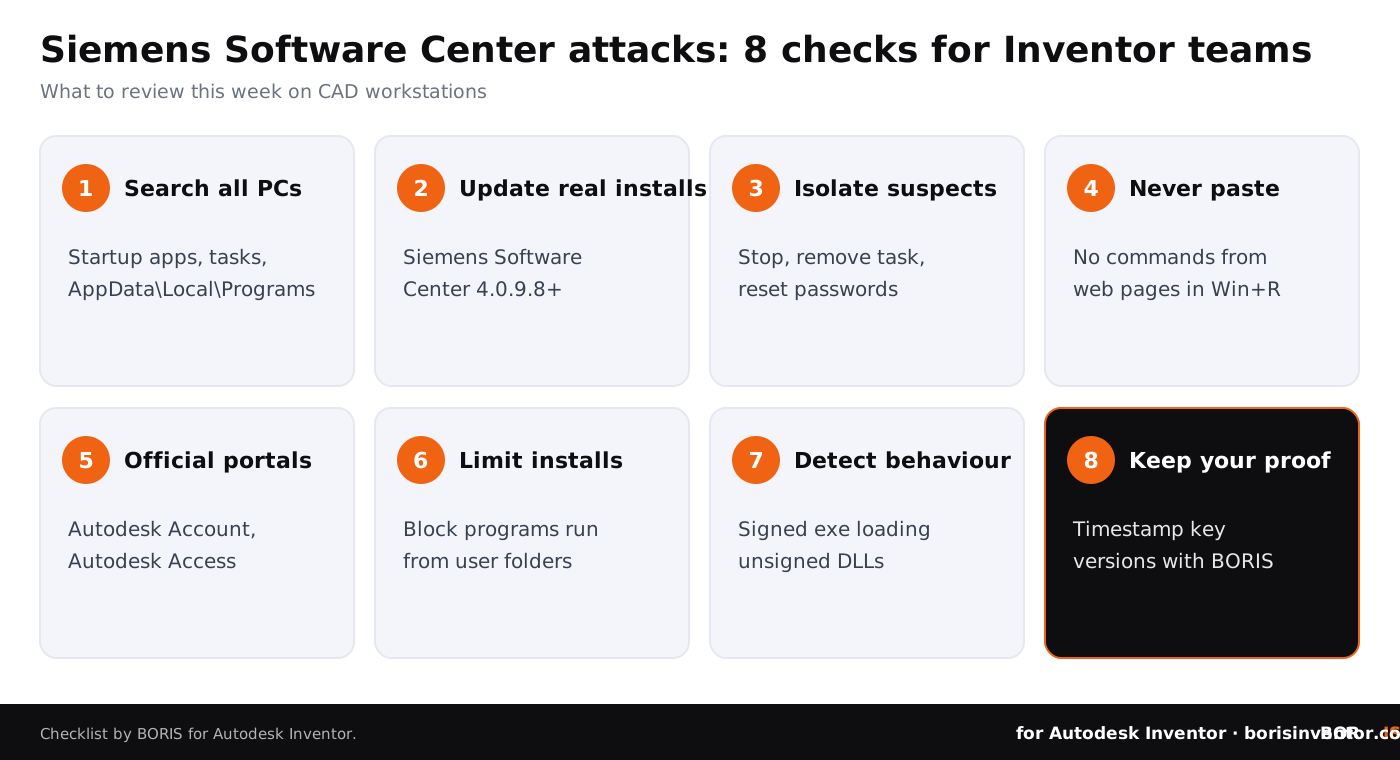
- Search for Siemens Software Center everywhere. Check startup apps, scheduled tasks and the AppData\Local\Programs folder on every workstation, including PCs that never had Siemens software. An unexpected copy is a red flag.
- Update legitimate installs. If you use NX, Solid Edge or other Siemens tools, make sure Siemens Software Center is on 4.0.9.8 or later. Start it once so the automatic update can run, then confirm the version.
- Isolate anything suspicious. If you find the folders or files Siemens lists, disconnect the PC, stop the process, remove the startup entry and task, and reset the user's passwords, including Autodesk, Vault and Microsoft 365 accounts used on that machine.
- Teach the one rule that stops ClickFix. Siemens put it plainly: "Never paste a command from a web page into Win+R, the Run box or PowerShell." Make this part of your security-first culture for CAD teams.
- Install CAD software only from official portals. For Autodesk that means your Autodesk Account and Autodesk Access, or an authorised partner. For other vendors, use their own download portals. Never install a CAD tool from a link in a chat, a forum post or a search ad.
- Limit who can install software. Per-user installs into the profile folder need no admin rights, so consider application control that blocks programs running from user folders on CAD workstations.
- Detect behaviour, not only signatures. Ask your security vendor whether it alerts on signed programs that load unsigned DLLs from user folders, and make sure protection blocks rather than just logs.
- Keep independent proof of your key designs. If a workstation is compromised, you need to show which designs you created and when. Register important versions with a timestamp that lives outside the infected PC, your vault and your cloud accounts.
These steps fit into the wider routines in our guides on protecting CAD files from unauthorized access and security protocols for remote CAD teams, where home PCs and self-managed installs make ClickFix lures even more dangerous.
Does this affect Inventor add-ins and helper tools?
Not directly, but the same logic applies. Inventor workstations often carry add-ins, iLogic rules, translators, licence helpers and vendor update tools, each with access to your files. Our article on plugin security architecture in Autodesk Inventor explains how to judge what an add-in can reach, and our overview of Inventor automation with iLogic, add-ins and the API shows how much power that code has.
Unpatched operating systems make every one of these risks worse. If you still run Windows 10 workstations, our report on Windows 10 ESU and Inventor sets out the options. And because attackers increasingly go after the tools that protect data, our analysis of backup tools as an attack path is worth reading alongside this one.
The bigger picture
This week's news on our sister sites has a common thread: design data is lost through people and trusted channels, and the companies that recover best are the ones that can prove what they owned.
- Trade secrets on trial. On CADChain, the report on the Huawei trade secret trial in Brooklyn covers testimony about an internal memo that offered staff bonuses for competitor information, and what it teaches about records and file-level protection.
- Proof decides injunctions. BORIS for SOLIDWORKS explains a Massachusetts ruling that trade secret owners must prove irreparable harm before getting a preliminary injunction, and why logs and dated design proof matter.
- Asset delivery and access tokens. Blended BORIS looks at online asset libraries and access tokens coming to Blender, and what tokens do and do not protect for creators who sell their work.
CADChain explains how its CAD data protection technology works across CAD systems, and our guide on common mistakes engineers make with CAD security lists more blind spots worth fixing.
Conclusion
The Siemens Software Center attacks did not need a breach at Siemens, a zero-day in Inventor or a clever exploit. They needed a signed program that trusted the files beside it and a user willing to paste one command. That combination exists in many engineering offices. Search your workstations for unexpected copies, update the real ones, teach the no-paste rule, install CAD software only from official portals, and keep proof of your designs that does not depend on any single PC staying clean.
Your designs, your proof.
BORIS for Autodesk Inventor gives every registered file a blockchain timestamp and a certificate of ownership, without sending your models to a cloud service.
👉 See how BORIS for Autodesk Inventor works
FAQ: Siemens Software Center and ClickFix attacks
What is CVE-2026-110936?
It is a DLL side-loading flaw in Siemens Software Center versions before 4.0.9.8. The program loads helper DLL files from its own folder without checking them, so a malicious DLL placed next to it runs with the program's rights. Siemens rates it 8.4 under CVSS 4.0.
Is it being exploited?
Yes. Siemens confirmed active exploitation on 19 October 2026 and linked it to the Romulus ClickFix campaign. CISA added it to its Known Exploited Vulnerabilities catalog on 20 October 2026.
Was Siemens hacked?
Siemens says no Siemens system, product or update channel was breached to its knowledge. The attackers used a genuine signed copy of the program and distributed it with their own malicious DLLs outside official channels.
Are Autodesk Inventor or Vault affected?
No Autodesk product is named in the advisory. The risk for Inventor teams is that the attack works on any Windows PC, even one without Siemens software, because the attacker brings the signed Siemens program along.
How do I fix legitimate Siemens Software Center installs?
Update to version 4.0.9.8 or later. Siemens says existing installations update automatically the next time they start, so open the program once and confirm the version.
What is the single most important user rule?
Never paste a command from a web page, chat or email into the Windows Run box, PowerShell or a terminal. Legitimate vendors do not ask you to fix errors that way.
Where should we download Autodesk software?
Only from your Autodesk Account, Autodesk Access or an Autodesk authorised partner. Avoid links in forums, chats and search ads, and never use cracked copies, which Autodesk says often include malware.
How does BORIS help?
BORIS for Autodesk Inventor registers CAD files with a blockchain timestamp from inside Inventor. Each registered version gets a dated certificate of ownership stored outside your workstation, vault and cloud accounts, so a compromised PC does not erase your proof of authorship.