
In mid-October 2026, UK software company CloudNC launched Quote Agent, an AI agent that reads a customer's request for quote, including 2D drawings and 3D models, and drafts a manufacturing plan and price for CNC machine shops. Shops can forward RFQ emails straight into it. For Inventor teams that send drawings to suppliers every week, that raises a practical question: where do your files go after you press send?
Quoting is one of the slowest steps in contract machining, and CloudNC is not the only company putting AI on it. What is new is how simple it has become for a small shop to hand a customer's drawing to a cloud service: forward the email, and the agent does the first pass. The shop's estimator still reviews and approves every quote, but your Inventor model, your drawing and your tolerances have now been uploaded to a third party you have no contract with.
This is not a story about a bad actor. CloudNC publishes its security certifications and warns users not to upload export-controlled data. It is a story about terms. The licence a shop accepts when it uploads files decides what happens to your design data, and most RFQ packages and NDAs were written before AI quoting tools existed. Below we explain what Quote Agent does, what its terms say, and what Inventor engineers and CAD managers should change in the way they send RFQs.
TL;DR: your RFQ drawings may now pass through AI quoting tools
CloudNC Quote Agent, launched in October 2026, drafts CNC quotes from forwarded RFQ emails and uploaded CAD files, PDFs and drawings. Its end user licence agreement, last updated 5 June 2026, says the customer (the shop) owns its data, but grants CloudNC a perpetual, irrevocable, sublicensable licence to use uploaded data and results to operate and improve the service for other users. CloudNC says files are encrypted on AWS and advises against uploading export-controlled data. If you send drawings to suppliers, update your RFQ terms, send only what a quote needs, and keep dated proof of what you shared.
What did CloudNC launch?
CloudNC is a London company founded in 2015, best known for CAM Assist, an AI plug-in that generates CNC toolpath strategies inside CAM software such as Autodesk Fusion and Mastercam. In September 2026 it announced a $20 million funding round led by Nimble Ventures and said more than 1,000 machine shops use CAM Assist. Quote Agent is its second product, and it is a standalone web application that does not need any CAM or CAD software.
According to DEVELOP3D's report on the launch, the agent takes RFQs forwarded by email or 2D and 3D files uploaded by the shop. It assesses manufacturing risks, proposes a manufacturing plan with routing times, estimates material and post-processing costs, lists inspection requirements, and asks questions when information is missing. It can also produce DFM reports with ballooned drawings and first article inspection reports. Shops describe their machines, costs and stocked materials in a settings area called Myshop, and DEVELOP3D reports that the agent learns from these interactions.
CloudNC's COO Jason Bowes summed up the purpose: "Every quote is a decision about which work a shop should take on and whether it can make money doing it." Pricing is aimed at small shops. There is a free tier with a manual mode that uses no AI, and paid plans start at $20 per month, with AI quoting priced at about $2.50 per part on the starter plans.
What happens to the drawings a shop uploads?
CloudNC's Quote Agent product page gives clear answers on security. Files are stored on AWS infrastructure and encrypted in transit and at rest. Its trust portal lists ISO/IEC 27001:2022, SOC 2 Type 2 and Cyber Essentials Plus. The same page says the service is cloud-based and that CloudNC does not recommend uploading export-controlled data, and it adds that customers should make sure any upload complies with their own security and contractual requirements.
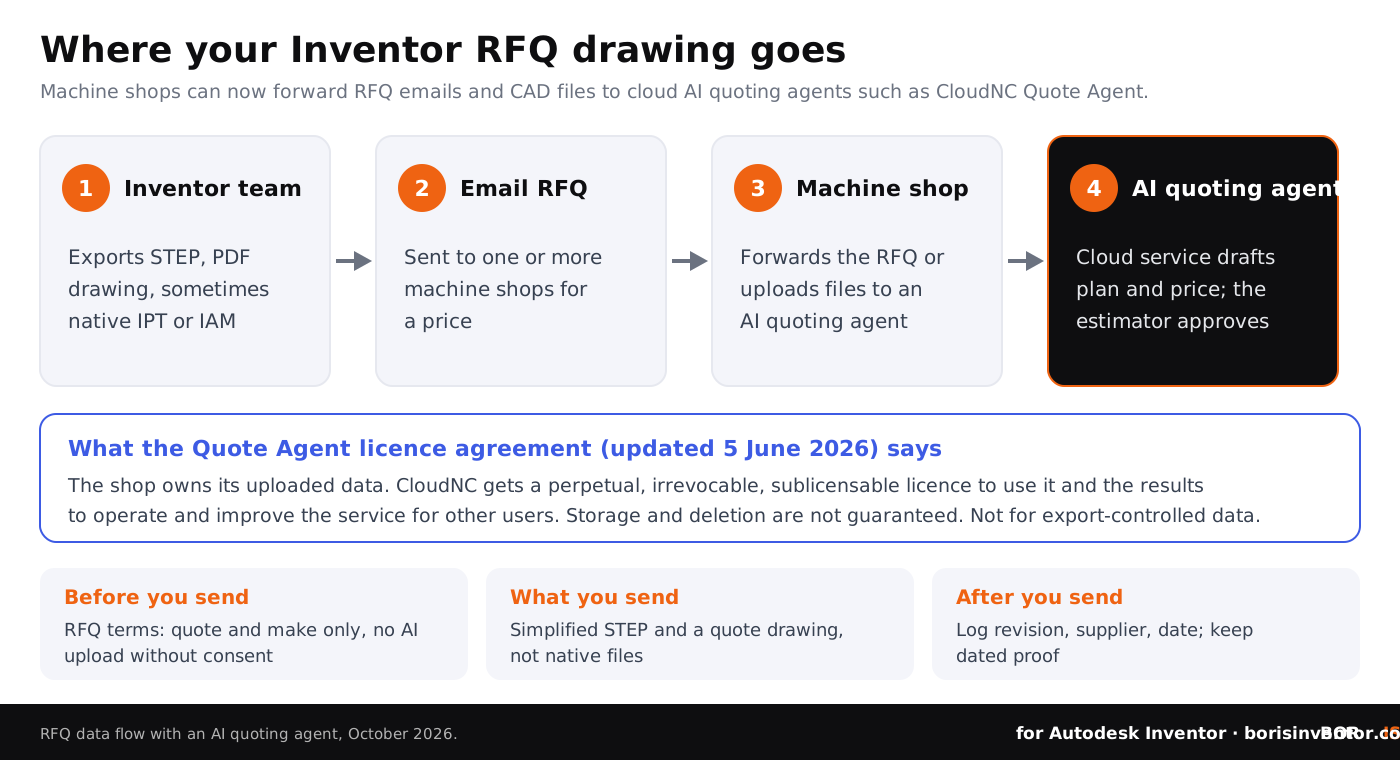
The end user licence agreement for Quote Agent, last updated on 5 June 2026 and governed by English law, sets out the rights. The key points for designers:
None of this is unusual for a software-as-a-service product, and nothing in the terms says CloudNC trains AI models on customer drawings. The point is the structure. You, the designer, send a confidential drawing to a supplier. The supplier uploads it under a licence that is wider than one quote, and confirms to the vendor that it has the right to do so. Whether it actually has that right depends on your RFQ terms and NDA, which our guide to NDA limitations for CAD files shows are often vague about subcontractors and software services.
Why does this matter more for Inventor teams than it seems?
Most Inventor users who work with outside machine shops send far more than a quote needs. A typical RFQ package contains a STEP file of the full part or assembly, a PDF drawing with every tolerance and note, sometimes the native IPT or IAM file, and an email thread that explains what the part is for. Each of those carries know-how: material choices, fits, surface finishes, and in an assembly, the layout of your product.
AI quoting does not create a new kind of leak, but it adds one more copy in one more system, under terms you never saw. We have seen this year how stolen engineering drawings end up online when a supplier's system is breached; our report on the Clop PLM data leak covers drawings from Philips and others published after attacks on PLM servers. Our guides to CAD file protection in outsourced manufacturing and supplier compliance with CAD data rules explain why every extra copy at a supplier raises your exposure.
There is also an AI-specific question that Autodesk users already face in their own tools. In our summary of Inventor AI after Autodesk University 2026 we looked at how Autodesk Assistant handles your data inside Inventor. With supplier-side AI, you lose even that visibility: you cannot see the settings, the plan or the terms the shop chose.
Keep proof of what you designed before it leaves your desk.
BORIS for Autodesk Inventor registers your CAD files with a blockchain timestamp and a certificate of ownership, directly inside Inventor, so you can show what you created and when, whoever handles the file next.
👉 Discover BORIS for Autodesk Inventor
What should machine shops that use Inventor ask before uploading?
Many manufacturing SMEs sit on both sides: they design in Inventor and also quote work for customers. If your shop is testing an AI quoting tool, treat customer drawings as you would want your own treated:
- Read the licence clause, not only the security page. Encryption protects files from outsiders; the licence decides what the vendor may do with them.
- Check customer contracts. If an NDA or purchase order says drawings may only be used to quote and make the part, ask the customer before uploading, or use the manual mode.
- Ask about enterprise terms. CloudNC offers an enterprise plan with single sign-on and enhanced security, and its separate CAM Assist terms include a version for regulated environments with a narrower licence. Ask whether a narrower data licence is available for Quote Agent.
- Keep controlled parts out. Follow the vendor's own advice on export-controlled data; our article on export control considerations for CAD files explains what counts.
What should Inventor engineers and CAD managers do now?
A practical checklist for anyone who sends Inventor drawings out for quotes:
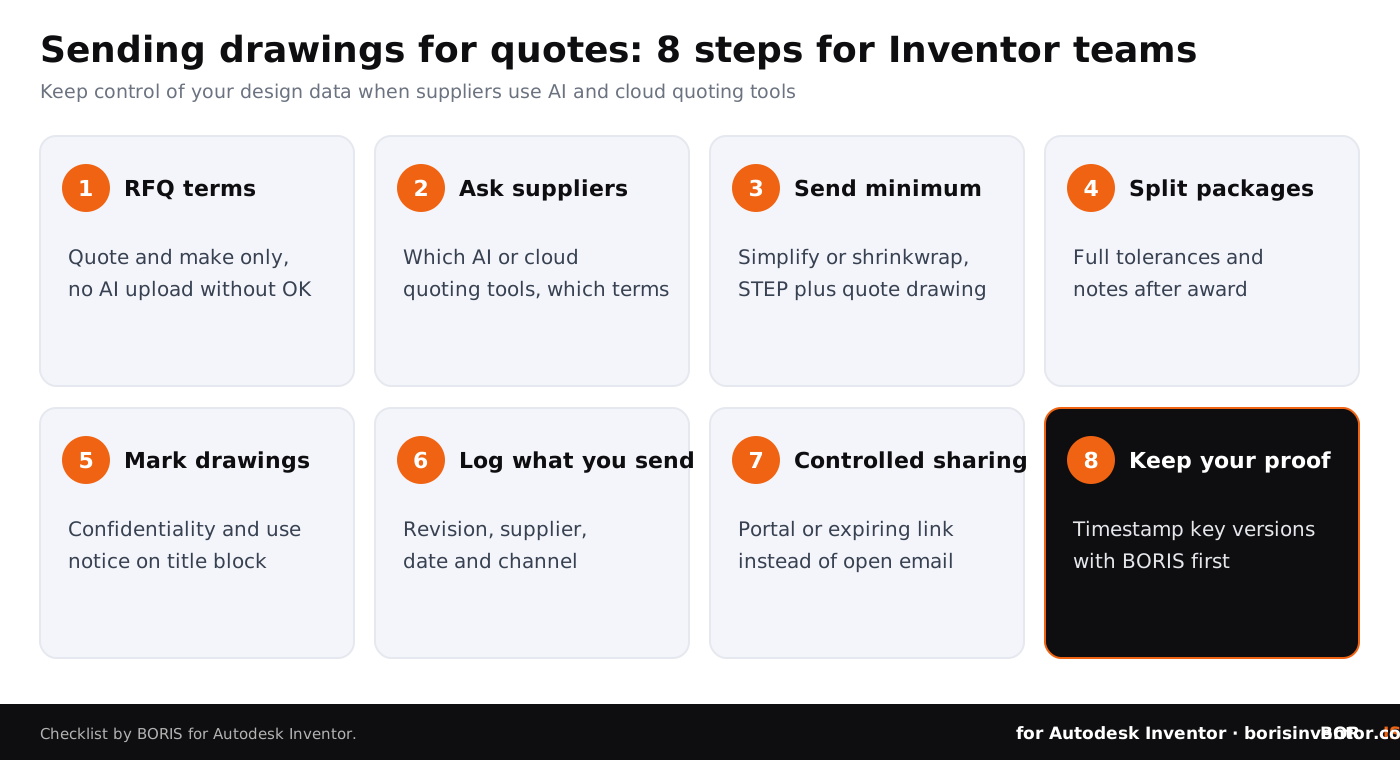
- Update your RFQ terms. Add one sentence: drawings may be used only to quote and manufacture, and may not be uploaded to third-party AI or cloud services without written consent.
- Ask suppliers which tools they use. A short question in your supplier onboarding form is enough: do you use AI or cloud quoting software, and under which terms?
- Send the minimum for a quote. Use Inventor's Simplify command or a shrinkwrap substitute to remove internal parts and features, and send STEP plus a quote drawing instead of native files.
- Split quote packages from production packages. Send full tolerances, process notes and assemblies only after you award the job.
- Mark every drawing. Put a clear confidentiality and use notice on the title block of drawings exported from Inventor.
- Log what you send. Record which revision went to which supplier, on which date, through which channel.
- Use controlled sharing where you can. Our guide on how to share CAD files securely compares portals, expiring links and plain email.
- Keep dated proof of authorship. Register key versions with a timestamp before they leave the company, so ownership never depends on a supplier's records.
If you need to prove later that a supplier misused a drawing, records decide the outcome. Our article on the NASCAR trade secrets case shows how courts ask companies to name their trade secrets precisely, and our guide to verifying manufacturer compliance with IP agreements covers audits and evidence.
The bigger picture
This week's news on our sister sites points the same way: design data escapes through the systems around the CAD tool, not through the CAD tool itself.
- Side systems. On CADChain, the report on the Loxone cyberattack explains how attackers entered through a web server in October 2026 and copied CRM partner contacts, support requests and applicant data, while the core products were not affected.
- Shared folders. BORIS for SOLIDWORKS covers Helix data theft from SharePoint, where a data extortion group listed Southwire, Quikrete and Hypertherm in October and is known for bulk downloads from SharePoint after phishing.
- Templates and reuse. Blended BORIS looks at the AI meme generator lawsuit, in which a registered comic was offered as a paid ad template before the case settled.
CADChain explains how its CAD data protection technology works across CAD systems, and our article on blockchain timestamps for proving design authorship shows how dated records work in practice. For Autodesk's own view of AI and data, see our summary of the 2027 State of Design and Make report.
Conclusion
AI quoting agents will save machine shops hours, and CloudNC has been more open about security than many vendors. But the terms show how far a single RFQ email can travel: from your Inventor workstation, to a supplier, to a cloud service that holds a perpetual licence to improve its product with what it receives. You cannot control every tool your suppliers adopt. You can control what you send, the conditions you attach to it, and the proof you keep. Update your RFQ terms, send less, and register what matters before it leaves your company.
Your designs, your proof.
BORIS for Autodesk Inventor gives every registered file a blockchain timestamp and a certificate of ownership, without sending your models to a cloud service.
👉 See how BORIS for Autodesk Inventor works
FAQ: AI quoting agents and Inventor drawings
What is CloudNC Quote Agent?
A cloud-based AI agent launched by CloudNC in October 2026 that helps CNC machine shops assess new jobs and draft quotes. It reads RFQs forwarded by email or uploaded CAD files, PDFs and drawings, and prepares a manufacturing plan, cost estimates and inspection requirements for the shop's estimator to approve.
Does CloudNC train AI on my drawings?
Its terms do not say so in plain words. The Quote Agent licence agreement lets CloudNC use uploaded data and results to operate and improve the service for other users and the underlying technologies. If this matters to you, ask the supplier and CloudNC in writing.
Who owns a drawing after a shop uploads it?
The terms say the customer, meaning the shop, owns its Customer Data. Your ownership of the design itself does not change, but the shop has granted CloudNC a broad licence and confirmed it had the right to do so. Your NDA and RFQ terms decide whether it did.
Is Quote Agent safe for export-controlled parts?
No. CloudNC says it does not recommend uploading export-controlled data, and its terms exclude use for military, dual-use or export-licensed goods.
How much does Quote Agent cost?
There is a free tier with a manual mode that uses no AI. Paid starter plans begin at $20 per month, with AI quoting priced at about $2.50 per part; professional plans are priced at about $2.40 per part.
Can I stop a supplier from using AI quoting tools?
You can restrict it by contract. Add a clause to your RFQ terms and NDAs that drawings may be used only to quote and manufacture, and may not be uploaded to third-party AI or cloud services without written consent.
What should I send in an RFQ from Inventor?
Only what a quote needs: a simplified STEP file made with Inventor's Simplify command or a shrinkwrap substitute, and a quote drawing with the key dimensions. Send native files and full production details after you award the work.
How does BORIS help when drawings go to suppliers?
BORIS for Autodesk Inventor registers CAD files with a blockchain timestamp from inside Inventor. Each registered version gets a dated certificate of ownership, so you can show what you designed and when, independent of any supplier's or vendor's records.