
TL;DR: Automate Autodesk Inventor IP Registration for Better Protection
Save time and secure intellectual property by automating CAD design registration. Using tools like iLogic, the Inventor API and blockchain registration, you can streamline ownership proof while reducing risks like IP theft or unauthorized edits. Engineers and SMEs in Europe already use these methods to avoid disputes with partners.
💡 Want to see how engineers defend their CAD rights effectively? Read about success stories of engineers defending their IP. Discover actionable steps for safeguarding your designs today.
Use Case: Automating Autodesk Inventor IP Registration
Have you ever questioned how effectively your intellectual property (IP) is protected when creating CAD designs in Autodesk Inventor? Automation in IP registration not only saves valuable time but also strengthens IP protection by giving you consistent, time-stamped evidence of ownership. Startups, SMEs, and manufacturing firms in Europe find this especially relevant, because limited resources often constrain extensive legal safeguards.
Automating the registration of a CAD design’s IP using tools like iLogic, the Inventor API, and blockchain registration can provide a seamless, efficient process to safeguard ownership rights while reducing risks such as unauthorized modifications and IP theft.
“Automation isn't just 'nice to have' anymore, it's a core business necessity for manufacturers and designers aiming to establish ownership of their IP in an increasingly competitive environment.”
Violetta Bonenkamp, Co-Founder, CADChain
Secure Intellectual Property with Our Comprehensive Resources
Check out Autodesk Inventor-specific guides and resources tailored for engineers and SMEs to streamline your IP management.
👉 Learn how to prove design ownership in legal disputes
Why Is Automating IP Registration Critical for CAD Designs?
Engineering firms and manufacturing startups share a common nightmare: unauthorized access to or duplication of proprietary CAD designs. Manual processes are error-prone and lack the scalability needed in fast-moving design workflows. Automation resolves these challenges by ensuring consistency and transparency throughout the ownership certification process.
When IP registration is automated, registration stops depending on someone remembering to do it. With BORIS for Autodesk Inventor, a cryptographic fingerprint (hash) of each CAD file is registered on a blockchain with a timestamp, while the file itself stays in your own storage. This record can support your case in disputes involving third-party collaborators or competitors, although how much weight a court gives it depends on the jurisdiction.
Dirk-Jan Bonenkamp, co-founder of CADChain, often points out that European clients increasingly expect suppliers to show clear proof of who owns a design, because compliance questions and IP disputes are common in shared projects.
What Are the Core Steps to Automate IP Registration in Autodesk Inventor?
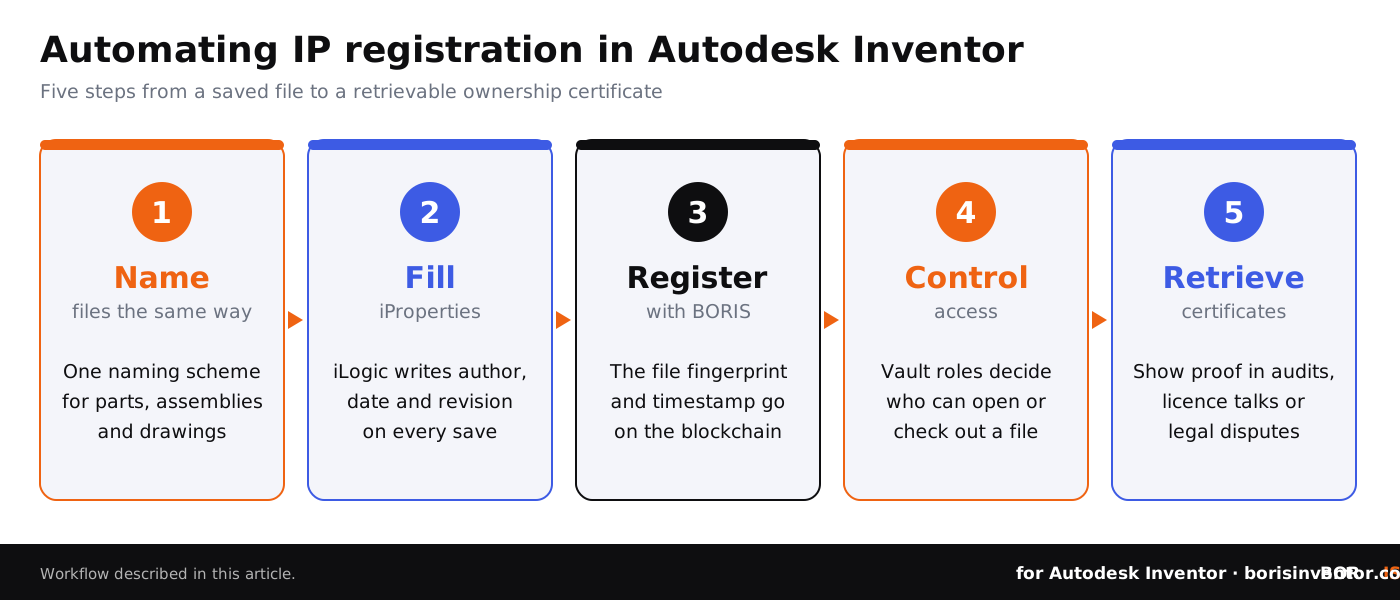
By following a step-by-step process, Autodesk Inventor users can efficiently implement an IP registration system. Here’s an actionable guide tailored to European contexts while leveraging tools like iLogic and the BORIS add-in.
- Configure and standardize naming conventions for CAD files in Autodesk Inventor. This ensures better organization and easier automation integration.
- Use iLogic rules to fill iProperties automatically with authorship, creation date and revision details on every save.
- Use the BORIS add-in to register a fingerprint of each key file on the blockchain when it is created or released. This tamper-evident record serves as proof of ownership.
- Keep files and their properties in a PDM system such as Autodesk Vault with role-based access control and encrypted storage, so that only verified parties can use or view sensitive designs.
- Generate blockchain-backed certificates of ownership that can be easily retrieved during IP audits or legal disputes.
For a deeper technical walkthrough, see how to automate CAD file registration in Inventor and our overview of Inventor automation with iLogic, add-ins and the API.
For an example of how digitization and legal innovation intersect, consider how a manufacturing network protected its trade secrets and CAD IP. By registering designs consistently, companies like this reduce the risks of collaborations involving sensitive files. For a side-by-side view, read automated IP registration vs traditional methods.
Mistakes to Avoid in Automating CAD IP Registration
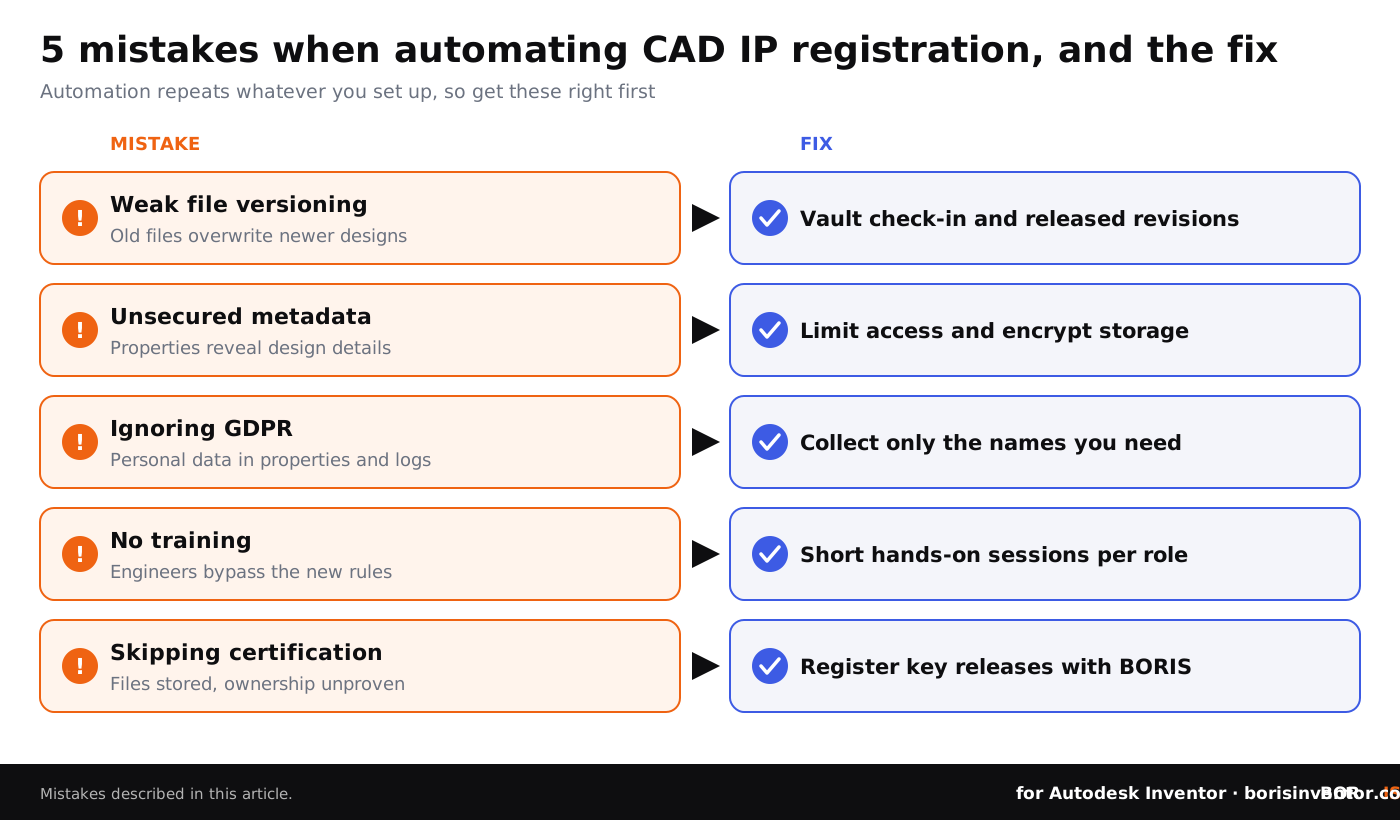
Mistakes in IP workflow automation can lead to costly errors. Here are common issues and how to safeguard against them:
- Weak file versioning: Without built-in checks, older files might overwrite updated designs during team collaborations.
- Unsecured metadata: Metadata can reveal design insights; limit access to it and encrypt the storage to keep out unauthorized viewers or hackers.
- Non-compliance with GDPR: Author names, emails and access logs are personal data. Failing to handle them according to Europe’s GDPR rules can result in penalties in distributed CAD workflows.
- Lack of training: If engineers don’t understand automated workflows, system errors tend to multiply instead of decreasing.
- Skipping ownership certification: Simply storing files isn’t enough. Without certified blockchain proofs, designs remain vulnerable to legal disputes.
Automation amplifies errors when it runs without training or clear governance. Avoid shortcut solutions.
Advanced Insights: How Blockchain Strengthens CAD Environments
Blockchain-based solutions like BORIS for Autodesk Inventor go beyond traditional methods such as file dates or emailed copies. Cryptographic hash validation shows whether a CAD file has been modified since it was registered. Ownership transfers and licence terms can also be recorded on the blockchain, which creates a tamper-evident audit trail.
For freelancers and small firms engaged in sensitive collaboration, learn more about how to protect CAD files when working with freelancers. Blockchain-backed systems like BORIS build trust among stakeholders while upholding security.
Reduce Your IP Risks with Blockchain for CAD
Want to turn your CAD processes into well-documented, tamper-evident systems?
👉 Read our Blockchain Certification Guide
Next Steps for IP-Savvy CAD Users in Europe
Automating IP ownership registration safeguards your designs and streamlines workflows. For European SMEs, this isn’t just a technological upgrade, it’s a necessity to stay competitive and avoid costly legal disputes. Tools like BORIS for Autodesk Inventor help achieve these goals without disrupting existing design processes.
Curious about the broader ecosystem of compliant, secure CAD workflows? Transition next to exploring compliance and standards for secure CAD environments to deepen your knowledge and enhance team readiness.
People Also Ask:
Is Autodesk Inventor discontinued?
No. Autodesk Inventor Professional is still sold and updated every year. Autodesk has retired the lighter Inventor LT edition, but the full version of Inventor continues to be actively supported.
Does Inventor have an API?
Yes, Autodesk Inventor provides an API that allows users to build programs automating operations. Tools like iLogic and VBA are used alongside the API to customize and extend existing functionalities.
Is Inventor as good as SolidWorks?
Both Autodesk Inventor and SolidWorks are highly capable parametric CAD tools. Inventor is often preferred for its integration with other Autodesk tools such as Vault and AutoCAD, while SolidWorks is praised for its ease of use and large community.
Do electrical engineers use Autodesk Inventor?
Electrical engineers often use Autodesk Inventor alongside AutoCAD Electrical to connect workflows between mechanical and electrical designs, especially in electromechanical system development.
What tools can automate workflows in Autodesk Inventor?
iLogic and Inventor API are the primary tools for automating tasks in Autodesk Inventor. These tools help in creating rules, automating repetitive workflows, and integrating external data into designs.
What is iLogic in Autodesk Inventor?
iLogic is a built-in tool in Autodesk Inventor that makes it possible to add rule-based logic to designs. It allows automation of tasks like modifying part dimensions, creating assemblies, and updating parameters without complex programming.
Can Autodesk Inventor handle Intellectual Property (IP) management?
Autodesk Inventor supports IP management workflows through iProperties, property tagging and, with Vault, file history and access logs. Add-ins such as BORIS add blockchain-based IP certification.
What are the benefits of using the Inventor API?
The Inventor API helps automate repetitive tasks, customize user interactions, and connect Inventor with other platforms, improving efficiency in complex design and manufacturing processes.
Are there learning resources for Inventor automation?
Yes, Autodesk provides documentation and tutorials for the Inventor API and iLogic. Additionally, platforms like Autodesk University and Autodesk resellers offer specialized courses and videos.
Can Inventor automate IP registration?
While Inventor doesn’t have a dedicated feature for IP registration, automation tools like iLogic and custom API scripts can structure workflows for tagging, organizing, and exporting Intellectual Property details, and add-ins such as BORIS register ownership directly from Inventor.
FAQ: Automating Autodesk Inventor IP Registration
How does automating IP registration save time?
Automation in IP registration removes repetitive manual tasks like metadata entry and filing. Tools like iLogic and the Inventor API fill properties automatically, while Vault handles versions and BORIS registers ownership, so registration happens as part of normal work instead of as a separate task. Legal evidence and secure ownership proof are built up at the same time.
What industries benefit most from CAD IP automation?
Manufacturing, engineering, and industrial design sectors benefit the most as IP risks here are high. Automation ensures cost-effective IP protection, especially for startups and SMEs with limited resources. Companies in Europe particularly use this to meet compliance standards and scale efficiently.
Can blockchain ensure fully tamper-proof IP ownership?
Not fully, but it gives strong tamper-evident proof. A registered cryptographic fingerprint and timestamp, created with tools like BORIS, make any later change to a file detectable. This is especially valuable in legal disputes about IP theft or unauthorized file sharing, although the weight of the evidence depends on the court and jurisdiction.
How does automating IP help SMEs in Europe compete?
By cutting costs and reducing errors, automation gives SMEs a competitive edge in securing intellectual property. IP disputes become easier to settle, resources are safeguarded, and small enterprises can confidently pursue partnerships. Learn more from how legal tech transforms engineering IP for SMEs.
Is training necessary for automation adoption?
Yes, training ensures engineering teams understand how tools like APIs, iLogic, and blockchain plugins integrate into workflows. Inadequate training risks errors that negate the benefits of automation. Companies should invest in onboarding resources and user-centric training programs.
What are the main security concerns when automating IP workflows?
Security pitfalls include metadata vulnerabilities, weak encryption, and failed role-based access controls. Each step of the IP automation process should include encryption and access validation, especially in distributed environments. Learn proven strategies by exploring 10 IP theft prevention tips.
How can freelancers leverage automated IP tools?
Freelancers can secure authorship with automated IP tools that create blockchain-backed certificates or record authorship in file properties. These measures give freelancers clear evidence of their contributions, especially in collaborative projects with large organizations or agencies.
What are common mistakes in CAD file registration automation?
Skipping ownership certification, unstandardized file naming, and failing GDPR compliance are common mistakes. These errors expose businesses to risks like IP disputes and data breaches. Best practices include consistent workflows, encryption, and comprehensive legal audits.
Why is compliance critical in Europe for CAD IP workflows?
Europe enforces strong regulations like GDPR for personal data, such as author names and access logs attached to CAD files. Automated workflows help handle this data consistently, reducing the risk of penalties and ensuring traceability across inter-company collaborations, key for SMEs competing globally.
What additional tech advances complement IP automation?
Integration with AI tools and DRM systems complements IP automation by managing data flows and access controls. AI optimizes workflows, while DRM controls who can open, edit or share files in cloud storage and third-party sharing.