
On 21 October 2026 Autodesk released its October update for Fusion, version 2706.1.14. Besides faster assemblies and new Autodesk Assistant skills, it adds three things that change how design data moves: designs can now be copied from one Fusion hub to another, imported geometry can be rebuilt into an editable parametric model with an AI tool called AutoTimeline, and Fusion can export STEP AP242 files with product manufacturing information. Autodesk also confirmed that Fusion will stop supporting Intel-based Macs at the end of March 2027.
Why should Autodesk Inventor teams care about a Fusion release? Because Fusion is part of the Product Design & Manufacturing Collection that many Inventor shops already pay for, and because Autodesk said at AU 2026 that Inventor will become the first "Fusion Connected Client". Fusion hubs are where a growing share of Inventor-related data ends up: shared exports, CAM work, electronics, supplier models and the files people open on a laptop away from the vault.
This article explains what the October update actually contains, which parts are available now and which are still rolling out or in preview, and what Inventor CAD managers should check before the new copy and rebuild tools reach every user. For the bigger strategy behind it, see our report on Inventor AI after AU 2026 and the Fusion Connected Client.
TL;DR: easier reuse, easier copying, more questions about control
Fusion's 21 October 2026 update adds Copy across hubs in Fusion web (staged rollout over two weeks), more predictable Save As and Copy Design, STEP AP242 export with PMI, and AutoTimeline, an AI tool that rebuilds imported geometry into an editable Fusion timeline (Tech Preview for Design Extension users). Autodesk Assistant can now edit many BOM rows at once and read context from your open session. Intel Macs lose Fusion updates after March 2027. For Inventor teams: decide who may copy designs between hubs, set rules for rebuilding supplier and customer geometry, check STEP AP242 handoffs with Inventor, and keep dated proof of which designs are yours.
What is in the Fusion October 2026 update?
Autodesk published the release notes as the Fusion October 2026 product update post on 21 October 2026. The headline items are performance gains on large assemblies, a smarter Autodesk Assistant, a visual automation tool called System Modeler, task management inside Fusion, a shared Hub Library for sheet metal rules, and new tools for imported and copied designs.
Autodesk quotes up to 35% faster open, save and edit on large nested assemblies, up to 31% faster saves of large assemblies and up to 71% faster startup for users with large preference files. It notes that these numbers were measured on customer-provided datasets and that results vary by design, so treat them as best cases, not promises.
Several features are not switched on for everyone yet. Copy across hubs and the enhanced Save As and Copy Design are part of a staged rollout over two weeks. AutoTimeline is a Tech Preview for Fusion Design Extension users. Collaborative Editing continues to roll out hub by hub, with admins notified by email before their hub changes.
What does Copy across hubs change?
A Fusion hub is the cloud workspace a company or a person uses to store projects and control who sees them. Until now, moving work from one hub to another usually meant downloading files and uploading them again, or asking for a project transfer or hub merge. With Copy across hubs in Fusion web, a user can copy designs from one hub to another directly. When you select an assembly, Fusion brings along all of the designs it references, and you can select several designs at once.
For reuse that is good news: a proven fixture can move into the main company hub without breaking references. For data control it is a new, very convenient exit. An engineer who belongs to the company hub and to a personal or customer hub can now copy a complete assembly, with every referenced part, in a few clicks.
Autodesk's announcement does not describe any hub administrator setting that limits who can copy across hubs or where copies may go. Until you have checked this in your own hub settings, assume that anyone who can open a design and has access to a second hub may be able to copy it there. Our guides on managing contractor access to CAD files and securing sensitive CAD data in cloud storage describe the access reviews that now matter even more.
Why do Save As and Copy Design matter for ownership?
Autodesk says copying in Fusion has not always been predictable, with references and drawings sometimes left behind. In the October update, Save As, Save As and Replace, and Copy Design copy what you select and reuse what you do not select.
That is cleaner, but it also means a new design can quietly keep live references to parts owned by another project, customer or team. Before you send a copied design to a customer or a supplier, check which components were copied and which are still shared. The same discipline applies to Inventor Copy Design and Pack and Go, and to the creator and owner fields we cover in how to track creator versus owner in CAD files.
What is AutoTimeline, and whose design is the result?
AutoTimeline uses AI-assisted feature reconstruction to find design features in imported geometry and rebuild them in the Fusion timeline. The result is an editable, parametric Fusion design instead of a dumb solid. Autodesk lists it as a Tech Preview available to all Fusion Design Extension users.
For engineers who receive STEP files from suppliers and customers every day, this saves hours. It also blurs a line that contracts and NDAs care about. Rebuilding a supplier's part as a parametric model is close to reverse engineering a CAD file, and a parametric copy is much easier to change, reuse and pass on than the original export. The software does not decide whether you are allowed to do that; your agreements do.
The opposite also holds: any neutral file you send out can now become an editable model faster, so weigh the risks of sharing CAD files externally before you send it.
How does STEP AP242 with PMI affect Inventor handoffs?
Fusion can now export STEP AP242 files with product manufacturing information (PMI), such as dimensions and tolerances that were imported into Fusion or authored there. The existing STEP export stays available. Inventor has been able to export STEP AP242 with 3D annotations for several releases, so this makes Fusion-to-Inventor and Fusion-to-supplier handoffs richer. A second new option lets you include user coordinate systems in STEP exports; it is off by default.
Richer exports carry more of your know-how. A STEP file with full PMI tells a supplier not only the shape but also the tolerances you chose, which is often where the real engineering knowledge sits. Decide per supplier whether they need model-based definition or a drawing, and check export control considerations for CAD files before sending annotated models across borders.
Copies travel fast. Make sure your proof travels with them.
BORIS for Autodesk Inventor registers your CAD files with a blockchain timestamp and a certificate of ownership, directly inside Inventor.
👉 Discover BORIS for Autodesk Inventor
What can Autodesk Assistant do now?
Autodesk Assistant in Fusion can now update many bill of materials rows at once from a plain-language request: bulk property changes, hiding subassembly children, resequencing rows, excluding components, and overriding quantities, estimated costs and physical properties independently of the CAD model. Autodesk says each override is clearly marked in the BOM. The Assistant can also create and modify configuration rules, and it now reads context from your current Fusion session, including the active document and, in manufacturing, the assigned machine, tools, stock and supported error messages.
That makes the Assistant more useful, and it means it sees more of your data. Since 6 October 2026, actions where the Assistant works with your design are metered with monthly Flex tokens in Fusion. For Inventor, Autodesk has said that subscription terms for the next-generation Assistant will be announced in 2027. Our report on Autodesk's State of Design & Make 2027 survey shows why trusted, connected data is now the deciding factor for AI results, and our analysis of APS passthrough billing explains who pays when cloud services touch your data.
What happens to Fusion on Intel Macs?
At the end of March 2027, Fusion will require an Apple silicon Mac to stay up to date. After the cutoff, Intel Macs get no Fusion updates or product support and new releases will not install. The last Intel-compatible release keeps launching until its normal eight-month build expiry ends.
Autodesk states that files and cloud data stay in your Fusion hub and are not affected, and that eligible Education and Commercial users can use Fusion in a browser during the transition. Inventor itself runs on Windows, but many Inventor shops have a few Mac users on Fusion for reviews, CAM or concept work. List those machines now, just as we suggested for Windows 10 workstations in our Windows 10 ESU guide for Inventor teams.
Which changes matter most for Inventor teams?
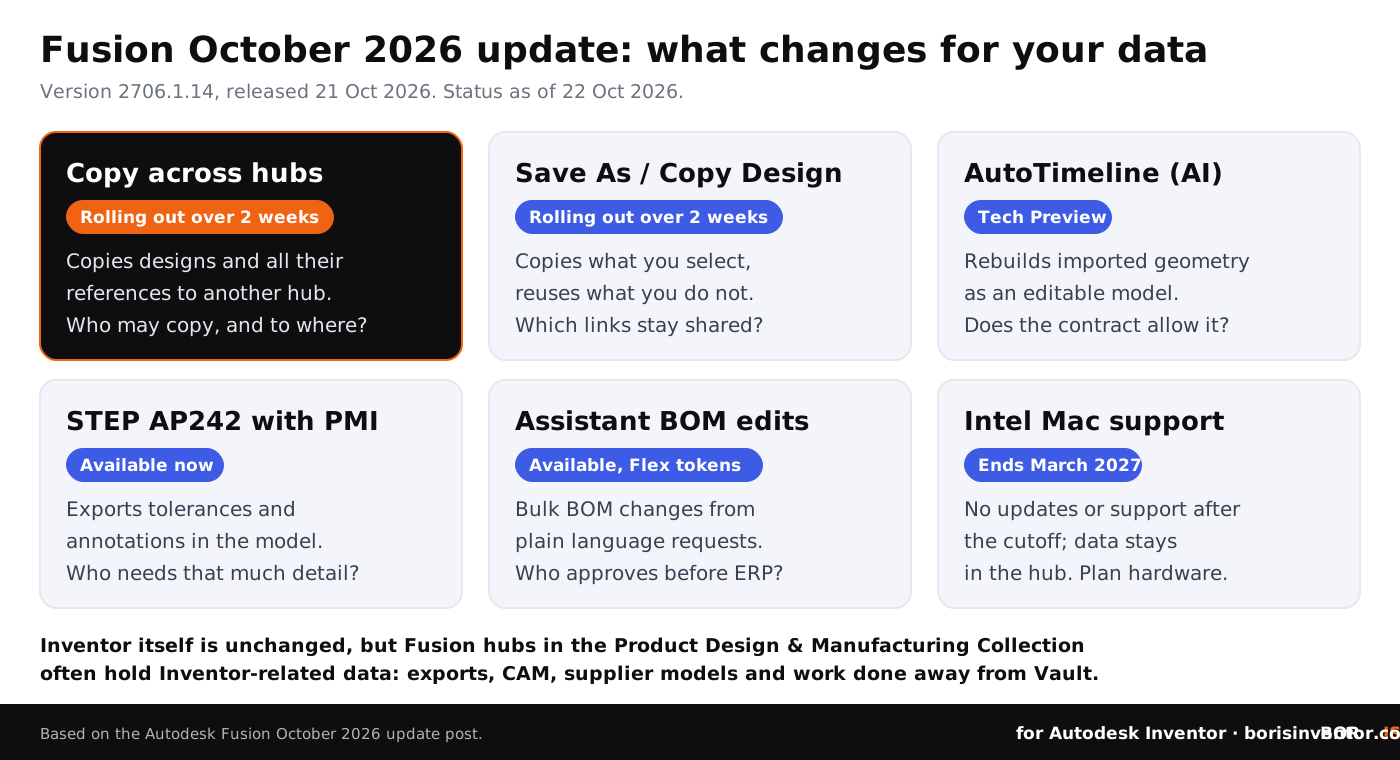
This table sums up the October 2026 Fusion changes that touch Inventor data, their status on 22 October 2026, and the question each one raises.
What should Inventor CAD managers do now?
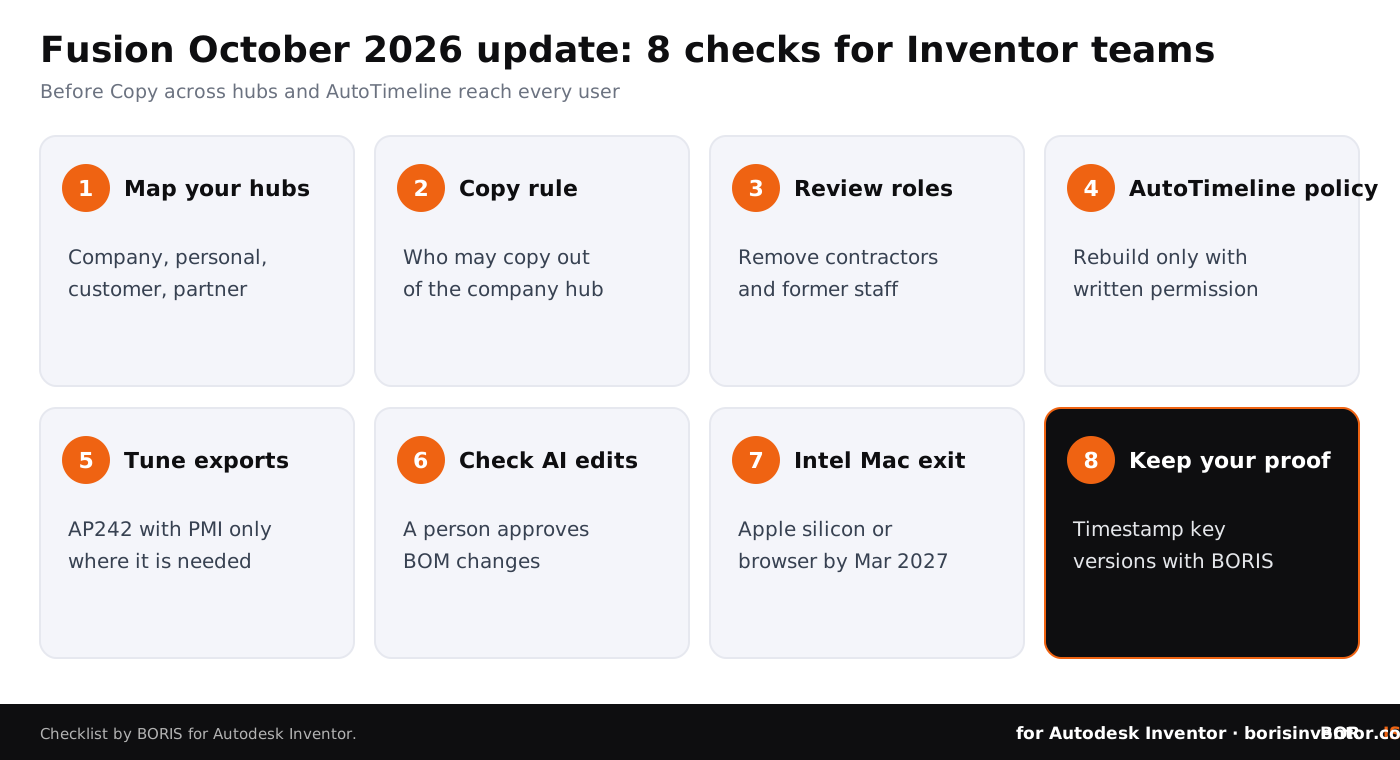
- Map your hubs. List every Fusion hub your company owns or uses, who administers it, and which engineers are also members of personal, customer or partner hubs.
- Set a rule for copying across hubs. Decide who may copy designs out of the company hub and where to. Check your hub admin settings and ask your Autodesk partner which controls apply, because the announcement does not describe any.
- Review project roles. Remove people who no longer need access, especially contractors and former staff, before Copy across hubs reaches every user.
- Write an AutoTimeline policy. Only rebuild supplier or customer geometry when the contract allows it, and record the source file, date and permission with the rebuilt design.
- Tune your exports. Decide per supplier whether a STEP AP242 file with PMI, a plain STEP file or a drawing is the right handoff, and keep a log of what was sent to whom.
- Check AI edits before they leave. Make a person approve BOM changes made by Autodesk Assistant before they go to ERP or a manufacturing partner.
- Plan the Intel Mac exit. Replace or move Mac users to Apple silicon or the browser version before the end of March 2027.
- Keep independent proof. Register key Inventor and Fusion design versions with a dated record that does not depend on any single hub, vault or account staying under your control.
These steps build on our guides to proving company ownership of employee designs and preventing CAD data theft in collaborative environments. Our report on the Clop PLM data leak shows what happens when nobody knows who holds which copy.
The bigger picture
This week's news on our sister sites shows the same pattern from three angles: the systems that hold and move design data keep changing, and the terms around them matter as much as the features.
- PLM patches. On CADChain, the report on Oracle's October 2026 patch update counts 43 fixes for the Agile PLM family, 17 of them exploitable remotely without a login, and explains why file-level protection still matters when PLM is patched.
- Licence terms and file formats. BORIS for SOLIDWORKS covers the mandatory SOLIDWORKS for Makers platform update and the Makers rule that watermarked native files cannot be opened in commercial versions.
- Platform terms. Blended BORIS looks at Meta's new Commercial Terms and their website crawling clause, effective 30 October 2026, and what creators can do about it.
CADChain explains how its CAD data protection technology works across CAD systems, and our CAD file security and sharing handbook collects the basics in one place.
Conclusion
For Inventor teams, the parts that deserve attention are the ones that make copies easier to create and move: Copy across hubs, the new copy behaviour, AutoTimeline and richer STEP exports. Decide who may copy what and where, set rules for rebuilding other people's geometry, check AI edits before they leave the building, and keep proof of your designs that does not depend on any one hub.
Your designs, your proof.
BORIS for Autodesk Inventor gives every registered file a blockchain timestamp and a certificate of ownership, without sending your models to a cloud service.
👉 See how BORIS for Autodesk Inventor works
FAQ: Fusion October 2026 update for Inventor teams
When was the Fusion October 2026 update released?
Autodesk published it on 21 October 2026 as version 2706.1.14. Some features, including Copy across hubs and the enhanced Save As and Copy Design, roll out to users over two weeks.
What is Copy across hubs?
A Fusion web feature that copies designs from one Fusion hub to another. Selecting an assembly also brings the designs it references, and several designs can be copied at once.
Can administrators block copying across hubs?
Autodesk's announcement does not describe an admin control for it. Check your hub settings and ask your Autodesk partner, and review who is a member of more than one hub in the meantime.
What is AutoTimeline?
An AI-assisted feature reconstruction tool that rebuilds imported geometry into an editable, parametric Fusion design. It is a Tech Preview available to Fusion Design Extension users.
Is it legal to rebuild a supplier's STEP file with AutoTimeline?
That depends on your contracts, NDAs and the law where you work, not on the software. Get permission where agreements limit modification or reuse, and record it with the rebuilt design.
Does this update change Inventor itself?
No. It is a Fusion release. It matters to Inventor teams because Fusion is part of the Product Design & Manufacturing Collection, Fusion hubs often hold Inventor-related data, and Autodesk plans to make Inventor a Fusion Connected Client.
What happens to Fusion on Intel Macs?
From the end of March 2027 Intel Macs get no Fusion updates or support and new releases will not install. The last Intel release runs until its eight-month build expiry ends, and cloud data stays in the hub.
How does BORIS help?
BORIS for Autodesk Inventor registers CAD files with a blockchain timestamp from inside Inventor. Each registered version gets a dated certificate of ownership, so you can show which designs you created and when, however many copies exist in other hubs.