
On Tuesday 10 November 2026, Microsoft ships the last security update for Windows 11 version 23H2 Enterprise and Education. After that Patch Tuesday, those PCs get no more monthly fixes. Windows 11 version 24H2 Home and Pro already lost updates on 13 October 2026. And in May and June 2027, the certificates that let Windows PCs connect to Windows Update expire, which will cut unsupported and badly out-of-date machines off from Windows Update completely.
For Autodesk Inventor teams this is not abstract. Inventor 2027 lists only 64-bit Windows 11 as its operating system, so most engineering offices have already moved off Windows 10. But a workstation running Windows 11 is not automatically a supported one. Windows 11 comes in yearly versions, each with its own end date, and the end date also depends on the edition: Home and Pro get 24 months, Enterprise and Education get 36.
CAD workstations are often the machines IT is most careful with. They run certified graphics drivers, add-ins, iLogic rules and Vault clients that nobody wants to break in the middle of a project. That caution is how a Pro workstation ends up on 24H2 a month after its last update, or an Enterprise workstation stays on 23H2 because the in-place upgrade never got scheduled. Here is what changes now, what Microsoft has said about 2027, and what to check on every PC and server that holds your Inventor data.
TL;DR: Check the Windows 11 version on every Inventor workstation this week.
Windows 11 23H2 Enterprise and Education get their final security update on 10 November 2026. Windows 11 24H2 Home and Pro, including Pro for Workstations, stopped getting updates on 13 October 2026. Supported targets today are 25H2 and 26H2, plus 24H2 only on Enterprise and Education until October 2027. Microsoft also says certificates used to connect to Windows Update expire on 17 May and 19 June 2027; unsupported versions will lose access to Windows Update after that. For Inventor teams: list every workstation and server, move 23H2 and 24H2 Pro machines to 25H2 or 26H2 after a pilot test with your add-ins and Vault client, make sure Vault, SQL and licence servers have the July 2026 update or newer, plan for offline PCs, back up first and keep dated proof of your key designs.
What ends on 10 November 2026?
Microsoft's Windows message center has repeated the same notice since August. Its 30-day reminder of 9 October says that Windows 11, version 23H2 Enterprise and Education editions reach end of updates on 10 November 2026 and that the November 2026 security update will be the last one available for them. After that, devices running these editions no longer receive monthly security updates. Microsoft's lifecycle page lists the end date in Pacific time as 11 November 2026 at 06:59, which is the same deadline: the November Patch Tuesday release is the final one.
The editions in scope are Enterprise, Education and Enterprise multi-session. Windows 11 23H2 Home and Pro already ended in November 2025. Microsoft's recommendation is to move eligible devices to a supported version of Windows 11. Its earlier 60-day and 90-day reminders named version 25H2, which Enterprise and Education receive updates for until October 2028.
A 23H2 machine does not stop working on 11 November. Inventor will still start, Vault will still check files in and out. What stops is the flow of security fixes, while the machine keeps opening customer files, browsing supplier portals and holding a local Vault workspace. We described the same risk for Windows 10 PCs in our article on the end of Windows 10 ESU Year 1.
Why do Pro workstations matter even more?
Many small engineering firms and manufacturing SMEs do not buy Enterprise licences. Their Inventor workstations run Windows 11 Pro or Pro for Workstations, and for those editions each yearly version gets 24 months of updates, not 36. Microsoft's message of 13 October 2026 confirmed that Windows 11, version 24H2 Home and Pro reached end of updates that day and that the October 2026 security update was the last one for them.
So a Pro workstation that is still on 24H2 today is already a month past its last patch. The supported Pro versions are now 25H2, with updates until October 2027, and 26H2, until October 2028. The good news: moving from 24H2 to 25H2 or 26H2 is a small step, as explained below.
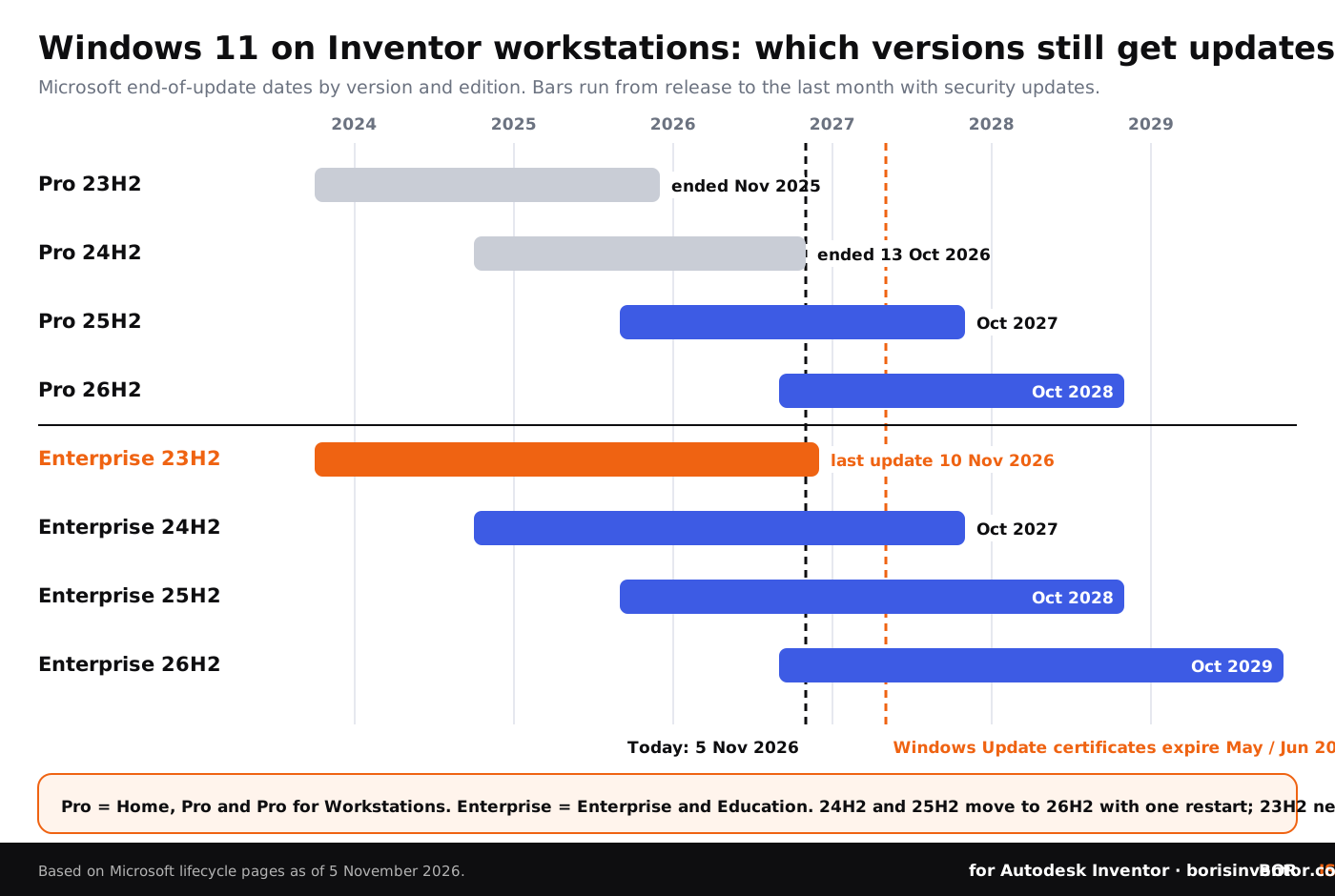
Which Windows 11 versions are still supported?
This table brings together the dates from Microsoft's lifecycle pages for the two edition groups found on most Inventor workstations.
The system requirements for Inventor 2027 list 64-bit Windows 11, refer to Autodesk's product support lifecycle, and require .NET 10.0 or later with Windows Updates enabled for installation. Autodesk has not published separate guidance on Windows 11 23H2 or 24H2 for Inventor, and we are not aware of a known incompatibility. The issue is security support, not whether Inventor starts.
How hard is the upgrade from 23H2?
It depends on where you start. According to Microsoft's 26H2 whitepaper, as reported by BleepingComputer in June 2026, versions 24H2, 25H2 and 26H2 share the same servicing branch. A PC on 24H2 or 25H2 moves to 26H2 with a small enablement package that turns on features already on the disk and needs one restart. Microsoft started offering 26H2 on 29 September 2026, first to 24H2 and 25H2 devices that opted in to get updates as soon as they are available, with a gradual rollout over the following months.
A PC on 23H2 is on an older branch and needs the full feature update, a download of about 6.5 GB installed as an in-place upgrade. For a CAD workstation that means the things that usually break in a big Windows upgrade need a test: graphics drivers, 3D mouse drivers, Inventor add-ins, the Vault client, licence settings, network shares and mapped drives, and any scripts that call Inventor through its API. Our guide on the .NET 10 update for Inventor and Vault covers another deadline on the same day: Microsoft ends support for .NET 8 and 9 on 10 November 2026.
The practical answer is a pilot. Upgrade one typical workstation, open a few large assemblies and drawings, run your most used iLogic rules, check in and check out from Vault, and only then roll out to the rest.
What is the 2027 Windows Update certificate change?
This is the part that turns a missed update into a dead end. In a Windows IT Pro Blog post of 8 October 2026, Microsoft explained the Windows Update certificate rotation. Windows Update relies on certificates to establish a trusted connection, and a set of them expires on 17 May 2027 and 19 June 2027. Devices need the replacement certificates to keep connecting to Windows Update after those dates. Microsoft's message center pointed admins to the topic again on 3 November 2026.
Microsoft's guidance by version is short:
- Windows 11 25H2 and later: no action needed.
- Windows 11 24H2 and Windows Server 2025: install the September 2025 security update or newer before 19 June 2027.
- Other supported Windows 11 versions, supported Windows 10 versions and Windows Server 2022: install the July 2026 security update or newer before 19 June 2027.
- Windows 10 Enterprise 2019 LTSC, Windows Server 2019 and Windows Server 2016: install the July 2026 security update or newer before 17 May 2027.
- Versions out of support: upgrade to a supported version. Microsoft states that such devices "will lose access to Windows Update services and won't receive any updates as a result."
Microsoft also says the guidance does not apply to devices that get their updates from Windows Server Update Services (WSUS). For everyone else, the lesson is simple: a workstation that is left on an unsupported version long enough does not just miss patches, it can lose the channel that would have fixed it.
What about Vault, SQL and licence servers?
The certificate change covers Windows Server too, which matters for the machines behind your Inventor data. The Vault server, its SQL Server instance, the Autodesk Network License Manager host and file servers with project shares all need the July 2026 update or newer, and for Windows Server 2019 and 2016 the deadline is the earlier one, 17 May 2027. Windows Server 2025 needs the September 2025 update or newer.
Many of these servers run as virtual machines. If yours sit on VMware, also read our article on the exploited VMware ESX logging flaw and what it means for Vault servers. And because a broken update can take a server down, make sure your backup tools are not an attack path of their own.
Why does this matter for your design data?
Unpatched workstations are one of the easiest ways into an engineering network. On our sister site CADChain, the NCSC Annual Review 2026 reports that 88% of incidents at large organisations it handled started through four routes: public-facing applications, phishing, valid accounts and remote services. A CAD PC that opens email attachments, customer STEP files and supplier portals sits right on two of those routes.
Recent Inventor-related cases show how attacks reach design tools. We covered the eMudhra certificate compromise and the Windows trust changes it forced, ClickFix attacks abusing a signed Siemens installer and a trojanized coding extension aimed at developer machines. In each case, a fully patched system with a short list of approved software was the best first defence.
Patching protects the machine. It does not prove who designed what. If a workstation is ever compromised, or a file leaks during a messy upgrade, you will want records of which version of a design existed and when, independent of the PC that held it. That is what blockchain timestamps for design authorship are for.
Upgrading Windows? Keep proof of your designs.
BORIS for Autodesk Inventor registers your CAD files with a blockchain timestamp and gives you a certificate of ownership, straight from Inventor.
👉 See how BORIS for Autodesk Inventor works
What should Inventor CAD managers do now?
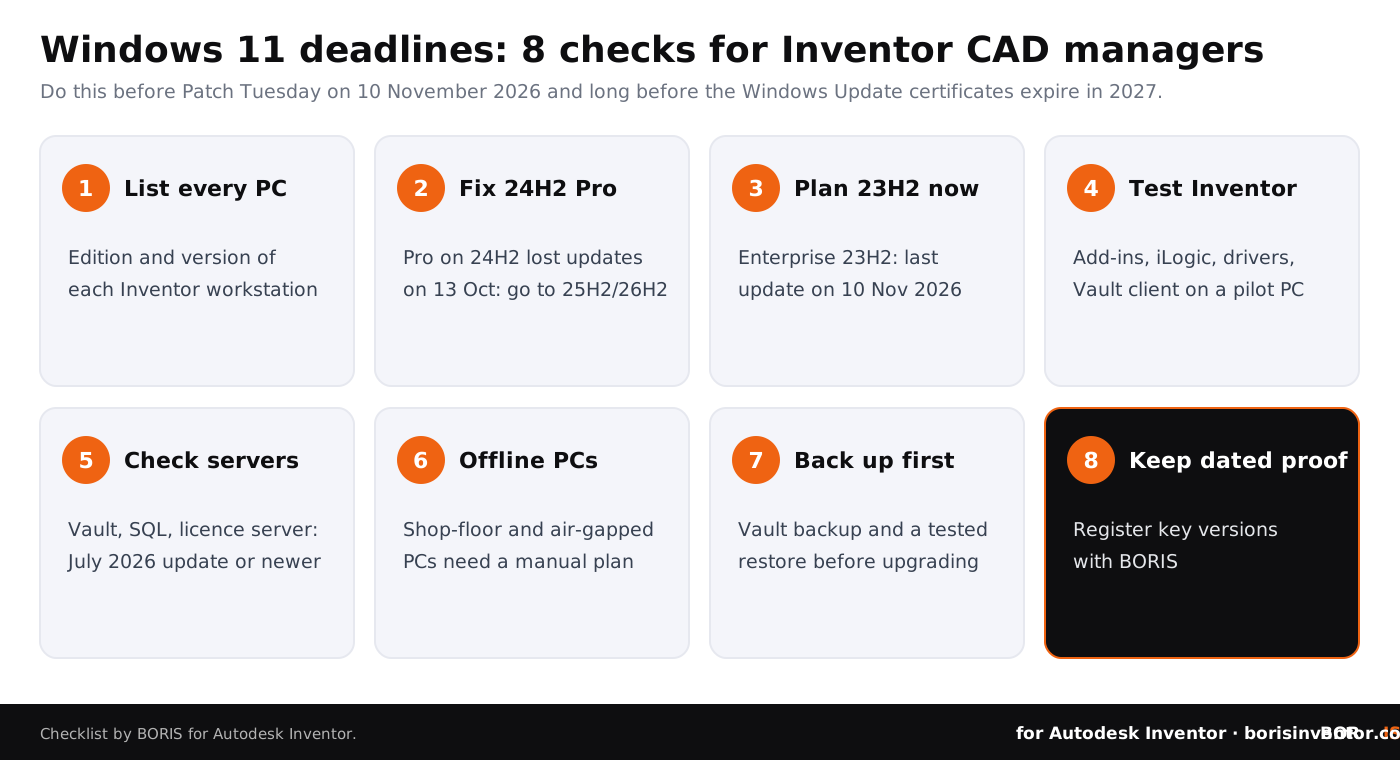
- List every PC and server. Record the Windows edition and version (run winver) of each Inventor workstation, laptop, Vault server, SQL host, licence server and file server.
- Fix Pro machines on 24H2 first. They have been without updates since 13 October 2026. Move them to 25H2 or 26H2; from 24H2 this is the small enablement package and one restart.
- Schedule 23H2 Enterprise upgrades. The 10 November update is the last one. Book the full upgrade now and install the November update in the meantime.
- Test Inventor on a pilot PC. Graphics and 3D mouse drivers, add-ins, iLogic rules, the Vault client, Content Center and licence checkout, with real assemblies and drawings.
- Check servers against the 2027 dates. Vault, SQL, licence and file servers need the July 2026 update or newer; Windows Server 2019 and 2016 before 17 May 2027.
- Plan for offline and shop-floor PCs. Machines that rarely see Windows Update need a manual route, such as the Microsoft Update Catalog, before mid-2027.
- Back up before you upgrade. Take a Vault backup with a tested restore and make sure local work is checked in before any in-place upgrade.
- Keep dated proof of key designs. Register the versions that matter with BORIS so ownership does not depend on any single workstation.
For more background, read our CAD file backup strategies for engineering firms, how to protect CAD files from unauthorized access and the complete guide to CAD data protection.
The bigger picture
This week's news on our sister sites shows how security, AI and copyright keep moving around design work.
- Cyber threats in numbers. On CADChain, the NCSC Annual Review 2026 explains why the UK's cyber agency sees espionage as the most significant long-term cyber threat to growth and which entry routes attackers used most.
- AI that builds CAD models. BORIS for SOLIDWORKS looks at a new benchmark that tested AI agents on parametric CAD tasks, including creating, editing and rebuilding models from drawings.
- AI training and EU copyright. Blended BORIS covers the Advocate General's opinion in the first generative AI case at the EU Court of Justice and what it means for artists who want to control how their work is used.
Conclusion
The Windows 11 deadlines are easy to miss because nothing visibly breaks. On 10 November 2026, Windows 11 23H2 Enterprise and Education get their last update. Pro workstations on 24H2 have been unpatched since 13 October. In May and June 2027, unsupported PCs lose access to Windows Update altogether.
For Inventor teams the fix is ordinary IT work done in the right order: know which version every workstation and server runs, move Pro machines to 25H2 or 26H2, test the full 23H2 upgrade on a pilot PC, bring servers up to date before the 2027 dates, back up Vault first and keep independent proof of your designs.
Your designs, your proof.
BORIS for Autodesk Inventor gives every registered file a blockchain timestamp and a certificate of ownership, straight from Inventor.
👉 Protect your Inventor designs with BORIS
FAQ: Windows 11 deadlines for Autodesk Inventor teams
When does Windows 11 23H2 stop getting updates?
For Enterprise and Education editions, the November 2026 security update released on 10 November 2026 is the last one. Windows 11 23H2 Home and Pro already stopped getting updates in November 2025.
Is Windows 11 24H2 still supported?
Only in Enterprise and Education, until 12 October 2027. Windows 11 24H2 Home, Pro and Pro for Workstations reached end of updates on 13 October 2026.
Which Windows version does Inventor 2027 need?
Autodesk lists 64-bit Windows 11 for Inventor 2027 and refers to its product support lifecycle. It also requires .NET 10.0 or later. Autodesk has not published separate guidance on specific Windows 11 versions such as 23H2 or 24H2.
How do I move from 24H2 to a supported version?
Microsoft says 24H2, 25H2 and 26H2 share the same servicing branch, so a 24H2 PC can move to 26H2 with a small enablement package and one restart. Test your add-ins and drivers on one PC first.
What happens in May and June 2027?
Certificates used to connect to Windows Update expire on 17 May and 19 June 2027. Supported, up-to-date devices already have the replacements. Devices on unsupported versions will lose access to Windows Update.
Do Vault and licence servers need action?
Yes. Windows Server 2022 needs the July 2026 update or newer before 19 June 2027, Windows Server 2019 and 2016 need it before 17 May 2027, and Windows Server 2025 needs the September 2025 update or newer.
Does the certificate change affect WSUS?
Microsoft says its guidance does not apply to devices that receive updates from Windows Server Update Services. Check with your IT team how your WSUS-managed PCs are handled.
How does BORIS help?
BORIS for Autodesk Inventor registers CAD files with a blockchain timestamp from inside Inventor, so you can show which version of a design existed and when. It does not patch Windows, replace Vault backups or give legal advice.