
On 27 October 2026 Autodesk published two security advisories for Autodesk Fusion. The first, ADSK-SA-2026-0019, fixes four high-severity flaws in the Fusion desktop app that could let an attacker read local files or run code on an engineer's computer through a booby-trapped design name, a link, an electronics library or a DLL. The second, ADSK-SA-2026-0018, fixes a command injection flaw in the Fusion Post Processor Utility, a Visual Studio Code extension that also works with Inventor CAM post processors.
All four Fusion desktop flaws are fixed in Fusion 2706.1.14, the October 2026 update that Autodesk released on 21 October. Anyone still running 2705.1.30 or an earlier build is exposed. Autodesk rates every issue as high severity, says each one needs a user to do something, such as open a design or click a link, and does not report any attacks using them.
Why does this matter on an Inventor website? Because Fusion is part of the Product Design & Manufacturing Collection that many Inventor shops pay for, it often runs on the same workstations as Inventor, and the flaws can read local files. On an Inventor workstation, local files include your Inventor parts, assemblies, drawings and the project files that point to your vault.
TL;DR: update Fusion to 2706.1.14 and the post processor extension to 5.0.2
Autodesk advisory ADSK-SA-2026-0019 (27 October 2026) covers four flaws in the Fusion desktop app: a malicious design name, a malicious Fusion link, a malicious electronics library description and an API command that loads a DLL from any path. Each can lead to reading local files or running code once a user acts. They are fixed in 2706.1.14. ADSK-SA-2026-0018 covers a crafted .stack.json file in the Fusion Post Processor Utility for VS Code, fixed in 5.0.2. Inventor itself is not named in either advisory. For Inventor teams: check the Fusion version on every machine, update the extension, review who can edit your shared hubs and libraries, and keep dated proof of your designs.
What did Autodesk announce on 27 October?
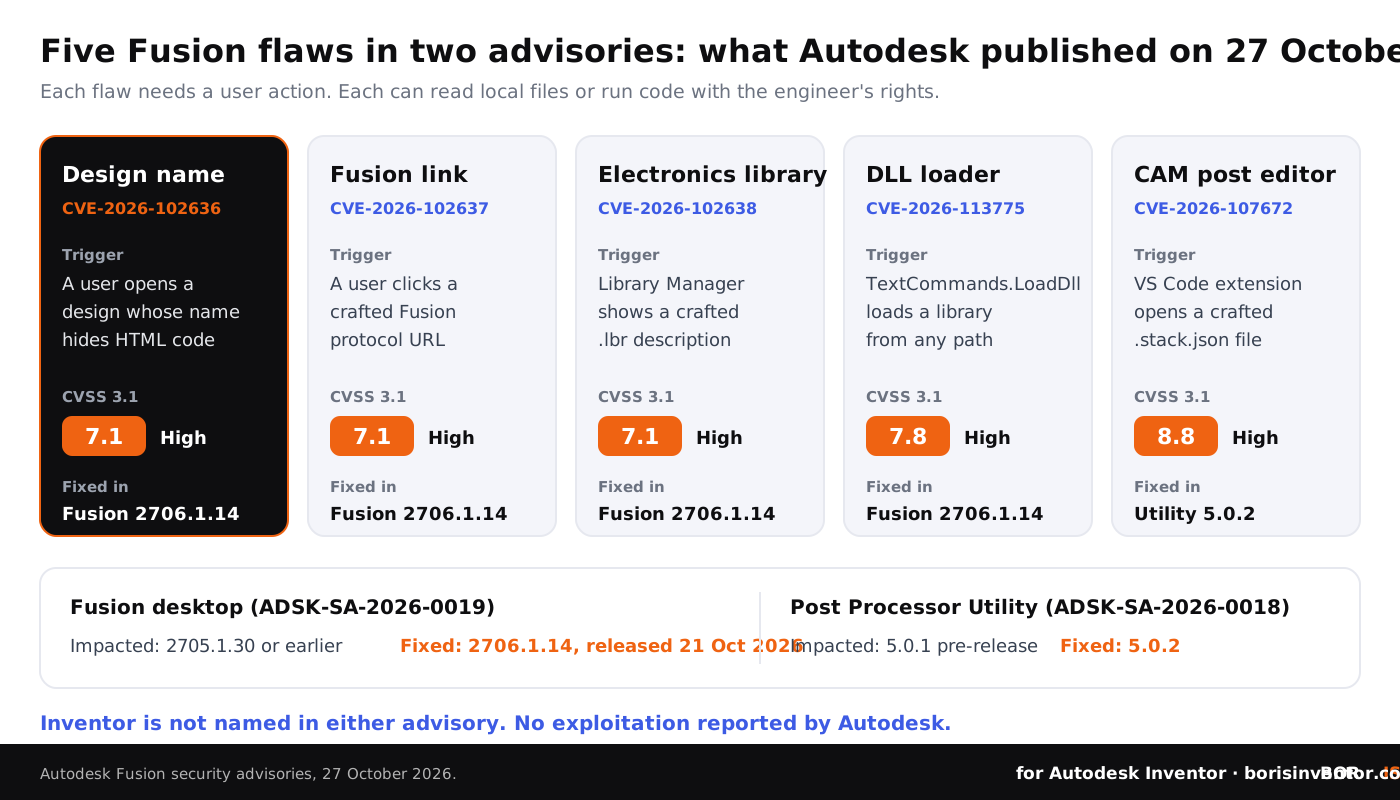
Autodesk's Trust Center lists advisory ADSK-SA-2026-0019 as "Cross-Site Scripting (XSS) Vulnerabilities in Autodesk Fusion Desktop", first published and last revised on 27 October 2026. Autodesk's summary is short: exploitation "can lead to code execution" and "requires user interaction". The four CVE records were published the same day, with CVSS 3.1 scores of 7.1 for the three cross-site scripting flaws and 7.8 for the DLL loading flaw.
Cross-site scripting (XSS) is usually a web problem: a site shows text that a user typed in, and the browser runs it as code. Fusion's desktop app uses web technology for parts of its interface, so the same mistake can happen inside the program. In each case below, Autodesk says the attacker could "read local files or execute arbitrary code in the context of the current process", which means with the same rights as the engineer who is running Fusion.
- CVE-2026-102636, the design name. A design whose name contains a crafted HTML payload. The code runs when another user opens the manipulated design. This is a stored flaw: the payload sits in the design until someone opens it.
- CVE-2026-102637, the Fusion link. A crafted payload in the documentName parameter of a Fusion protocol URL. The code runs when a user opens the link, for example from an email or a chat message.
- CVE-2026-102638, the electronics library. A crafted payload in the description of an electronics library (.lbr) file. The code runs when the description is shown in the Library Manager after the library has been imported.
- CVE-2026-113775, the DLL loader. The Fusion API exposes a command, TextCommands.LoadDll, that can load a dynamic library from any path. A malicious library loaded this way runs its code inside Fusion.
All four were reported by the researcher Abdul-lateef Yusuff Goke (Alpha Aquila). The advisory lists 2705.1.30 or earlier as impacted and 2706.1.14 as the fixed version, adding that the product list is subject to change.
What is the Post Processor Utility flaw?
The second advisory, ADSK-SA-2026-0018, concerns the Autodesk Fusion Post Processor Utility, a free Visual Studio Code extension for editing, testing and debugging post processors. Its Marketplace page says it works with Fusion, Inventor CAM and HSMWorks, and it showed more than 81,000 installs on 28 October 2026. Post processors for Fusion and Inventor CAM are JavaScript text files with a .cps extension, so CAM programmers in Inventor shops are among its users.
According to CVE-2026-107672, a maliciously crafted .stack.json file can trigger a "trusted Markdown injection" in the extension and let an attacker run commands as the current user. The CVE record scores it 8.8. The advisory lists only the 5.0.1 pre-release as impacted and 5.0.2 as fixed, available through the Visual Studio Marketplace. The extension is open source, and its public GitHub repository shows the 5.0.2 update merged on 11 September 2026, weeks before the advisory. Credit goes to the researcher Jinho Kim (0sc4r).
The risk here is narrower, since it affects one pre-release version, but the place is sensitive. Post processors decide what G-code reaches your machine tools, and the people who edit them often keep customer models, setups and machine definitions on the same computer.
Is Autodesk Inventor affected?
No Inventor version is named in either advisory, and Autodesk has not said that Inventor is affected. The issue is where the two programs meet.
- Shared workstations. Fusion and Inventor often run on the same Windows machine under the same user account. A flaw that reads local files in Fusion's process can read whatever that user can read, including Inventor files and local copies of vault data.
- Shared hubs. Inventor teams increasingly use Fusion hubs to share exports, CAM work, electronics and supplier models. Our coverage of the Fusion October 2026 update explains how Copy across hubs and AutoTimeline make that traffic easier.
- Shared CAM tools. Inventor CAM uses the same kind of .cps post processors as Fusion, and the same VS Code extension edits both.
- Shared future. Autodesk announced at AU 2026 that Inventor will become the first Fusion Connected Client, as we reported in our article on Inventor AI after AU 2026.
This is the third time in 2026 that Autodesk has fixed a stored XSS flaw triggered by a Fusion design name. CVE-2026-0533, published in January, fired in the delete confirmation dialog and was fixed in 2606.1.21. CVE-2026-4345, published in April, fired when design names were exported to CSV and was fixed in 2702.1.47. The October flaw fires when the design is opened, which is the most ordinary action of all. Design names are treated as plain labels, and in a shared hub anyone with edit rights can set one.
Who could exploit these flaws in practice?
Every scenario needs a user action, which is why Autodesk rates them high rather than critical. That does not make them hard to set up. The realistic paths for an engineering team look like this:
- A shared hub with too many editors. A former contractor, a supplier with a hub invitation or a compromised account renames a design. The next engineer who opens it runs the payload.
- A link in a message. A Fusion protocol link arrives in an email, a Teams chat or a ticket, looking like a request to review a design.
- A library from outside. Electronics libraries are swapped between designers, distributors and forums. A library description is not something anybody reviews.
- Scripts and add-ins. A script that calls the Fusion API can load a DLL from any folder. Our guide to Inventor automation with iLogic, add-ins and the API explains why extension code deserves the same review as any other software.
- CAM files from others. Post processor packages and test files shared between CAM programmers, resellers and forums.
These are the same social engineering patterns we described in the Siemens Software Center ClickFix attacks: a trusted tool, an ordinary request, and one click.
Proof that does not depend on one program.
BORIS for Autodesk Inventor registers your CAD files from inside Inventor and gives each registered version a blockchain timestamp and a certificate of ownership.
👉 See how BORIS for Autodesk Inventor works
How do you check and update Fusion?
Fusion is not updated through Autodesk Access. According to Autodesk support, Fusion downloads and installs updates by itself; you can see the installed version under the question mark icon, then About, and you can ask for an update with Check for update in the same menu. Fusion then asks you to restart to finish the update.
Automatic updates do not guarantee that every machine is current. Laptops that stay offline, machines where Fusion is rarely started and users who postpone the restart can all stay on an old build. The same is true of VS Code extensions: they usually update themselves, but only when VS Code runs with access to the Marketplace.
Fusion builds 2705.1.30 or earlier are impacted by the first four. Only the 5.0.1 pre-release of the extension is listed for the fifth. Two weeks ago we covered Autodesk advisory ADSK-SA-2026-0017 for the ADP Desktop SDK, which, unlike Fusion, is updated through Autodesk Access.
What should Inventor CAD managers do now?
- Find every Fusion install. List the workstations and laptops where Fusion is installed next to Inventor, including machines used only for CAM or electronics.
- Confirm the version. Check that each one runs Fusion 2706.1.14 or later, and force an update on machines that have been offline.
- Update the extension. Where CAM programmers use VS Code to edit .cps post processors, make sure the Autodesk Fusion Post Processor Utility is on 5.0.2 or later.
- Review hub and project roles. Remove former staff, finished contractors and suppliers who no longer need edit rights. Anyone who can rename a design can plant a payload. See how to manage contractor access to CAD files.
- Treat links and libraries as files. Tell users to open shared designs from the hub itself, not from unexpected Fusion links, and to import electronics libraries only from known sources.
- Control scripts and add-ins. Keep an approved list of Fusion and Inventor scripts and add-ins, and do not run code that loads libraries from download or temp folders.
- Separate where you can. Keep shared review work on machines or accounts that do not hold your complete Inventor project data, and give CAD users standard, not administrator, rights.
- Keep dated proof of your work. If files are read or copied without your knowledge, a dated record of what you designed, and when, still stands.

For background, read our guides on Inventor file formats and security implications, how to share CAD files securely with contractors, how to track who accesses your CAD files and common mistakes engineers make with CAD security. Cloud storage questions are covered in how to secure sensitive CAD data in cloud storage.
The bigger picture
This week's news on our sister sites shows how many forces now act on engineering data:
- Rules from governments. On CADChain, China's draft rules on protecting Chinese trade secrets describe a sanctions-style tool against foreign companies, with comments open until 24 November 2026.
- Platforms and pricing. BORIS for SOLIDWORKS reports on Dassault Systèmes' third-quarter 2026 results, including growth in cloud and 3DEXPERIENCE revenue and AI companions that are metered with tokens.
- Proof of authorship. Blended BORIS covers a German appeal court ruling on AI and copyright, where a songwriter kept copyright in lyrics because the human raw version could be shown, even though an AI tool was used later.
CADChain explains how its CAD data protection technology works across CAD systems, and our article on blockchain timestamps for proving design authorship shows how dated records work in practice. For the wider web layer around your designs, see our report on the php2shell PHP vulnerabilities.
Conclusion
The Fusion advisories of 27 October 2026 are not a crisis: the fixes are out, the flaws need a user action, and no attacks have been reported. They are a reminder that the tools around Inventor read the same files as Inventor. A design name, a link, a library description or a test file can all carry code when software trusts them too much. Update Fusion to 2706.1.14, update the post processor extension, tighten who can edit shared hubs and libraries, and keep independent, dated proof of the designs that matter to you.
Your designs, your proof.
BORIS for Autodesk Inventor gives every registered file a blockchain timestamp and a certificate of ownership, without sending your models to a cloud service.
👉 See how BORIS for Autodesk Inventor works
FAQ: Autodesk Fusion security advisories and Inventor teams
What did Autodesk publish on 27 October 2026?
Two security advisories. ADSK-SA-2026-0019 covers four high-severity flaws in the Fusion desktop app (CVE-2026-102636, 102637, 102638 and 113775), fixed in Fusion 2706.1.14. ADSK-SA-2026-0018 covers CVE-2026-107672 in the Fusion Post Processor Utility for Visual Studio Code, fixed in 5.0.2.
Which Fusion versions are affected?
Autodesk lists Fusion 2705.1.30 or earlier as impacted and 2706.1.14, the October 2026 update released on 21 October, as the mitigated version. For the extension, only the 5.0.1 pre-release is listed as impacted.
Is Autodesk Inventor affected?
Inventor is not named in either advisory. The risk for Inventor teams comes from Fusion running on the same workstations, Fusion hubs holding Inventor-related data, and Inventor CAM post processors being edited with the same VS Code extension.
Have these flaws been exploited?
Autodesk does not report any exploitation. Each flaw requires a user action, such as opening a design, clicking a Fusion link, importing a library or opening a crafted file.
How do I check my Fusion version?
Click the question mark icon in Fusion and choose About. Use Check for update in the same menu to fetch the latest build, then restart Fusion when asked. Fusion is not updated through Autodesk Access.
Why does a design name matter?
Because in the flaw CVE-2026-102636, HTML hidden in a design name runs when another user opens the design. In a shared hub, anyone with edit rights can change a name, so hub roles are part of your security.
How does BORIS help?
BORIS for Autodesk Inventor registers CAD files with a blockchain timestamp from inside Inventor. Each registered version gets a dated certificate of ownership, so you can show what you designed and when, even if files are copied without your knowledge.