
Open any Autodesk Inventor project folder and you will see a mix of extensions: .ipt, .iam, .idw, .dwg, .ipn, .ipj and sometimes .ide. Each one stores a different part of your design, and most of them point to each other. Knowing which file does what saves you from broken assemblies, missing parts on a supplier's screen and drawings that will not open. This guide explains every Inventor file type, how the files link together, which one to send to whom, how to open them without Inventor, and which neutral formats Inventor 2026 can import and export.
TL;DR: Autodesk Inventor uses one file per job. .ipt is a part, .iam an assembly that references part files, .idw or .dwg a 2D drawing, .ipn a presentation with exploded views and animations, .ipj the project file that tells Inventor where to find everything, and .ide a saved iFeature. IDW and DWG drawings look identical; DWG can also be opened in AutoCAD. Inventor files are not backward compatible, so share STEP, PDF or DWG with people who do not need your native design history.
Autodesk Inventor file types at a glance
Here is the quick reference. Every extension below is a native Inventor format; the last column shows what to send when the receiver only needs to see or make the part.
Autodesk lists the same core types in its help page File Types in Inventor. The rest of this article walks through each one.
What is an .ipt file in Autodesk Inventor?
An .ipt file is an Inventor part. It holds one component, built from 2D sketches and 3D features such as extrusions, revolves, holes and fillets. Sketch constraints and dimensions drive the geometry, which is what makes Inventor a parametric modeler. A part can contain a single solid body or several bodies (a multi-body part), and those bodies can later be pushed out into separate part files.
An .ipt also carries everything behind the shape: the feature history, model and user parameters, iProperties such as part number and material, and any iLogic rules stored in the document. Sheet metal parts, iParts (table-driven part families) and Content Center standard parts are .ipt files too. That is why a native part file is worth far more than its geometry, a point we come back to in CAD file protection for Inventor parts and drawings.
What is an .iam file?
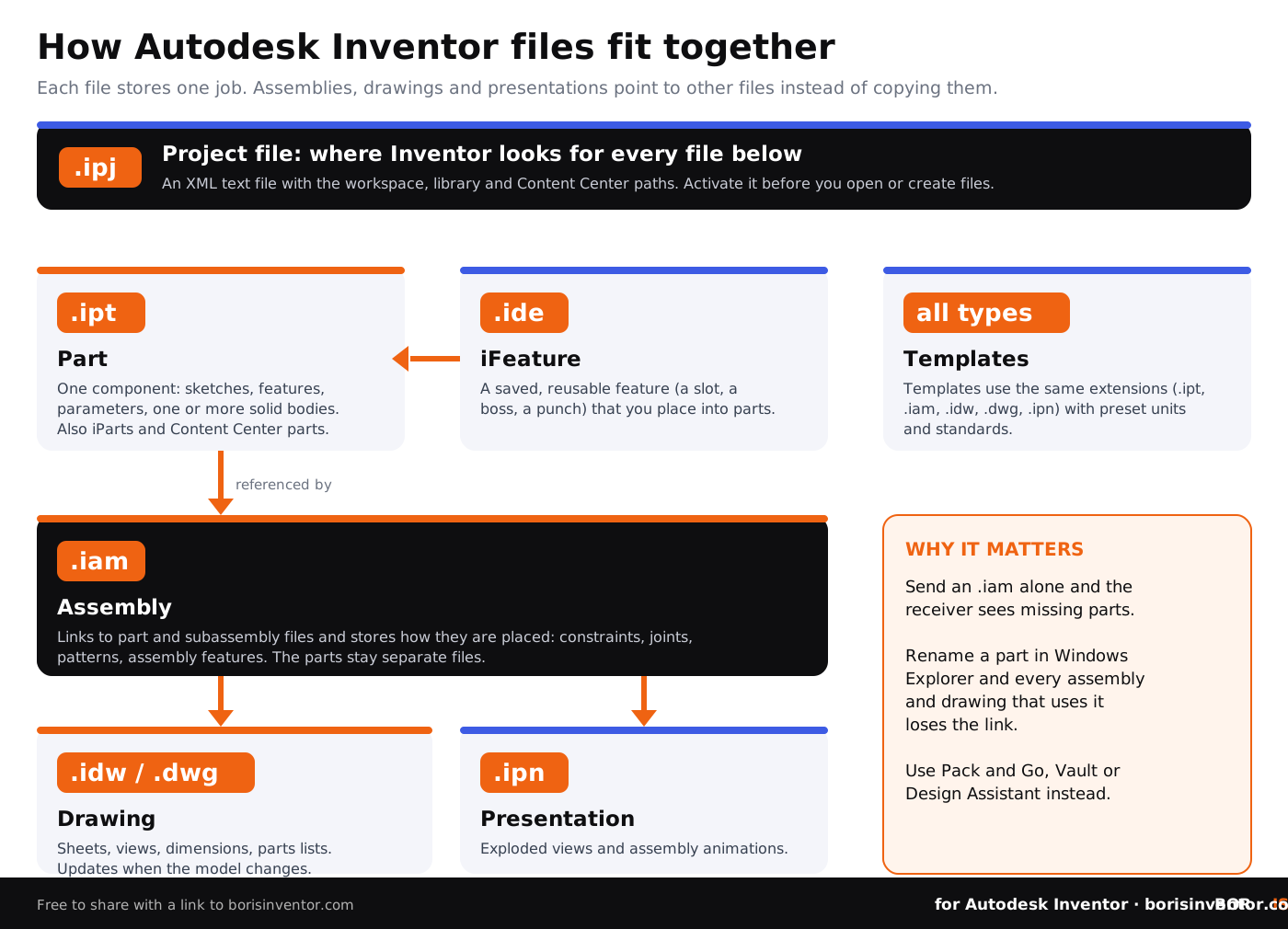
An .iam file is an Inventor assembly. It positions parts and subassemblies with constraints and joints so they work together as one product, and it can add assembly features such as a hole drilled through several parts at once. The key point for file handling: an assembly does not copy its parts inside itself. It stores links to the separate .ipt and .iam files. Send someone an .iam on its own and Inventor will report the referenced files as missing. Our guide to assembly files in Autodesk Inventor goes deeper into how assemblies are structured.
What is an .idw file, and what is the difference between IDW and DWG?
An .idw file is an Inventor drawing: one or more sheets with views of a part or assembly, dimensions, annotations, and for assemblies an automated parts list and item balloons. Drawings stay linked to the model and, by default, update when the model changes. That is why Autodesk suggests waiting until a design is nearly finished before detailing it.
Inventor can save the same drawing as an .dwg file instead. According to Autodesk's help on drawing file types, both formats produce identical drawings. The differences are practical:
- IDW is the Inventor-native drawing format. It opens only in Inventor or Inventor View, and it gives smaller files.
- Inventor DWG uses the AutoCAD file format, so it also opens in AutoCAD and in the free DWG TrueView. The Inventor data inside it can be changed only in Inventor, and data you add in AutoCAD can be changed only in AutoCAD.
- If your customers, suppliers or your own team still work in AutoCAD, Autodesk suggests making DWG the default drawing format in Inventor.
- Templates exist for both: you pick .idw or .dwg when you start a new drawing from File, New.
Drawings are often the most shared Inventor files, and the ones with the most know-how in them (tolerances, finishes, notes). Before you send one out, read the limits of converting CAD drawings to PDF.
What is an .ipn file?
An .ipn file is an Inventor presentation. It is built on top of an assembly and is used to create exploded views (for example for an assembly instruction drawing) and animations that show the assembly order. Animations can be saved as .wmv or .avi video files. Like a drawing, a presentation references the assembly rather than copying it, so the assembly and its parts must travel with it.
What is an .ipj file?
The .ipj file is the Inventor project file, and it is the one most people overlook. It is a small text file in XML format that stores the paths to the folders where your design data lives: the workspace, libraries and Content Center files, plus settings such as how many old versions to keep when you save. When you open a file, Inventor uses these paths, in order, to find every referenced part. That is why Autodesk recommends creating or activating a project before you open or create files.
- Inventor installs a Default project automatically. It is meant for experiments, not real design work, and it cannot be deleted.
- The two current project types are single-user (one person, files in one workspace) and Autodesk Vault (shared work managed by Vault). Older shared project types are hidden unless you switch them on in Application Options.
- Projects use relative paths when the folders sit below the project file, which keeps links working when a whole project folder is moved.
An .ipj is not a model and has no geometry, but it reveals your folder structure and library locations, so keep it in-house. For setup advice, see how to manage CAD projects in Autodesk Inventor and Inventor Vault setup and management tips.
Other Inventor file types you may see
- .ide: an iFeature, a saved feature (for example a standard slot or boss) that you can place into other parts.
- Templates: Inventor templates use the same extensions (.ipt, .iam, .idw, .dwg, .ipn) with predefined units and standards, organized by tabs in the Create New File dialog.
- iParts and iAssemblies: table-driven families stored as .ipt and .iam factory files, with generated members.
- External iLogic rules: text or VB files stored outside the Inventor documents, explained in what is iLogic in Autodesk Inventor.
- OldVersions folders: copies of earlier saves that Inventor keeps according to the project setting for versions retained. They help when you need to recover unsaved and previous CAD file versions in Inventor.
How do Inventor files link together?
Think of an Inventor design as a chain of references. The project file tells Inventor where to look. Parts hold the geometry. Assemblies point to parts. Drawings and presentations point to parts and assemblies. Three habits follow from this:
- Never rename or move Inventor files in Windows Explorer. The assemblies and drawings that use them lose the link. Rename through Vault or Design Assistant, which update the references.
- Send complete packages. Use Pack and Go (or a Vault download with dependents) so every referenced file travels with the assembly or drawing.
- Name files with intent. Clear part numbers in file names make references readable; see CAD file naming conventions for version tracking.
More day-to-day habits are in file management tips for Autodesk Inventor users and our Autodesk Inventor file management guide.
How to open Inventor files without Inventor
- Inventor Read-only Mode: included with the Inventor installation since Inventor 2026, it opens part, assembly, drawing and presentation files for viewing without consuming a license.
- Inventor View: a standalone viewer that comes with Autodesk Vault or can be downloaded from Autodesk.
- DWG TrueView or AutoCAD: for drawings saved as .dwg.
- A neutral or visual file: if the receiver only needs to look, send a PDF, images or a STEP file they can open in their own tools.
Can I open a newer Inventor file in an older version?
Not as a native file. Autodesk states that Inventor files are not backward compatible: each release can read files from earlier releases, but files saved in a newer release cannot be opened in an older one, and there is no option to save back to an earlier release. Different updates of the same yearly release are compatible with each other. If a supplier runs an older Inventor, send a neutral format such as STEP or SAT; they lose the feature history but keep the geometry. CAD file versions in Autodesk Inventor explains how versions and revisions differ.
Which file formats can Inventor import and export?
Beyond its own types, Inventor 2026 reads and writes the main exchange formats. According to Autodesk's translator support table:
- Import and export: STEP (AP203, AP214 and AP242), IGES, SAT, Parasolid, JT, STL, OBJ, CATIA V5, NX and IFC.
- Export only: USDz and glTF for visualization, and QIF for quality and inspection data.
- Import only: SolidWorks, Solid Edge, Rhino, Alias, CATIA V4 and PTC Creo files.
- AnyCAD: many of these can be placed as an AnyCAD reference that stays linked to the source file, or converted into native Inventor parts.
- Drawings export to DWG and PDF; sheet metal flat patterns can be saved as DXF or DWG.
Use Save As, Save Copy As, or Export, CAD Format to write a copy in another format; your native file stays unchanged. For how neutral formats compare, read CAD file format standards in manufacturing and what native CAD file formats are. Translation can also change geometry; see geometry alienation in CAD conversion.
Which Inventor file should you send to whom?
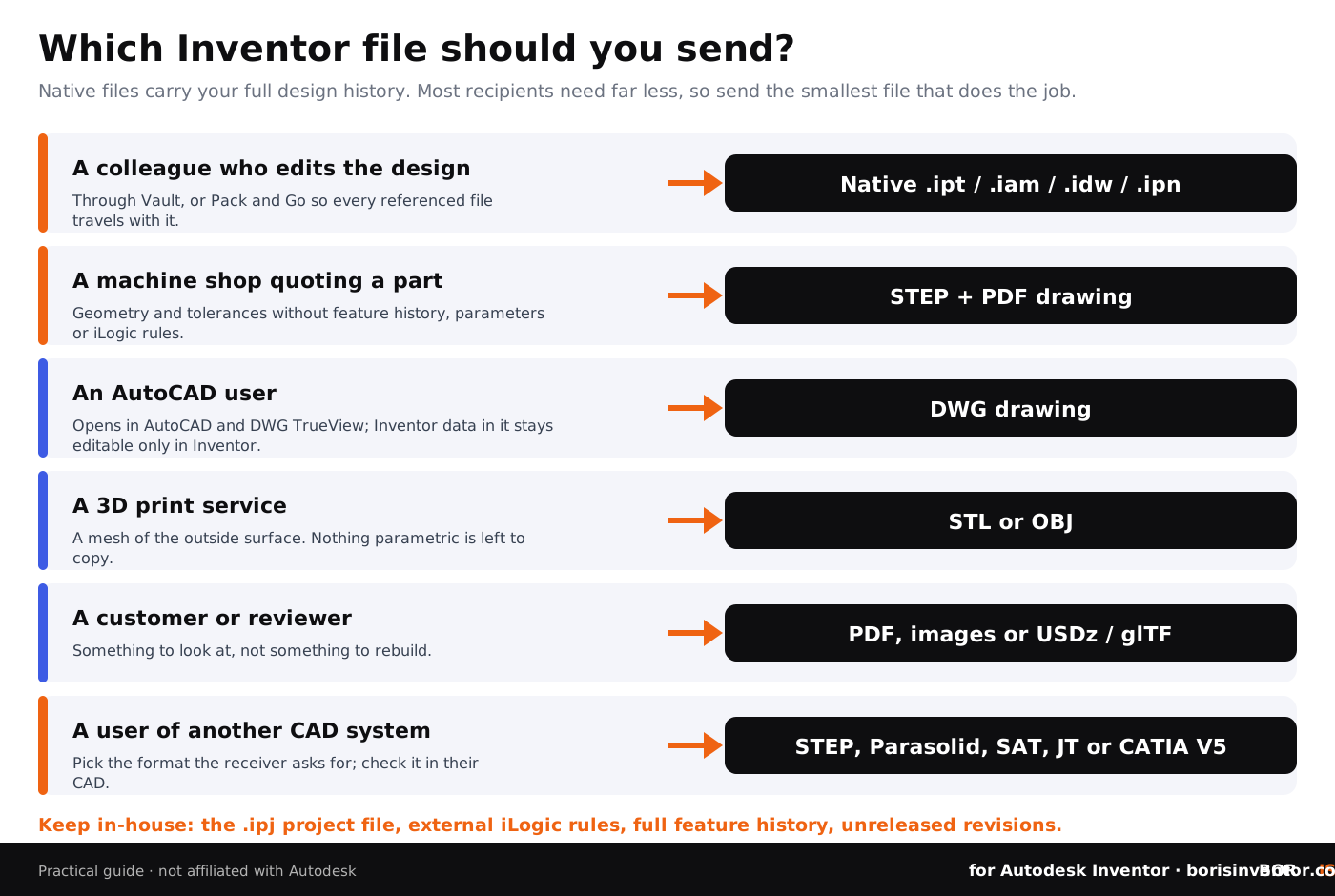
The safest rule: send the smallest file that does the job. A machine shop needs geometry and tolerances, not your parameters, iLogic rules or feature history.
Why Inventor file types matter for IP protection
Each file type exposes a different amount of your know-how. A native .ipt or .iam shows how you built the design: features, parameters, rules and iProperties. A STEP file shows the shape. A PDF drawing shows dimensions and tolerances. Metadata travels too, as explained in CAD file formats, metadata and privacy, and each format has its own risks, covered in Autodesk Inventor file formats and security implications.
- Share neutral formats outside the company by default; share native files only with people who must edit them.
- Keep the .ipj, external iLogic rules and unreleased revisions inside Vault.
- Agree in writing what a supplier may do with your files; see how to share CAD files securely with contractors.
- Register the native files before they leave, so you can prove what you designed and when.
Prove which Inventor files are yours, whatever format you share
BORIS for Autodesk Inventor registers your parts, assemblies and drawings with a timestamp on the blockchain, straight from Inventor, and gives you a verifiable certificate of ownership. Share a STEP or PDF and keep dated proof of the native design behind it.
👉 Try BORIS for Autodesk Inventor
Learn how it works in blockchain certification for CAD files and digital fingerprints for CAD files.
Common mistakes with Inventor files
- Emailing an .iam or .idw without the part files it references.
- Renaming or moving parts in Windows Explorer and breaking every assembly that uses them.
- Doing real design work in the Default project.
- Saving a file in a newer Inventor release before checking what your supplier runs.
- Sending native files when a STEP and a PDF drawing would do.
- Mixing IDW and DWG drawings without a team rule, so nobody knows which one is the master.
For conflicts between versions, see how to prevent CAD file version conflicts.
Conclusion
Autodesk Inventor keeps each part of a design in its own file: .ipt for parts, .iam for assemblies, .idw or .dwg for drawings, .ipn for presentations, .ipj for the project that ties them together and .ide for reusable iFeatures. Because assemblies, drawings and presentations reference other files, the way you move, rename and share them matters as much as the files themselves. Keep native files and the project in Vault, send neutral formats outside, and register what you send so ownership is never in doubt. Working in SOLIDWORKS too? The SolidBoris blog covers the same questions for SLDPRT and SLDASM files.
FAQ: Autodesk Inventor file types
What are the main Autodesk Inventor file types?
.ipt (part), .iam (assembly), .idw and .dwg (drawing), .ipn (presentation), .ipj (project) and .ide (iFeature). Templates use the same extensions as the files they create.
What is the difference between .ipt and .iam?
An .ipt holds one part. An .iam is an assembly that references several .ipt and .iam files and stores how they are positioned with constraints and joints.
Should I use IDW or DWG for Inventor drawings?
Both produce identical drawings. IDW gives smaller files and opens only in Inventor tools; DWG also opens in AutoCAD and DWG TrueView. Choose DWG if people downstream work in AutoCAD.
What is an .ipj file in Inventor?
The Inventor project file. It is an XML text file with the paths Inventor uses to find your workspace, libraries and Content Center files, plus project settings. Activate it before opening or creating files.
What is an .ipn file used for?
An .ipn presentation file creates exploded views of an assembly for drawings and animations of the assembly order, which can be saved as .wmv or .avi video.
Can I open Inventor files without an Inventor license?
Yes. Inventor Read-only Mode, included with the Inventor installation, views .ipt, .iam, .idw, .dwg and .ipn files without using a license. Inventor View, which comes with Vault, also opens them, and DWG drawings open in DWG TrueView.
Can an older version of Inventor open a newer file?
No. Inventor files are not backward compatible, and Inventor cannot save to a previous release. Send a neutral format such as STEP or SAT instead.
Can Inventor open SolidWorks or STEP files?
Yes. Inventor 2026 imports STEP, IGES, SAT, Parasolid, JT, CATIA, NX, Creo, SolidWorks, Solid Edge, Rhino and Alias files, either as an AnyCAD reference or converted into Inventor parts.
Which Inventor file should I send to a manufacturer?
Usually a STEP file for the geometry plus a PDF drawing for tolerances and notes. Keep native .ipt and .iam files, which contain your full design history, for people who must edit the design.