
On Wednesday, 11 November 2026, attackers used the remote support tool ScreenConnect to plant their own remote access software on hundreds of computers that managed service providers (MSPs) look after for their customers. The security company Huntress counted 288 affected computers in 48 organisations in the first wave and 205 computers in 41 organisations in a second wave on 13 November. ConnectWise, the maker of ScreenConnect, says the attackers came in through third-party extensions, not through a flaw in ScreenConnect itself.
Many small and mid-sized manufacturers do not run their own IT. An MSP looks after the PCs, servers and backups, and a CAD reseller connects remotely when Inventor or Vault needs help. With tools like ScreenConnect, a technician clicks a computer in a list and can see its screen, run a command or copy a file. In the wrong hands, that power reaches every computer on the list at once.
Below: what happened, why it matters for Inventor workstations and Vault servers, what to ask your IT provider and CAD reseller, and what to check yourself. Some things are still unknown, such as whether any data was taken, and we say so.
TL;DR: From 11 November 2026, attackers abused a ScreenConnect extension called RMM+ that, in versions 1.0.31 and 1.0.32, accepted a blank access key and bypassed ScreenConnect's accounts, roles and multi-factor authentication. They ran commands as SYSTEM on customer PCs, installed their own ScreenConnect clients and left a toolkit that hijacks the legitimate support connection. ConnectWise disabled the flagged extensions in its cloud for about 400 partner environments; self-hosted installations must do it themselves.
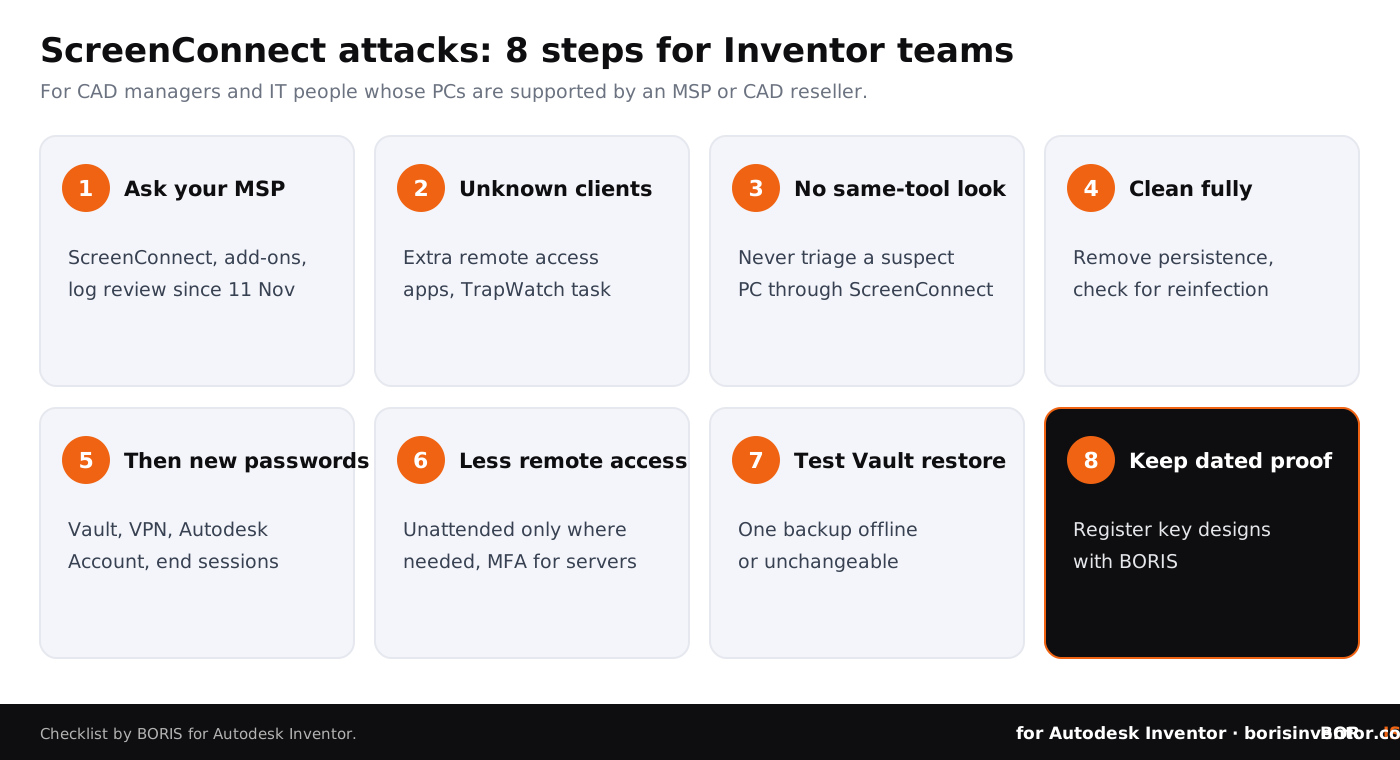
Ask your MSP and CAD reseller whether they use ScreenConnect and these extensions, and what their log review found. Look for unknown ScreenConnect clients on your PCs, make sure technician clients run version 26.6.5 or later, never connect to a suspect PC through the same tool, change passwords after cleanup and limit which machines can be reached remotely at all.
What happened on 11 November?
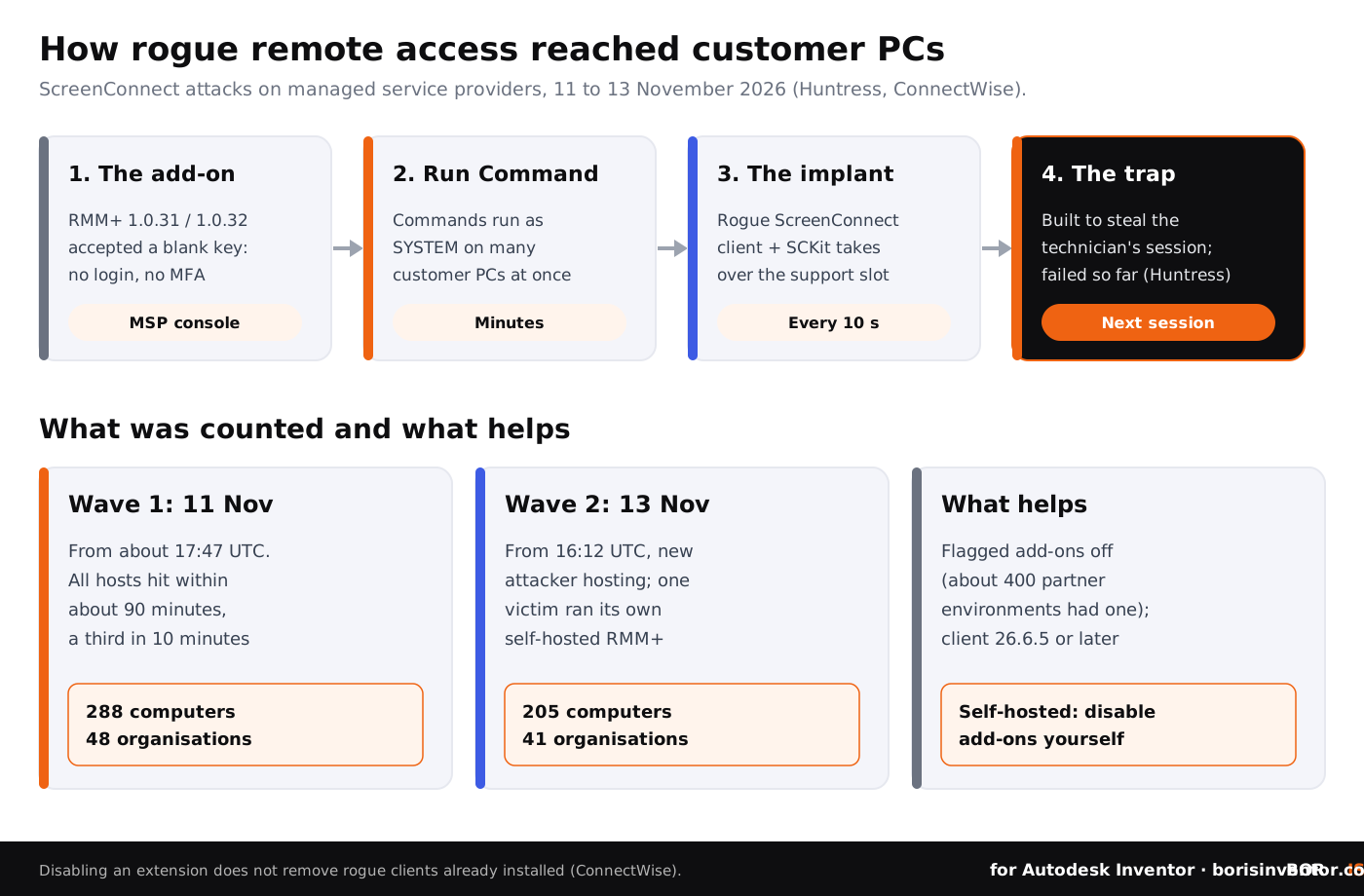
According to Huntress's analysis, suspicious activity started at about 17:47 UTC on 11 November across several cloud-hosted ScreenConnect environments. All 288 computers in the first wave were hit within about 90 minutes, roughly a third of them in the first ten minutes. In its first public count, Huntress reported six compromised MSPs, 286 endpoints and 47 customer organisations, and said the numbers were still rising.
The way in was an extension, a small add-on that MSPs install in their ScreenConnect console to connect it with other tools. Huntress found that the RMM+ extension, in versions 1.0.31 and 1.0.32, accepted a blank access key when an administrator had never set one. Because RMM+ talks to ScreenConnect outside the normal sign-in, requests with that blank key were accepted without any user account, role check or multi-factor authentication. In other words, the attackers did not need anyone's password.
From there, they used ScreenConnect's Run Command feature to execute commands as SYSTEM, the most powerful account on a Windows PC, on many customer computers at once. The commands silently installed a second ScreenConnect client controlled by the attackers and a toolkit that Huntress calls SCKit. A second wave started on 13 November at 16:12 UTC and reached 205 computers in 41 organisations; in that wave, one affected organisation was running its own, self-hosted copy of RMM+.
What does the toolkit do on an infected PC?
Huntress describes SCKit as a package of 16 files, encrypted and tied to each victim computer's hardware ID. Its main part, which the attackers called RelayTrap, sits in a folder under C:\ProgramData. A script runs every ten seconds as SYSTEM, stops the legitimate ScreenConnect client and takes over its connection slot. A scheduled task keeps it running, Microsoft Defender gets exclusions and a second rogue client is added for good measure.
The name says what it is for. When a technician later connects to the trapped PC, the toolkit is built to steal the technician's ScreenConnect session cookie, reuse it on the MSP's console and push a payload to every computer that console can reach. Huntress reconstructed this step from the code and stresses that console takeover attempts failed in every recovered log it had reviewed so far. ConnectWise said it had received reports of technician workstations being compromised during remote sessions, but that these were still being confirmed.
Two warnings follow. Huntress saw computers infected again shortly after they came out of isolation, because the persistence was still there. And connecting to the PC with the remote tool to take a look is exactly what the trap waits for.
Why does this matter for Inventor and Vault?
A remote support tool usually has more access to a CAD workstation than the engineer who uses it. Running as SYSTEM, an attacker can read the local Vault workspace with checked-out parts and assemblies, the project folders and mapped network drives, exported STEP files waiting to go to a supplier and the passwords and browser sessions saved on that PC. Our article on the Operation Endgame takedown explains how quickly saved logins are sold on.
The same tool is often installed on the servers that matter most: the Vault server with its SQL database and file store, the licence server and the file server. One console that reaches all of them is convenient for your IT provider. It is also a single point that, if abused, opens the whole design office. Our guide to what an ESXi zero-day means for Vault servers shows the same problem one layer lower, at the hypervisor.
This is also not the first time this year that a service provider's tool became the route in. In October, ConnectWise Cloud Backup and AOMEI Backupper showed how backup tools can be abused, and BORIS for SOLIDWORKS covered the N-able N-central zero-days that put another popular MSP platform offline on 9 November. Huntress told BleepingComputer it has seen a significant increase in attacks that use legitimate remote management software as the first payload in 2026.
What should you ask your IT provider and CAD reseller?
Most Inventor teams cannot check an MSP's console themselves. You can, however, ask direct questions and expect clear answers. ConnectWise's security advisory gives the wording to use: "The presence of an identified extension alone does not establish compromise." So the question is not only whether the extensions were installed, but what the log review showed.
- Do you use ScreenConnect for our company, cloud-hosted or self-hosted? Ask your CAD reseller the same question; resellers often use their own remote tool for Inventor and Vault support.
- Were any of the flagged extensions installed, and are they disabled now? On self-hosted installations, ConnectWise says it "cannot disable these extensions" for the partner.
- Did you review Run Command, Toolbox and audit history from 11 November onwards? Ask for the result in writing, including any commands run on your computers.
- Are all technician clients on ScreenConnect 26.6.5 or later? ConnectWise says that version blocks the spread technique, and that updating the server or cloud console does not update the technicians' own clients.
- Which of our machines have unattended remote access, and who can use it? The answer tells you how far one stolen console session reaches.
- How would you tell us about an incident, and how fast? If your contract does not say, agree on it now.
Remote access can be abused. Proof of authorship should not be.
BORIS for Autodesk Inventor registers your CAD files with a blockchain timestamp and gives you a certificate of ownership, straight from Inventor.
👉 See how BORIS for Autodesk Inventor works
What should Inventor teams do now?
- Ask the questions above this week. Send them to your MSP and your CAD reseller, and keep their answers with your IT records.
- Look for remote access software you do not recognise. In the list of installed apps, more than one ScreenConnect client, or one you cannot explain, is a reason to call your IT provider. Huntress lists a scheduled task named TrapWatch and a RelayTrap folder under C:\ProgramData as signs of this toolkit. Do not delete anything before your provider has checked which client is legitimate.
- Do not connect to a suspect PC with the same tool. Huntress advises against triaging infected computers through ScreenConnect. Use other tools, or take the PC off the network and look at it locally.
- Clean fully before returning a PC to work. Remove the rogue clients and their persistence, check again for reinfection and only then reconnect the PC to Vault and the network.
- Change passwords after cleanup, not before. Rotate the Vault, Windows, VPN and Autodesk Account passwords used on affected PCs from a clean device, end active sessions and replace any keys or tokens stored on them. Our guide to Autodesk two-step verification explains the sign-in options.
- Reduce standing remote access. Agree with your provider which machines really need unattended access. For engineering workstations, a session the user has to accept is often enough; for the Vault and licence servers, limit access to named technicians with multi-factor authentication.
- Check that you can restore Vault. Make sure at least one Vault backup is offline or cannot be changed from the network, and test a restore. Our guide to CAD file backup strategies covers the basics.
- Keep dated proof. Register key designs with BORIS, so that if files ever leave the building you can show which version you created and when.
Is ScreenConnect itself unsafe to use?
Based on what is public, the problem was in third-party extensions, not in ScreenConnect's own code. ConnectWise said on 12 November that it had found no evidence of a compromise of its infrastructure or of a vulnerability in ScreenConnect itself, and later that the initial access did not involve a ScreenConnect vulnerability as far as it knew. The client version that blocks the spread technique, 26.6.5, fixes a separate issue, CVE-2026-84869, published in September, which could let files be transferred and run through an active remote session without the host's confirmation.
The lesson is about how much trust a remote support console holds. A tool that can run commands on all your computers, and every add-on bolted onto it, deserves the same care as the Vault administrator account. Huntress puts it simply: "Defenders are advised to treat any ScreenConnect connection to an unfamiliar machine as unsafe."
Our guides on security protocols for remote CAD teams and role-based access control for CAD data explain how to limit what any single account can reach. For working with outside partners in general, see our tips for protecting IP in vendor collaboration.
How would you notice misuse of remote access?
Remote support activity looks legitimate, so logs matter. Ask your provider whether ScreenConnect's audit log is kept and reviewed, and make sure Vault's history shows who checked out or downloaded files and when. Our article on tracking who accesses your CAD files explains what to log, and auditing CAD file change history shows how to read it.
Engineers should report a cursor moving on its own, a support session nobody asked for or a new remote access icon. Our list of common mistakes engineers make with CAD security and our guide to CAD file protection with Vault, encryption and proof of ownership show how these habits fit into a wider plan.
The bigger picture
This week's news on our sister sites shows the same pattern from three sides: trust that is given by default and then abused.
- Open by default. On CADChain, the Grok Build data leak describes research that found most of the internal apps built with the tool could be opened by anyone with the address, without signing in.
- Shortcuts with a price. BORIS for SOLIDWORKS reports how Gemini was tricked into recommending a site for cracked SOLIDWORKS, and why pirated CAD software is a common source of the malware that steals logins.
- Rules for creative work. Blended BORIS looks at Indonesia's draft AI copyright law, where Google, Meta and TikTok argued against parts of a bill that would, among other things, stop AI from imitating a creator's distinctive style.
Conclusion
Between 11 and 13 November 2026, attackers used MSPs' ScreenConnect consoles to plant their own remote access on hundreds of customer computers, through a third-party extension that accepted a blank access key. ConnectWise has disabled the flagged extensions in its cloud, but self-hosted installations, rogue clients already planted and earlier, unnoticed victims remain open questions.
For an Inventor team, the remote support tool is a key to every workstation and to the Vault server. Ask your MSP and CAD reseller what they use and what their logs show, look for remote access software you cannot explain, clean before you change passwords, cut unattended access to what is needed and make sure Vault can be restored. And keep dated proof of your designs, so you can show what is yours if a copy ever surfaces.
Your designs, your proof.
BORIS for Autodesk Inventor gives every registered file a blockchain timestamp and a certificate of ownership, straight from Inventor.
👉 Protect your Inventor designs with BORIS
FAQ: ScreenConnect attacks and Inventor teams
What is ScreenConnect?
ScreenConnect, made by ConnectWise, is remote support software. Managed service providers and resellers use it to see a customer's screen, run commands and transfer files.
What happened between 11 and 13 November 2026?
Attackers used ScreenConnect consoles of several managed service providers to run commands on customer computers and install their own remote access clients. Huntress counted 288 computers in 48 organisations in the first wave on 11 November and 205 computers in 41 organisations in a second wave on 13 November.
How did the attackers get in?
Huntress found that the third-party RMM+ extension, in versions 1.0.31 and 1.0.32, accepted a blank access key when none had been configured, bypassing ScreenConnect's accounts, roles and multi-factor authentication. ConnectWise says initial access did not involve a ScreenConnect vulnerability as far as it knows, and how every provider was first entered is not fully confirmed.
Which extensions were disabled?
ConnectWise flagged Labtech Plus, RMM Plus, RMM+, RMM Plus Password Link and RMM+ Password Link and disabled them in its cloud. It also disabled ITBoost Integration, RepairShopr Integration and Guest Session Starter in the cloud and its marketplace. Self-hosted installations have to disable them themselves.
Was design data stolen?
That has not been reported. The sources we checked do not say whether any files or data were taken, and the affected organisations have not been named. With SYSTEM access, however, the attackers could have reached anything stored on the affected computers.
We do not use ScreenConnect. Are we safe?
Not necessarily. Your IT provider or CAD reseller may use it to support you, so ask them. The lesson also applies to other remote support tools: they need strong sign-in, few add-ons and regular log reviews.
What should we do if a PC is affected?
Do not connect to it with the same remote tool. Have your provider remove the rogue clients and their persistence, check for reinfection and only then return the PC to work. Then change the passwords used on it from a clean device, end active sessions and replace stored keys or tokens.
How does BORIS help?
BORIS for Autodesk Inventor registers CAD files with a blockchain timestamp from inside Inventor, so you can show which version of a design existed and when. It does not block remote access or remove malware, and it does not replace endpoint security, access control or backups.