
GL.iNet, the maker of popular travel routers, VPN gateways and the Comet range of remote KVM devices, confirmed on 20 November 2026 that an unauthorized party exploited a vulnerability in its cloud remote management service and installed malicious software on some of its routers and KVMs. The company says the cloud hole is closed and released security firmware, but it is still investigating whether the computers connected to infected KVMs were compromised. If an engineer on your team uses one of these boxes to reach an Inventor workstation, a Vault server or the office network from home, that computer is now part of the question.
A remote KVM, short for keyboard, video and mouse, sits between a computer and the network. It sends the screen out to a browser or app and sends keyboard and mouse input back in, so someone far away can work on the machine as if they were sitting at the desk, even in the BIOS. GL.iNet's cloud platform, GoodCloud, lets owners manage their routers and KVMs remotely, including the computers and servers attached to the KVMs. That convenience is exactly what made this incident serious.
For Inventor teams the attraction of these devices is easy to understand. A CAD workstation with a strong graphics card, a licensed Inventor and a Vault client stays in the office, and the engineer reaches it from a laptop at home or on the road. A small travel router holds the VPN profile that connects that laptop to the office network. Neither is usually on the IT department's list of systems to patch.
TL;DR: GL.iNet says an unauthorized party exploited a flaw in its GoodCloud remote management service on 20 November 2026 and installed malware on some routers and remote KVMs. The cloud flaw is fixed and security firmware is out (KVMs 1.10.3, or 1.8.7 for the Comet Q; routers per model), but GL.iNet has not said how many devices were hit, whether data was taken, or whether computers behind infected KVMs were compromised.
If your engineers use GL.iNet KVMs or routers to reach Inventor workstations, Vault or the office network: find every device, check it before you upgrade it, install the security firmware, revoke the VPN keys and passwords it held, and check the computer that sat behind each KVM.
What did GL.iNet confirm?
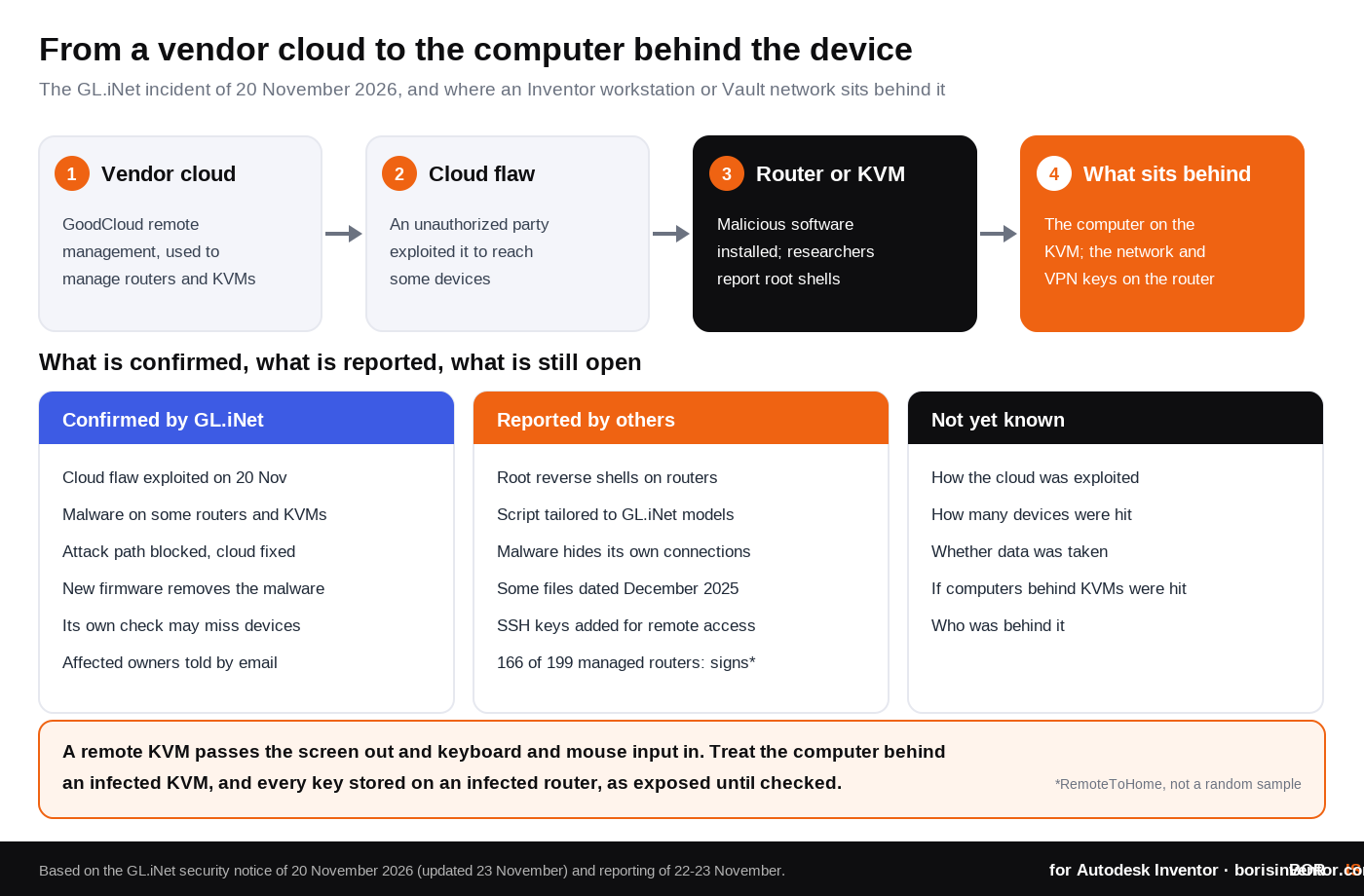
According to GL.iNet's security notice of 20 November 2026, last updated on 23 November, the company identified a vulnerability in its cloud remote management services on 20 November. An unauthorized party exploited it to access some GL.iNet routers and KVM devices and install malicious software on them. "The attack path has been blocked," the notice says: the cloud vulnerability is fixed, the access used in the incident is blocked, and devices can no longer be newly infected through that path.
The cloud fix does not clean devices that were already infected. GL.iNet asks every owner to install the latest stable security firmware for their exact model, even if the checks find nothing, and says that firmware removes the malware identified in this incident without a factory reset. For KVMs the minimum is version 1.10.3 for the Comet (RM1, RM1V2), Comet Pro (RM10), Comet 5G (RM10RC), Comet PoE (RM1PE) and Comet X (RM4PE), and 1.8.7 for the Comet Q (RMQ1). Routers have their own minimum per model, from 4.7.14 for the Brume 2 (GL-MT2500) and Spitz Plus (GL-X2000) up to 4.11.1 for the Beryl AX (GL-MT3000), Flint 2 (GL-MT6000) and Mango 2 (GL-MG1300). The notice adds that an unlisted model is not necessarily unaffected.
GL.iNet's own check looks for one indicator, a running process with the text crond -i /tmp/.log, in the router's process list or in the KVM's built-in terminal. The notice now also says that the official checks "may not detect every affected device", that additional indicators have been found, and it points owners to an unofficial community tool for a wider check. GL.iNet says it will email the customers it identifies as affected at the address of their cloud account, and that it is still determining the scope of the incident, including whether computers connected to affected KVMs were impacted.
What have researchers found on infected devices?
Independent reports go further than the notice. BleepingComputer reported on 22 November that owners and researchers found custom malware built for GL.iNet hardware and root-level reverse shells that connected routers to an outside server. The malicious installer script it examined recognises many GL.iNet router and KVM models, downloads further programs, survives reboots through startup scripts and scheduled tasks, disguises itself under the process name GL.iNet published, replaces a network tool to hide its own connections, and can install SSH keys for remote access. The script contains Chinese-language developer comments. Nobody has publicly attributed the attack.
One owner of a Comet KVM shared network logs showing the device downloading a malicious script on 19 November, a day before GL.iNet's notice, and then contacting around 1,800 residential IP addresses a day. The purpose of that traffic is unclear. Some malicious files on GL.iNet devices carry timestamps from December 2025, which suggests that some devices may have been compromised for months, although it is not clear whether those infections are linked to the November attack.
RemoteToHome Consulting, which manages a large number of GL.iNet routers for its clients, publishes its own findings and says GL.iNet has not reviewed them. By the morning of 23 November it had reached 199 routers, and 166 showed signs of the 20 November attack, an older backdoor, or both. The firm stresses that this is not a random sample. It also reports that it has not found GL.iNet's single indicator process on any of those routers, and that a KVM upgrade that keeps the saved settings carried an added boot script and SSH key across into the fixed firmware on its test unit. GL.iNet has not confirmed those findings.
Why does this matter for Inventor and Vault teams?
Most engineering offices never decided to put a GL.iNet device into their network. An engineer bought a remote KVM to reach a heavy CAD workstation from home, or brought a travel router to get a stable VPN connection from a hotel, and it worked. These devices are cheap, small and easy to forget, and the cloud management option is part of what makes them convenient.
Look at what sits behind them. A KVM attached to an Inventor workstation passes on everything that appears on its screen, from open assemblies and drawings to the Vault client, email and browser, and it carries keyboard input, including passwords typed into Windows, Vault or an Autodesk account. A KVM on a server rack may reach the Vault server, the SQL server, the licence server or a hypervisor console. A router that holds a WireGuard or OpenVPN profile for the office holds the key that lets a device into the network where your Vault and file servers live. A remote KVM is designed to be in a position to see and type; the question after this incident is whether someone else used that position.
There is a broader lesson as well. Any device that its maker can manage from the cloud is one cloud flaw away from being managed by someone else. We saw the same pattern with the ScreenConnect attacks on managed service providers, where trusted remote access was turned into rogue access on hundreds of PCs, and with backup tools used as an attack path. Remote access is a common way into manufacturing companies; Dragos counted 1,266 industrial ransomware attacks in the third quarter of 2026, most of them at manufacturers.
Which devices in an engineering setup should you check first?
If you are not sure what remote access paths your engineers use, start with the basics in our guides to security protocols for remote CAD teams and CAD file security for remote teams. The answer is often a mix of company VPN, remote desktop, vendor tools and devices like these.
Know which designs were yours, and when.
BORIS for Autodesk Inventor registers your CAD files with a blockchain timestamp and a certificate of ownership, straight from Inventor. If a workstation or network is ever compromised, you still have independent, dated proof of which design existed at which moment.
👉 Protect your Inventor designs with BORIS
What should you check on the computer behind a KVM?
GL.iNet's notice asks owners of an infected KVM to check the connected computer as a precaution: look for unfamiliar programs, browser extensions or user accounts, unexpected startup items or scheduled tasks, unusual settings changes or network activity, and run a full scan with up-to-date security software. On an Inventor workstation, add the places that matter for design data.
- Accounts and sessions. Reset the Windows password and the passwords of the Vault and Autodesk accounts that were used through the KVM, and sign out other sessions where the service allows it. Our article on stolen logins and Vault access explains why a typed password should be treated as known once a device in the path is suspect.
- Vault activity. Review who checked out, downloaded or changed files in the period the device may have been compromised. Our guide to tracking who accesses your CAD files shows what Vault and Windows can tell you.
- Local copies. Workstations keep local working folders with recent parts, assemblies and drawings. Note which projects were on the machine, in case you need to assess exposure later.
- Remote access tools. Look for remote desktop or remote support software that nobody remembers installing.
Eight steps for Inventor teams this week
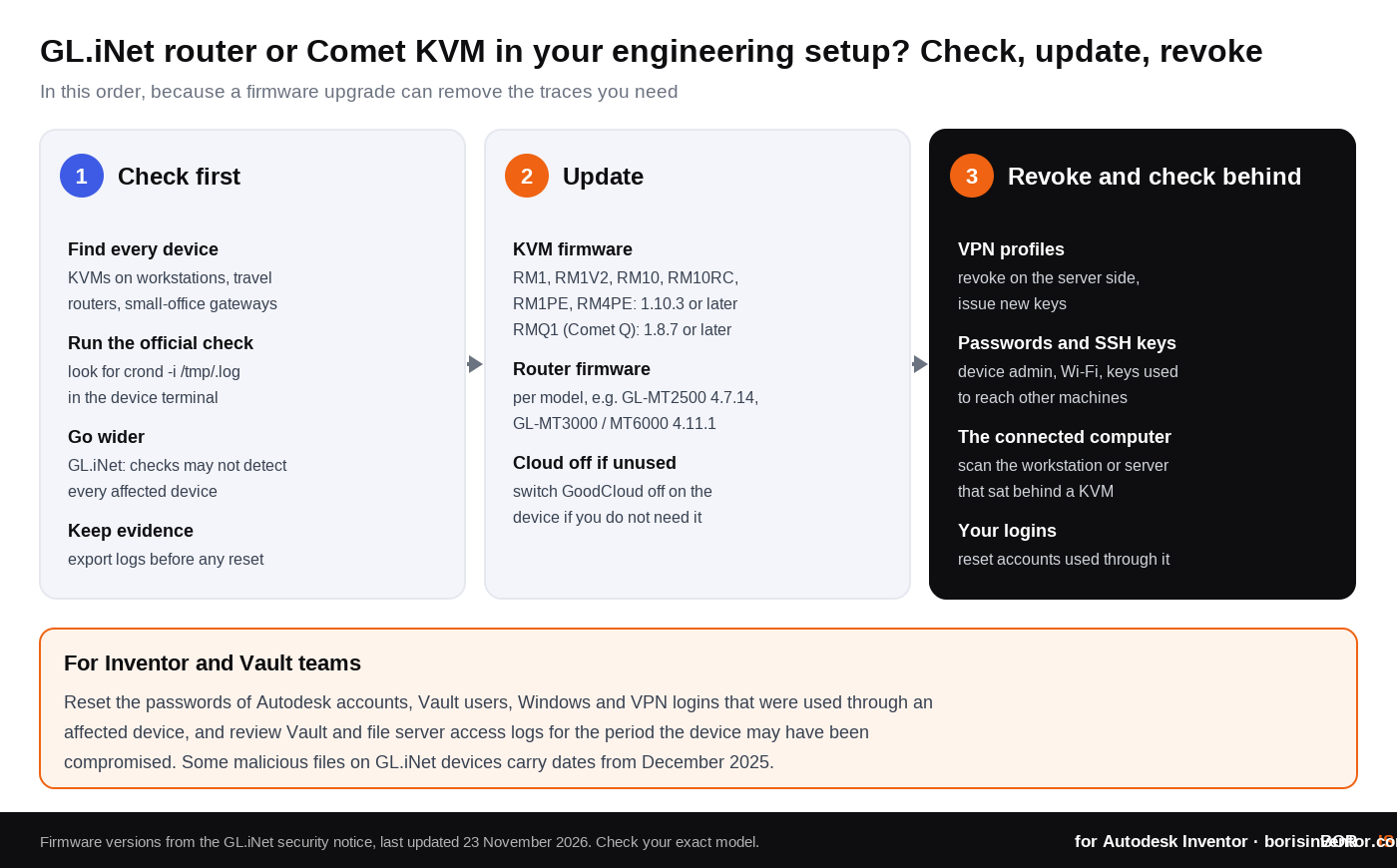
- Ask the question out loud. Send a short note to engineers and CAD managers: who uses a GL.iNet router, Comet KVM or any other remote KVM or travel router for work? Make it safe to answer; these devices are usually bought with good intentions.
- Check before you upgrade. Run GL.iNet's check in the device's own terminal and, if you need more certainty, the wider community check GL.iNet links to. Export the device log from the GoodCloud account. Researchers say a firmware upgrade can remove traces you may need later.
- Install the security firmware. KVMs: 1.10.3 or later, or 1.8.7 or later for the Comet Q. Routers: the minimum version for the exact model in GL.iNet's notice. Do not install firmware for another model.
- Do not carry suspect settings forward. If a device shows any sign of infection, consider upgrading without keeping the saved configuration and setting it up again, so that added scripts or keys do not survive.
- Revoke what the device held. Remove its VPN peer or certificate on the server side and issue new keys, change its admin and Wi-Fi passwords, and remove any SSH keys it used to log in elsewhere.
- Check the computers behind KVMs. Scan the workstation or server, look for new accounts, startup items and remote access tools, and reset the Windows, Vault and Autodesk passwords used through the device.
- Switch the cloud off where you do not need it. If nobody uses GoodCloud to manage a device, turn it off on the device itself and reach it through your own VPN instead.
- Put remote access on the asset list. Treat KVMs, travel routers and VPN gateways like servers: owned, inventoried, patched and reviewed. The same applies to the other edge devices we covered recently, such as VMware vCenter, self-hosted Confluence and Node-RED gateways.
Keep an eye on vendor advisories for the software in the middle of your setup too; our overview of Autodesk security advisories in 2026 lists what Inventor, Vault and Fusion teams have had to patch this year.
The bigger picture
This week's news on our sister sites shows how much engineering risk sits at the edges of a company:
- VPNs as the way in. BORIS for SOLIDWORKS covers an Intel 471 report on access brokers targeting manufacturers, which found VPN services behind 28.5% of the access cases it tracked in the sector.
- Where your design data may travel. On CADChain, the EU dual-use list update that took effect on 20 November is a reminder that sending controlled technical data electronically can itself count as an export.
- Platforms change under you. Blended BORIS reports that the ArtStation Marketplace is moving its checkout to Gumroad, with orders stopping on 18 December, a reminder to know where your files are hosted and on whose terms.
Conclusion
The GL.iNet incident is not about a flaw in Autodesk software, and there is no report that CAD data was stolen. It is about the small devices engineers use to reach that software from somewhere else. A vendor's cloud service was exploited, malware landed on routers and remote KVMs, and the maker is still working out whether the computers behind those KVMs were touched. Until that is answered, treat every infected device, and every key and password it held, as exposed.
For Inventor teams the practical task is short: find the devices, check them, update them, revoke what they held and check the workstations behind them. Then decide which remote access paths you actually want, and make sure each one has an owner.
Your designs, your proof.
BORIS for Autodesk Inventor gives every registered file a blockchain timestamp and a certificate of ownership, straight from Inventor.
👉 Protect your Inventor designs with BORIS
FAQ: the GL.iNet router and KVM security incident
What happened at GL.iNet?
GL.iNet says it identified a vulnerability in its GoodCloud remote management service on 20 November 2026. An unauthorized party exploited it to access some GL.iNet routers and KVM devices and install malicious software. The company says the cloud vulnerability is fixed and devices can no longer be newly infected through that path.
Which GL.iNet KVMs need an update?
GL.iNet lists the RM1, RM1V2, RM10, RM10RC, RM1PE and RM4PE, which need firmware 1.10.3 or later, and the RMQ1 (Comet Q), which needs 1.8.7 or later. Install the latest stable security firmware even if the check finds nothing.
Which routers are affected?
GL.iNet's notice lists minimum security firmware for many models, including the GL-MT2500 Brume 2 (4.7.14), GL-MT3000 Beryl AX and GL-MT6000 Flint 2 (4.11.1) and GL-BE3600 Slate 7 (4.10.2). It says an unlisted model is not necessarily unaffected, so check GL.iNet's download centre for your exact model.
Is the computer connected to an infected KVM compromised?
GL.iNet has not said. It is still investigating whether computers connected to affected KVMs were impacted and asks owners to check the connected computer as a precaution. Because a KVM passes on the screen and keyboard input, reset passwords used through it and scan the machine.
Is GL.iNet's own check enough?
GL.iNet says its official checks may not detect every affected device and links to an unofficial community tool for a wider check. Independent researchers report finding signs of compromise on routers where GL.iNet's single indicator was absent.
Does the firmware update clean an infected device?
GL.iNet says the security firmware removes the malware identified in this incident without a factory reset. Independent researchers report that upgrades which keep saved settings can carry added scripts or SSH keys forward, so for a device that shows signs of infection consider a clean setup and revoke every key it held.
Was Autodesk software or CAD data affected?
No Autodesk product is involved, and there is no public report that CAD files were taken. The risk for Inventor teams comes from what these devices can reach: workstations, Vault servers and VPN access to the office network.
How does BORIS help?
BORIS for Autodesk Inventor registers CAD files with a blockchain timestamp from inside Inventor, so you can show which version of a design existed and when. It does not secure routers or KVMs; it gives you independent, dated evidence of your designs if systems around them are ever compromised.