
Autodesk released Inventor 2027.2 on 3 November 2026. Next to new assembly, sketch and drawing tools, the update makes Autodesk Assistant better at writing iLogic rules and event triggers, lets you upload up to five files to the Assistant at a time, and adds a local MCP (Model Context Protocol) server so that outside AI agents such as Cursor, Claude Code or GitHub Copilot can inspect and modify the model you have open in Inventor.
That last change is the one CAD managers should read twice. Inventor 2027 already had an MCP server inside the Assistant preview add-in. With 2027.2, Autodesk documents a local MCP server that any MCP-capable agent on the workstation can use, with the same set of tools the Assistant uses, which means a coding assistant an engineer installed for scripting can now reach parameters, iLogic rules, model states and geometry in a live Inventor session.
It can save hours of repetitive work. It also moves design data along new paths. Here is what Autodesk has said, what it has not said yet and what to check first.
TL;DR: Inventor 2027.2 opens your open models to AI agents. Treat the new MCP server like any add-in that can edit designs.
Autodesk Assistant in 2027.2 can write iLogic rules from one prompt, create event-trigger rules that check designs on save, and read up to five uploaded files such as images, spreadsheets or PDFs. A new local MCP server lets agents such as Cursor, Claude Code or GitHub Copilot inspect and modify the model in an Inventor session you already have open, with the same tools as the Assistant. Autodesk says Assistant prompts and MCP tool results go to its servers and are not used for AI model training. A third-party agent sends what it reads to its own AI provider under that vendor's terms. Decide which agents may connect, review every AI-written rule like code, check models into Vault only after human review, and keep dated proof of the design versions that matter.
What is new in Inventor 2027.2?
According to Autodesk's What's New post of 3 November 2026, the release brings these main changes.
- AI. Autodesk Assistant now supports improved iLogic workflows, event triggers and a better understanding of iComponents and model states. A local MCP server lets outside AI agents work on the open model. You can upload files to the Assistant for context.
- Assemblies. Each constraint type has its own button on the Assemble tab, tangent constraints accept multi-select, and Place and Insert places several constrained components in one operation.
- Model states. Quick creation, drag-and-drop reordering, arrows that show delegation and icons that flag out-of-date generated files.
- Sketches, drawings and more. You can add geometry to a sketch pattern while editing it, move connected drawing views together, avoid repeated retrieved dimensions and pick parameters from an auto-complete list.
Our earlier article on Autodesk Inventor AI after AU 2026 covered what Autodesk announced in October, including Inventor as a Fusion Connected Client. Inventor 2027.2 is the first update where a large part of that agent work reaches the desktop.
What can Autodesk Assistant do with iLogic now?
Autodesk's examples show the Assistant writing working automation rather than only answering questions. You can ask it to create an iLogic rule that runs when you save, checks the design against company standards and opens a new conversation to review the results. Another example creates an external rule for an event trigger that checks the document for an iProperty value before it is saved. A third creates new parameters linked to existing model dimensions and then writes an iLogic rule from scratch from a single prompt.
The 2027.2 release notes add that the Assistant's Edit iLogic Rule function now supports partial edits: prepend, append and find-and-replace. In plain terms, the Assistant can change part of an existing rule without rewriting all of it. A small edit can then land inside a rule your team already trusts.
iLogic rules are code that runs with the user's rights, and event triggers can run across many documents unseen. Our overview of Inventor automation with iLogic, add-ins, the API and Autodesk Assistant explains what each type of automation can reach. Review an AI-written rule like one from a new colleague.
What is the Inventor local MCP server?
MCP, the Model Context Protocol, is an open standard that lets AI applications discover and call external tools. Autodesk's 2027.2 post puts it this way: "Inventor provides a local MCP (Model Context Protocol) server that allows an MCP-capable AI agent, such as Cursor, Claude Code, or GitHub Copilot, to inspect and modify the model in an Inventor session that you already have open." It adds that the agent has access to the same set of tools used by the built-in Autodesk Assistant.
Two words matter there: local and modify. Local means the server runs on the workstation next to Inventor, not in Autodesk's cloud. In Autodesk's general support guidance on connecting AI clients to its products, a local desktop MCP server runs on the same machine as the product, needs the product to be running and typically needs no authentication, while cloud MCP servers require an Autodesk sign-in. Modify means the agent is not limited to reading. It can change the model, and the 2027.2 assembly notes confirm that MCP tools are one of the entry points for placing components, alongside manual placement, the Assistant, Place from Vault and Content Center.
In the Autodesk material we could read on 4 November, we did not find details on how the Inventor MCP server is switched on, which port it uses or whether it restricts which local programs may connect. Check your Inventor settings and the 2027.2 help before you deploy, and treat any program that can reach the server as able to work on the open model.
Where does your design data go?
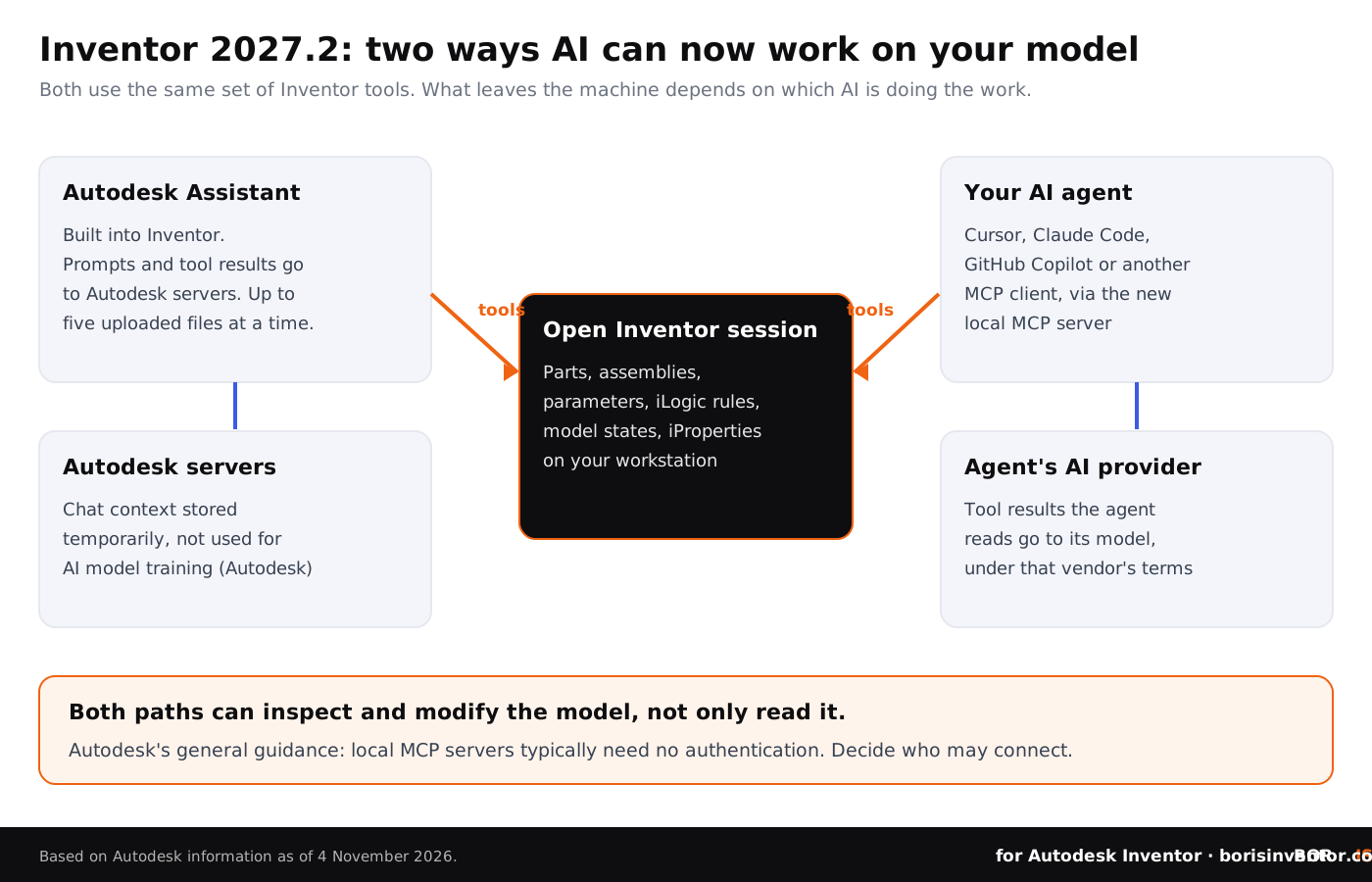
It depends on which AI does the work. For the built-in Assistant, an Autodesk support note of 23 September 2026 is clear on the basics: "Autodesk Assistant requires a connection to Autodesk servers to function. Prompts and MCP tool results are transmitted during Assistant interactions, while file content and usage data are not transmitted." The same note says chat context is stored temporarily and is not used for AI model training, and that AI features may not be available in all regions.
Note two details. MCP tool results are transmitted, so parameter values, iProperties or rule text returned by the tools can leave the machine. And the note predates file uploads: in 2027.2, images, spreadsheets and PDFs you add are sent to the Assistant as context. Ask Autodesk how uploaded files are kept before engineers drop customer drawings into the panel.
For a third-party agent, Autodesk's terms are not the ones that count. When Cursor, Claude Code or GitHub Copilot reads your model through the MCP server, the results go into that agent's conversation and to the AI model behind it, under that vendor's terms and your account settings. Our piece on AI quoting agents and your Inventor drawings shows how much those terms can differ between services, and Autodesk's 2027 State of Design and Make report explains why so many firms are adopting AI faster than they set rules for it.
Keep dated proof of your own design work while AI tools change how models are made.
BORIS for Autodesk Inventor registers your CAD files from inside Inventor and gives each registered version a blockchain timestamp and a certificate of ownership, so you can show which design existed and when. Your models do not have to leave your machine.
👉 See how BORIS for Autodesk Inventor works
Why does it matter which AI client connects?
Because the client becomes part of your CAD toolchain. Only days before 2027.2 shipped, a trojanized copy of a Claude Code extension sat on Cursor's extension marketplace for several hours, as we described in our report on the backdoored extension. Autodesk names Cursor, Claude Code and GitHub Copilot as examples of agents that can drive the new server. An agent environment with a malicious extension, or a prompt hidden in a file the agent reads, could now reach a live Inventor model as well as the engineer's code.
None of this is a flaw in Inventor. The same lesson came up in October's Fusion security advisories, where flaws in add-in and link handling were the risk, and in the Siemens Software Center ClickFix attacks, which targeted engineers who install tools themselves. The answer is ordinary control: approved clients, approved extensions, current versions and a short list of people who may connect agents to production models.
Who is responsible for a change an AI agent makes?
You are. Autodesk's own guidance on MCP connections says to review AI-generated results before relying on them or applying changes to your model or data. An agent that edits a parameter, rewrites part of a rule or places components does so with the engineer's session and rights. If the change ends up in a released drawing, your company carries it, not the AI vendor.
That makes version history and review more important, not less. Keep agent work on copies and check it into Vault only after review. If an agent builds a model from a customer's drawing, make sure you may use that drawing that way. For patterns that keep a project clean, see CAD data lifecycle management.
Can you switch the Assistant off?
Partly. Autodesk's help for 2027.2 says you can hide the Assistant panel. A separate support article of 23 September 2026 explains that in Inventor 2027, when the Assistant add-in is not loaded, the Assistant is not running in the Inventor process, but the button stays visible and clicking it loads the add-in and starts the Assistant for that session. In other words, unloading the add-in stops it until someone clicks the button again.
If contracts or export rules forbid sending design information to cloud AI, write that into your CAD standards and check the add-in setting on managed workstations. Teams that already manage add-ins centrally, as discussed in our guide to the .NET 10 update for Inventor and Vault, can fold these settings into the same process.
What should Inventor teams do now?
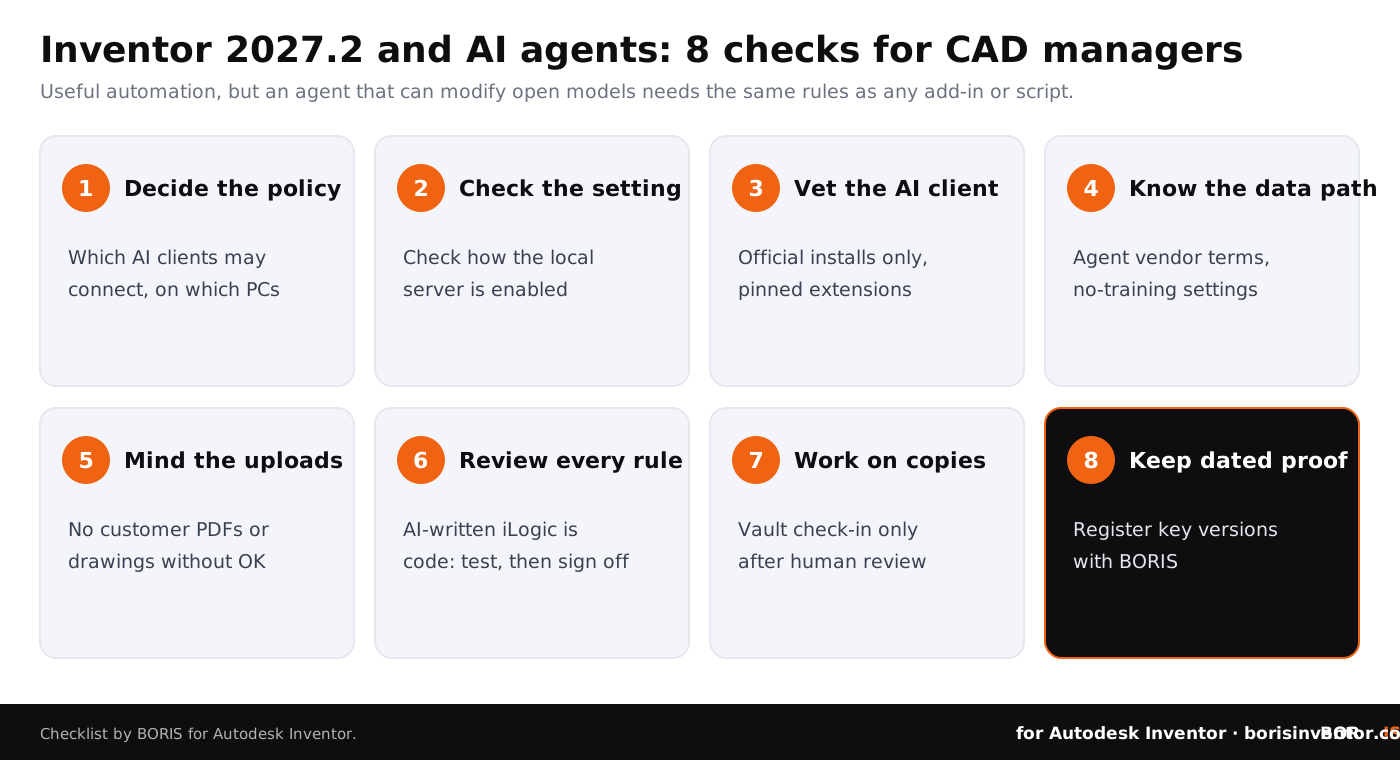
- Decide the policy. Write down which AI clients may connect to Inventor, on which workstations and for which projects. Start with a pilot group rather than everyone.
- Check the setting. Before rolling out 2027.2, find out how the local MCP server is enabled on your machines and keep it off where restricted projects live.
- Vet the AI client. Install agents and extensions only from official sources, keep them updated and pin approved extension versions where you can.
- Know the data path. Read the data and training terms of every agent you allow, and use business plans with no-training settings for design work.
- Mind the uploads. Do not upload customer drawings, supplier quotes or controlled specifications to any AI chat without approval.
- Review every rule. Treat AI-written iLogic rules and event triggers as code: read them, test them on copies and keep them in version control.
- Work on copies. Let agents change working copies, and check results into Vault only after human review, with a note that AI was used.
- Keep dated proof. Register key design versions with BORIS so you can show what your team designed and when, independent of any AI tool's logs.
For more background, read how CAD file formats carry metadata, how to share CAD files securely with contractors, the complete guide to CAD data protection and how blockchain timestamps support design authorship.
The bigger picture
This week's news on our sister sites shows how much pressure sits on the tools and networks around design data.
- Networks under watch. On CADChain, the KeyDrift malware on Cisco SD-WAN explains how Cisco Talos found attackers stealing encryption key material from network devices used by space, defence and aerospace organisations.
- Fake job offers. BORIS for SOLIDWORKS covers ESET's report on fake job offers that deliver malware to engineers at drone makers and their suppliers, along with poisoned code repositories.
- AI training in court. Blended BORIS follows the wave of amicus briefs in the OpenAI copyright case, where artists, photographers and AI companies argue over training on creative work.
CADChain explains how its CAD data protection technology works across CAD systems.
Conclusion
Inventor 2027.2 is a practical release: faster constraints, cleaner model states, better patterns and drawings, and an Assistant that can write real iLogic. The local MCP server goes further and lets outside AI agents inspect and modify the models your engineers have open. Use it, but on your terms. Decide which agents may connect, know where each one sends data, keep uploads clean, review AI-written rules like code, check changes into Vault only after a person has looked at them and keep dated proof of the designs that matter.
Your designs, your proof.
BORIS for Autodesk Inventor gives every registered file a blockchain timestamp and a certificate of ownership, straight from Inventor.
👉 See how BORIS for Autodesk Inventor works
FAQ: Inventor 2027.2, AI agents and the local MCP server
What is the Inventor MCP server?
It is a local Model Context Protocol server that ships with Inventor 2027.2. It lets an MCP-capable AI agent, such as Cursor, Claude Code or GitHub Copilot, inspect and modify the model in an Inventor session you already have open, using the same tools as the built-in Autodesk Assistant.
Does Autodesk use Assistant chats to train AI?
Autodesk's support note of 23 September 2026 says chat context is stored temporarily and is not used for AI model training. It also says prompts and MCP tool results are sent to Autodesk servers, while file content and usage data are not.
What happens to data read by a third-party agent?
It goes to that agent's AI provider and is handled under that vendor's terms and your account settings, not Autodesk's. Check the training, retention and data location terms of each agent before allowing it.
How many files can I upload to Autodesk Assistant?
Autodesk says the Assistant can access up to five files at a time, such as images, spreadsheets or PDFs, and you can add more files later in the same conversation.
Can I turn Autodesk Assistant off in Inventor?
You can hide the panel and unload the add-in. Autodesk says that when the add-in is not loaded the Assistant is not running, but the button stays visible and clicking it loads the add-in again for that session.
Are AI-written iLogic rules safe to use?
They can be useful, but they are code that runs with the user's rights. Read and test every rule on copies before adding it to shared rules or event triggers.
How does BORIS help?
BORIS for Autodesk Inventor registers CAD files with a blockchain timestamp from inside Inventor, so you can show which version of a design existed and when. It does not control AI agents, replace Vault or give legal advice.