

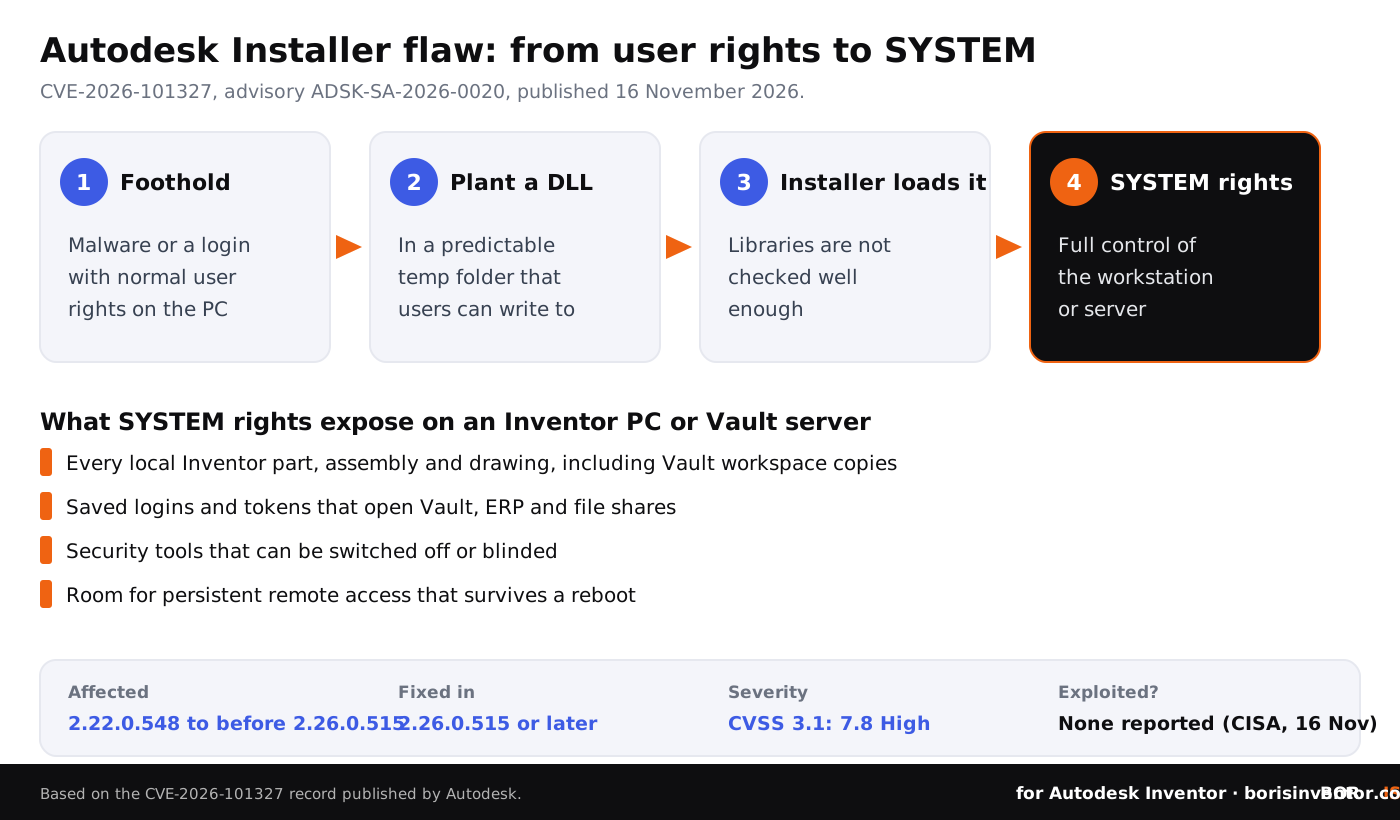
On 16 November 2026, Autodesk published security advisory ADSK-SA-2026-0020 for a flaw in the Autodesk Installer, the component that installs and updates Inventor, Vault and most other current Autodesk desktop products. The flaw, CVE-2026-101327, lets someone who already has a low-privilege account on a Windows PC plant a malicious DLL that the installer then loads, and run code as NT AUTHORITY\SYSTEM, the most powerful account on the machine. Installer versions from 2.22.0.548 up to, but not including, 2.26.0.515 are affected.
This is not a flaw in Inventor itself, and nobody can use it from the internet on its own. It is a local privilege escalation: a way to turn a small foothold into full control of a workstation. That is exactly the step attackers need after a phishing email, a stolen password or a rogue tool gets them onto an engineer's PC with ordinary user rights. With SYSTEM rights, they can read every local Inventor file, switch off security tools and collect the logins that lead to Vault and file servers.
The fix is simple: update the Autodesk Installer to version 2.26.0.515 or later. The harder part for CAD managers is finding every place the old installer still lives, including deployment images on network shares that keep putting the vulnerable version back. Below: what the advisory says, how the attack works, what it means for Inventor and Vault teams, and eight steps for this week.
TL;DR: Autodesk Installer versions 2.22.0.548 to before 2.26.0.515 can load a malicious DLL from a predictable temporary folder that ordinary users can write to, which gives an attacker SYSTEM rights (CVE-2026-101327, CVSS 7.8 High, published 16 November 2026). No exploitation has been reported, and CISA's assessment on 16 November lists exploitation as "none". The flaw is not in CISA's catalog of known exploited vulnerabilities.
For Inventor teams: update the installer on every CAD PC and Vault server, refresh the installer inside your deployment images, keep users out of the local Administrators group and treat any malware on an engineering PC as a potential full takeover. Keep dated proof of your key designs, so a stolen copy never becomes a dispute about who owns them.
What did Autodesk announce on 16 November 2026?
Autodesk, acting as the CVE numbering authority for its own products, published the CVE record for CVE-2026-101327 at 19:10 UTC on 16 November 2026, with the title "Privilege Escalation Vulnerability in Autodesk Installer". The record points to Autodesk advisory ADSK-SA-2026-0020 and, as the fix, to the current download of the installer, AdODIS-installer.exe.
The record lists the Autodesk Installer from version 2.22.0.548 up to, but not including, 2.26.0.515 as affected. All other versions are listed as unaffected by default. The weakness is classed as CWE-427, an uncontrolled search path element: the program looks for code libraries in a place that someone else can control. The record says the flaw was found externally but does not name a researcher, and it does not give the date when version 2.26.0.515 was released.
The description in the CVE record is short and specific:
"A maliciously crafted DLL placed in a predictable, attacker-writable temporary directory used by the Autodesk Installer can lead to privilege escalation to NT AUTHORITY\SYSTEM due to insufficient validation of loaded libraries."
How serious is CVE-2026-101327?
Autodesk rates it 7.8 out of 10, High, under CVSS 3.1. The vector explains the score: the attack is local (AV:L), not complex (AC:L), needs a low-privilege account (PR:L) and no action from another user (UI:N), and its impact on confidentiality, integrity and availability is high. In plain words: whoever can already log on or run code as a normal user can, in the right conditions, become the machine's most powerful account.
CISA added its own assessment to the record on 16 November. It lists exploitation as "none", the attack as not automatable and the technical impact as "total". When we checked on 18 November, the flaw was not in CISA's catalog of known exploited vulnerabilities (catalog version 2026.11.17), and we found no public report of attacks using it. That can change once technical details appear, which is why this is the right week to update, not the next maintenance window.
What is the Autodesk Installer, and why is it on every Inventor PC?
Autodesk introduced a new installation and deployment experience with Inventor and Vault 2022. Behind it sits ODIS, Autodesk's On-Demand Install Service, which installs, updates and removes newer Autodesk desktop products. On a typical Windows machine it lives in C:\Program Files\Autodesk\AdODIS\V1, and it is the reason the installer survives on a PC long after Inventor itself has been installed: it is used again for every update, every added product and every uninstall.
CAD administrators meet it in three places. First, on each workstation where Inventor, Vault Client, Inventor Nastran, AutoCAD or other Autodesk products are installed. Second, on servers, including Vault servers, where Autodesk software was installed with the same framework. Third, inside deployment images: the custom install packages that admins build from Autodesk Account and keep on a network share to roll out Inventor to many PCs. Autodesk's own support guidance for deployments describes placing the current AdODIS-installer.exe in the image's ODIS folder. An image built months ago may still carry an affected version.
Earlier this autumn we covered a similar case in which a shared Autodesk component, not Inventor itself, needed an update: the ADP Desktop SDK advisory ADSK-SA-2026-0017. Our overview of Autodesk security advisories in 2026 lists the others that touched Inventor, Vault and Fusion teams this year.
How would an attacker use it against an Inventor team?
Privilege escalation flaws are the second step of an attack, not the first. The first step is getting any code to run as an ordinary user on a CAD workstation, and this autumn has shown plenty of ways to do that. Our articles cover the Outlook zero-day that leaks Windows logins, fake job tests that put malware on engineers' laptops and a trojanized AI coding extension aimed at people who write Inventor automation.
Once malware runs with user rights, an engineer's PC still sets limits: it cannot read other users' profiles, change system settings or stop endpoint protection. A path to SYSTEM removes those limits. From there an attacker can copy every Inventor part, assembly and drawing on the disk, including local workspace copies of Vault files, collect saved credentials and tokens that open Vault, ERP and file shares, switch off or blind security tools and install persistent remote access. The Dragos figures on industrial ransomware show how often that path ends in data theft and extortion at equipment makers.
Shared and multi-user machines carry the highest risk. Think of a PC in the workshop that several people log on to, a training room, a terminal server or virtual desktop used by contractors, or a Vault server where a service account or a support provider has a normal user login. On such machines, one person with ordinary rights could plant the DLL and wait for an installer run by someone else or by a management tool.
What does it mean for Vault servers and IT providers?
A Vault server holds every released model and drawing of a company in one place. If Autodesk software on it was installed through the same framework, the installer is there too, and anyone with a low-privilege login on that server should be considered a potential administrator until it is updated. That includes accounts of outside providers. Our article on the ScreenConnect attacks on MSPs explains why provider access is a common route in, and the one on stolen logins and Vault access covers how to check whether company accounts are in stolen data.
Ask your IT provider three questions this week: which installer version runs on our CAD PCs and servers, when were our Inventor deployment images last rebuilt, and who besides administrators can log on to the Vault server.
Where should you look for the vulnerable installer?
Proof that stays with your designs.
BORIS for Autodesk Inventor registers your CAD files with a blockchain timestamp and a certificate of ownership, straight from Inventor, so you can show what you designed and when, whatever happens to a workstation.
👉 Protect your Inventor designs with BORIS
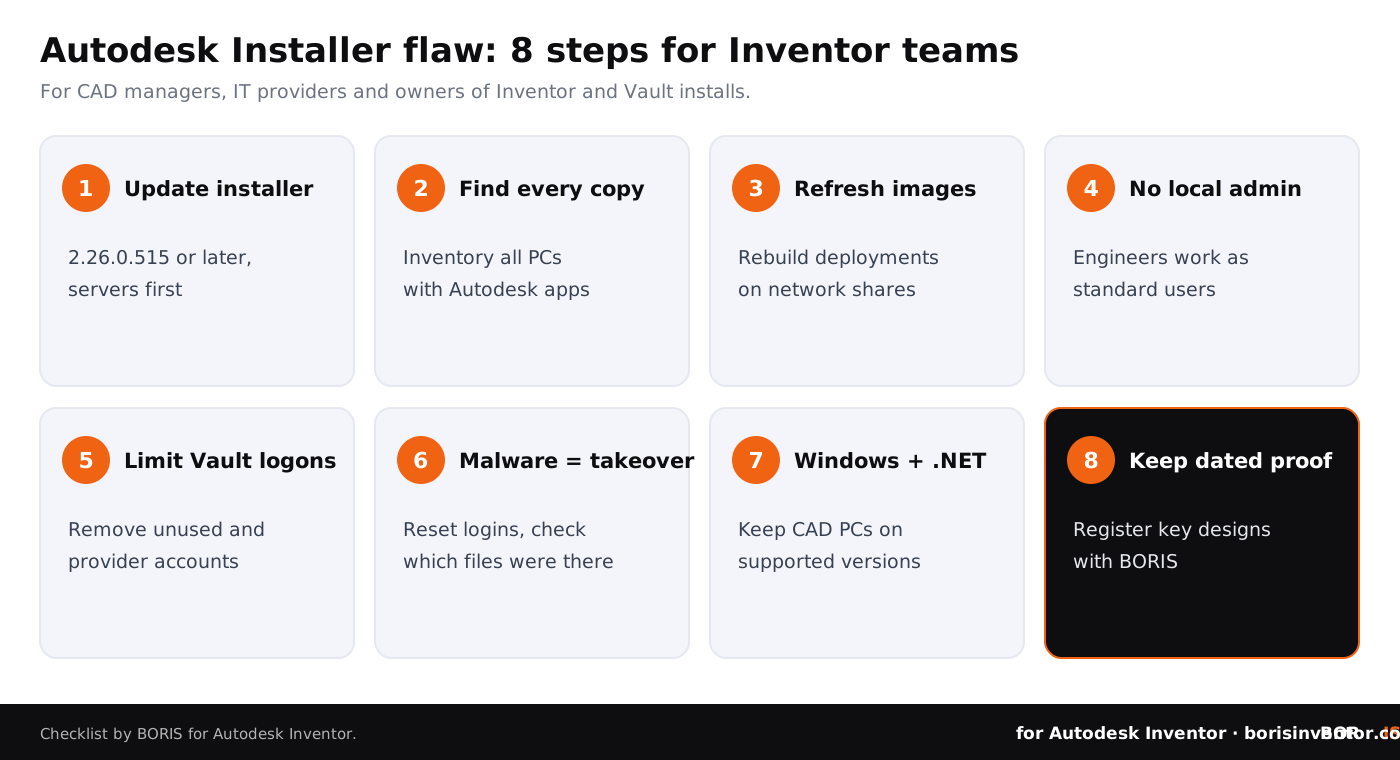
Eight steps for Inventor teams this week
- Update the Autodesk Installer to 2.26.0.515 or later. Download the current AdODIS-installer.exe from Autodesk and install it from an elevated prompt; for a silent rollout, admin guides use the switch --mode unattended. Start with shared PCs and servers.
- Find every copy. Use your software inventory or patch tool to list installer versions on all Windows machines with Autodesk products, not only Inventor PCs.
- Refresh your deployment images. Rebuild Inventor and Vault deployments from Autodesk Account, or replace the installer in the image's ODIS folder, so new PCs do not get the old version.
- Keep engineers out of the local Administrators group. Local admin rights make this kind of flaw almost unnecessary. Our article on common CAD security mistakes explains why this one keeps coming back.
- Limit who can log on to the Vault server. Remove unused accounts, give providers time-limited access and log every session. Our guide to role-based access control in CAD environments covers the setup.
- Treat malware on a CAD PC as a full compromise. If anything suspicious ran with user rights, assume SYSTEM access was possible: reset that user's passwords and tokens, and check which files were on the disk.
- Keep Windows and .NET current. Our notes on the end of Windows 11 23H2 support and the .NET 10 update for Inventor and Vault list the other updates CAD PCs need this month.
- Keep dated proof of your key designs. Register important Inventor files with BORIS, so that if a workstation is ever taken over and files are copied, you can show which version was yours and since when.
If you need a refresher on how files leave a company once a machine is compromised, our guide to CAD file protection walks through Vault permissions, encryption, DRM and proof of ownership.
What is still unclear?
Several points are not in the public record. Autodesk's advisory page did not load for us, so we could not check its product list or wording; the CVE record names only the installer and its version range. The record does not say which temporary folder is used, which actions start the vulnerable loading of libraries, when version 2.26.0.515 became available or whether Autodesk Access updates the installer automatically on every machine. The researcher who reported the flaw is not named. If Autodesk adds details, check your rollout against them.
What is clear is the size of the window: the version range starts at 2.22.0.548, and any Windows machine where Autodesk products were installed or updated with such a version and not updated since is likely to still have it.
The bigger picture
This week's news on our sister sites shows how much of design data security sits in the tools and partners around CAD:
- CAD files as an attack route. On CADChain, the AutoCAD 2027.1 vulnerabilities covers 16 flaws Autodesk fixed in AutoCAD 2027.1.1, where crafted DWG, DXF and other files could run code when opened, and also points to this installer update.
- Partners with access. BORIS for SOLIDWORKS looks at the Infoblox breach through a SharePoint migration vendor and what to check before an outside partner moves your PDM data.
- Rules for creative work. Blended BORIS covers the Manchester Animation Festival's ban on generative AI films from 2027 and what it means for Blender animators.
Conclusion
Autodesk advisory ADSK-SA-2026-0020, published on 16 November 2026, fixes CVE-2026-101327 in the Autodesk Installer: versions 2.22.0.548 to before 2.26.0.515 can load a planted DLL and give a low-privilege user SYSTEM rights. It is rated 7.8, High, and no exploitation has been reported. It does not let anyone into your network from outside, but it turns any small foothold on a CAD PC or Vault server into full control.
For Inventor teams, the work is short and practical: update the installer everywhere, rebuild deployment images, keep users out of the Administrators group and control who can log on to Vault. And because no patch can bring back a file that has already been copied, keep dated proof of the designs that matter most.
Your designs, your proof.
BORIS for Autodesk Inventor gives every registered file a blockchain timestamp and a certificate of ownership, straight from Inventor.
👉 Protect your Inventor designs with BORIS
FAQ: the Autodesk Installer flaw and Inventor teams
What is CVE-2026-101327?
It is a privilege escalation flaw in the Autodesk Installer, published by Autodesk on 16 November 2026 with advisory ADSK-SA-2026-0020. A malicious DLL placed in a predictable temporary folder that the installer uses can be loaded by it and run with NT AUTHORITY\SYSTEM rights. It is rated 7.8, High, under CVSS 3.1.
Which versions are affected?
According to the CVE record, Autodesk Installer versions from 2.22.0.548 up to, but not including, 2.26.0.515. Updating to 2.26.0.515 or later fixes it.
Is Autodesk Inventor itself vulnerable?
The flaw is in the installer component, not in Inventor's handling of parts or drawings. But the installer is present on machines where Inventor, Vault and other current Autodesk desktop products are installed, so Inventor PCs and Vault servers are where you will find it.
Can an attacker use it from the internet?
Not on its own. The attacker needs a low-privilege account or code already running on the Windows machine. It is typically the second step after phishing, a stolen password or a malicious download.
Is it being exploited?
No exploitation had been reported when we checked on 18 November 2026. CISA's assessment of 16 November lists exploitation as none, and the flaw is not in CISA's known exploited vulnerabilities catalog.
How do we update the installer on many PCs?
Download the current AdODIS-installer.exe from Autodesk and push it with your software deployment tool; admin guides run it silently with the switch --mode unattended from an elevated prompt. Then rebuild or update your Inventor deployment images so new installs get the fixed version.
Do engineers need local admin rights for Inventor?
Daily work in Inventor does not normally require local administrator rights, though installs and some updates do. Keeping engineers out of the Administrators group makes privilege escalation flaws matter much more, because they become the only way to gain full control.
How does BORIS help?
BORIS for Autodesk Inventor registers CAD files with a blockchain timestamp from inside Inventor, so you can show which version of a design existed and when. It does not patch the installer or stop malware, and it does not replace updates, access control or backups.